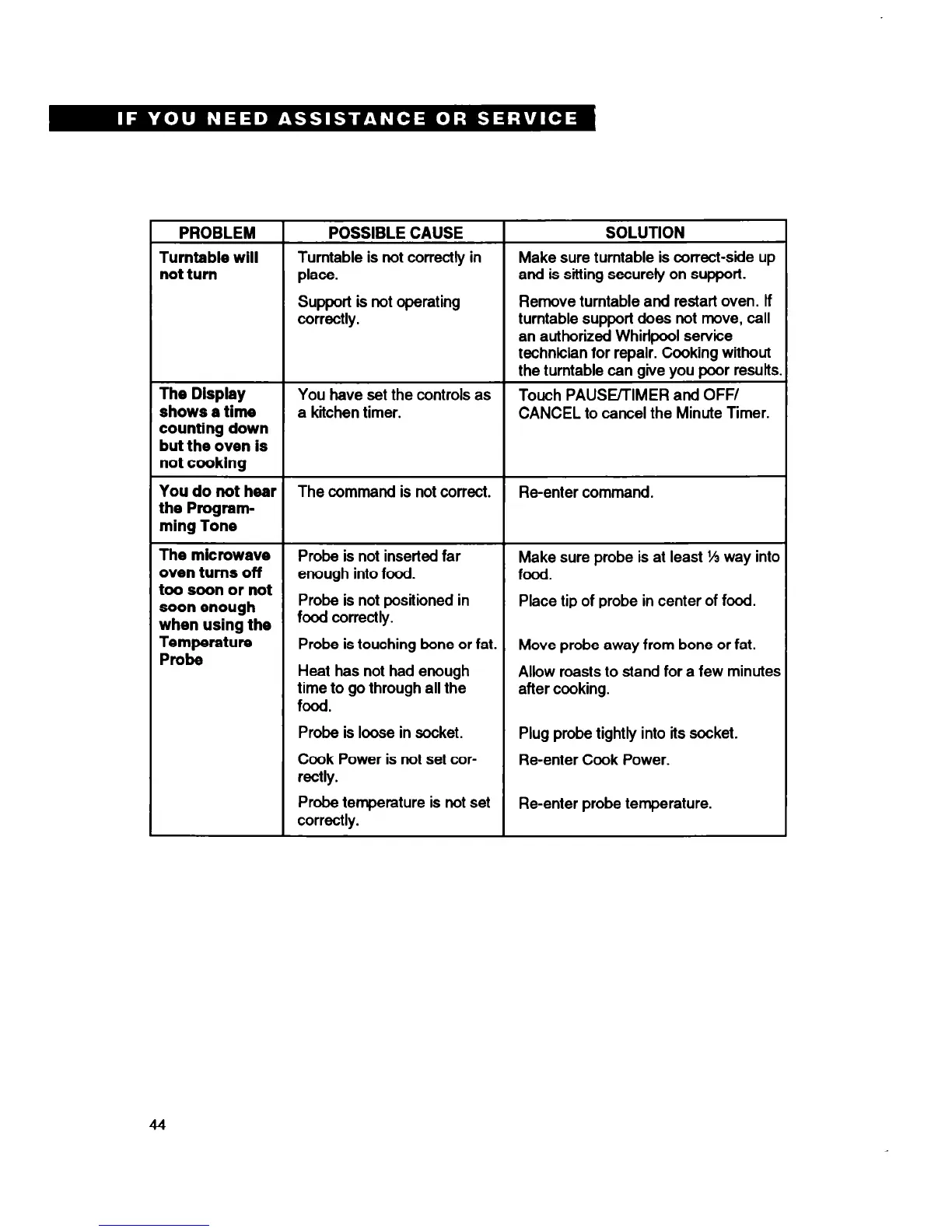
PROBLEM
POSSIBLE CAUSE
SOLUTION
Turntable will
Turntable is not correctly in
Make sure turntable is correct-side up
not turn
place.
and is sitting securely on support.
Support is not operating
Remove turntable and restart oven. If
correctly.
turntable support does not move, call
an authorized Whirlpool service
technician for repair. Cooking without
the turntable can give you poor results
The Display
You have set the controls as
Touch PAUS~IMER
and
OFF/
shows a time
a kiichen timer.
CANCEL to cancel the Minute Timer.
counting down
but the oven is
not cooking
You
do not hear
The command is not correct. Re-enter command.
the Program-
ming Tone
The microwave
Probe is not inserted far Make sure probe is at least ‘55 way into
oven turns off
enough into food. food.
too soon or not
soonenough
Probe is not positioned in Place tip of probe in center of food.
when using the
food correctly.
Temperature
Probe is touching bone or fat.
Probe
Move probe away from bone or fat.
Heat has not had enough
Allow roasts to stand for a few minutes
time to go through all the after cooking.
food.
Probe is loose in socket.
Cook Power is not set cor-
rectly.
Plug probe tightly into its socket.
Re-enter Cook Power.
Probe temperature is not set
correctly.
Re-enter probe temperature.
44





 To Next Page