3
KEYPAD FEATURE INSTRUCTIONS
Delay Start Delayed start Delay Start is used to enter the starting time for an oven function with a delayed start.
Delay Start should not be used for foods such as breads and cakes because they may not
bake properly.
To set a Timed Cook or a Delayed Timed Cook, see the “Cook Time” section.
Cook Time Timed coking Cook Time allows the oven to be set to turn on at a certain time of day, cook for a set
length of time, and/or shut off automatically.
To set a Timed Cook or a Delayed Timed Cook, see “Cook Time” section.
Self Clean Self Cleaning
cycle
See the “Self-Cleaning Cycle” section in the Owner’s Manual.
Control Lock
(Hold 3 sec)
Oven Control
Lockout
1. Check that the oven and cooktop are off.
2. Press and hold Control Lock for 3 seconds.
3. A tone will sound and a lock will be displayed.
4. Repeat to unlock. No keypads will function with the controls locked.
Surface Temperature
When the range is in use, all range surfaces may become hot,
such as the knobs and oven door.
Storage Drawer
When the oven is in use, the drawer may become hot. Do not
store plastics, cloth, or other items that could melt or burn in the
drawer.
Oven Vent
The oven vent releases hot air and moisture from the oven, and
should not be blocked or covered. Do not set plastics, paper or
other items that could melt or burn near the oven vent.
Cooktop Use
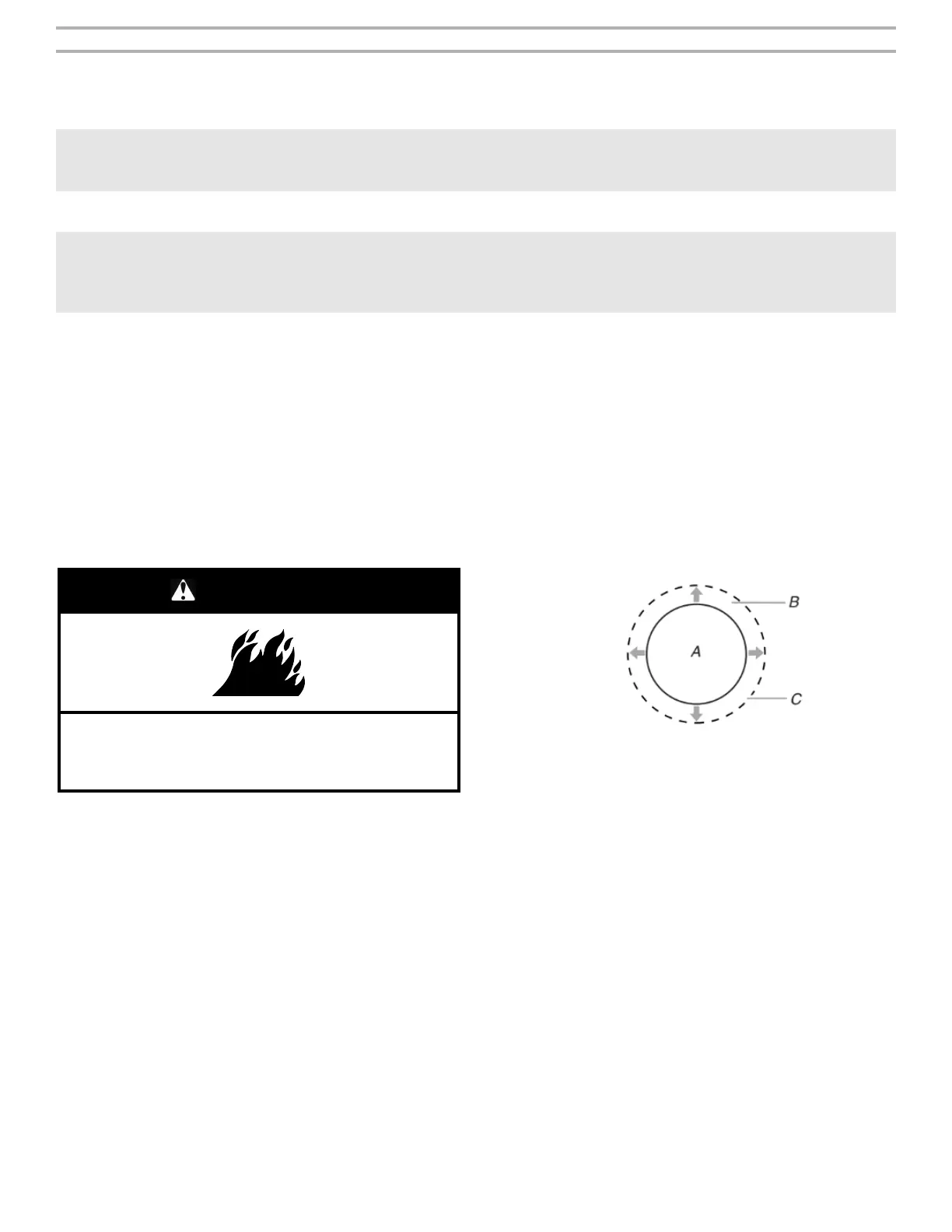
WARNING
Fire Hazard
Turn off all controls when done cooking.
Failure to do so could result in death or fire.
Ceramic Glass
The surface cooking area may glow red when an element is ON.
Some parts of the surface cooking area may not glow red when an
element is ON. The glow will also randomly cycle off and back on
again, even while on Hi, to keep the cooktop from extreme
temperatures. This is normal operation.
It is normal for the surface of light-colored ceramic glass to appear
to change color when surface cooking areas are hot. As the glass
cools, it will return to its original color.
� Avoid storing jars or cans above the cooktop. Dropping a
heavy or hard object onto the cooktop could crack the cooktop.
� To avoid damage to the cooktop, do not leave a hot lid on the
cooktop. As the cooktop cools, air can become trapped
between the lid and the cooktop and the ceramic glass could
break when the lid is removed.
� For foods containing sugar in any form, clean up all spills and
soils as soon as possible. Allow the cooktop to cool down
slightly. Then, while wearing oven mitts, remove the spills
using a scraper while the surface is still warm. If sugary spills
are allowed to cool down, they can adhere to the cooktop and
cause pitting and permanent marks.
� To avoid scratches, do not slide cookware or bakeware across
the cooktop. Aluminum or copper bottoms and rough finishes
on cookware or bakeware could leave scratches or marks on
the cooktop.
� Do not cook popcorn in prepackaged aluminum containers on
the cooktop. They could leave aluminum marks that cannot be
removed completely.
� To avoid damage to the cooktop, do not allow objects that
could melt, such as plastic or aluminum foil, to touch any part
of the entire cooktop.
� To avoid damage to the cooktop, do not use the cooktop as a
cutting board.
� Use cookware about the same size as the surface cooking
area. Cookware should not extend more than 1/2" (13 mm)
outside the area.
A. Surface cooking area
B. Cookware/canner
C. 1/2" (1.3 cm) maximum overhang
� Use flat-bottomed cookware for best heat conduction and
energy efficiency. Cookware with rounded, warped, ribbed, or
dented bottoms could cause uneven heating and poor cooking
results.
� Determine flatness by placing the straight edge of a ruler
across the bottom of the cookware. While you rotate the ruler,
no space or light should be visible between it and the
cookware.
� Cookware designed with slightly indented bottoms or small
expansion channels can be used.
� Make sure the bottoms of pots and pans are clean and dry
before using them. Residue and water can leave deposits
when heated.
� To avoid damage to the cooktop, do not cook foods directly on
the cooktop.
Cooktop On Indicator Light
The Cooktop On indicator light is located on the console panel.
When any control knob/cooktop element on the console panel is
turned on, the Cooktop On indicator light will glow.



 To Next Page