5
Factory Reset
Factory reset allows you to reset all to factory defaults.
Instruction:
1. Press the
button repeatedly–>Factory Reset.
2. Press the number button 1 - To reset microwave to factory
default.
3. Press the
button to confirm.
Cooking General guide
1. Please follow the function instructions to cook the different
types of foods.
2. For better cooking performance, it is recommended to stir/turn
and let the food stand 1 minute after cooking and reheat.
3. For better cooking performance, try to use the preset button
first.
4. For auto function, Auto functions never allow any change:
� If unit is currently sensing when door was opened, the
cycle will be canceled and return to idle.
� If the unit is not in a sensing state, you can start and
proceed with remaining time after the door is shut and you
press start.
Express Cook
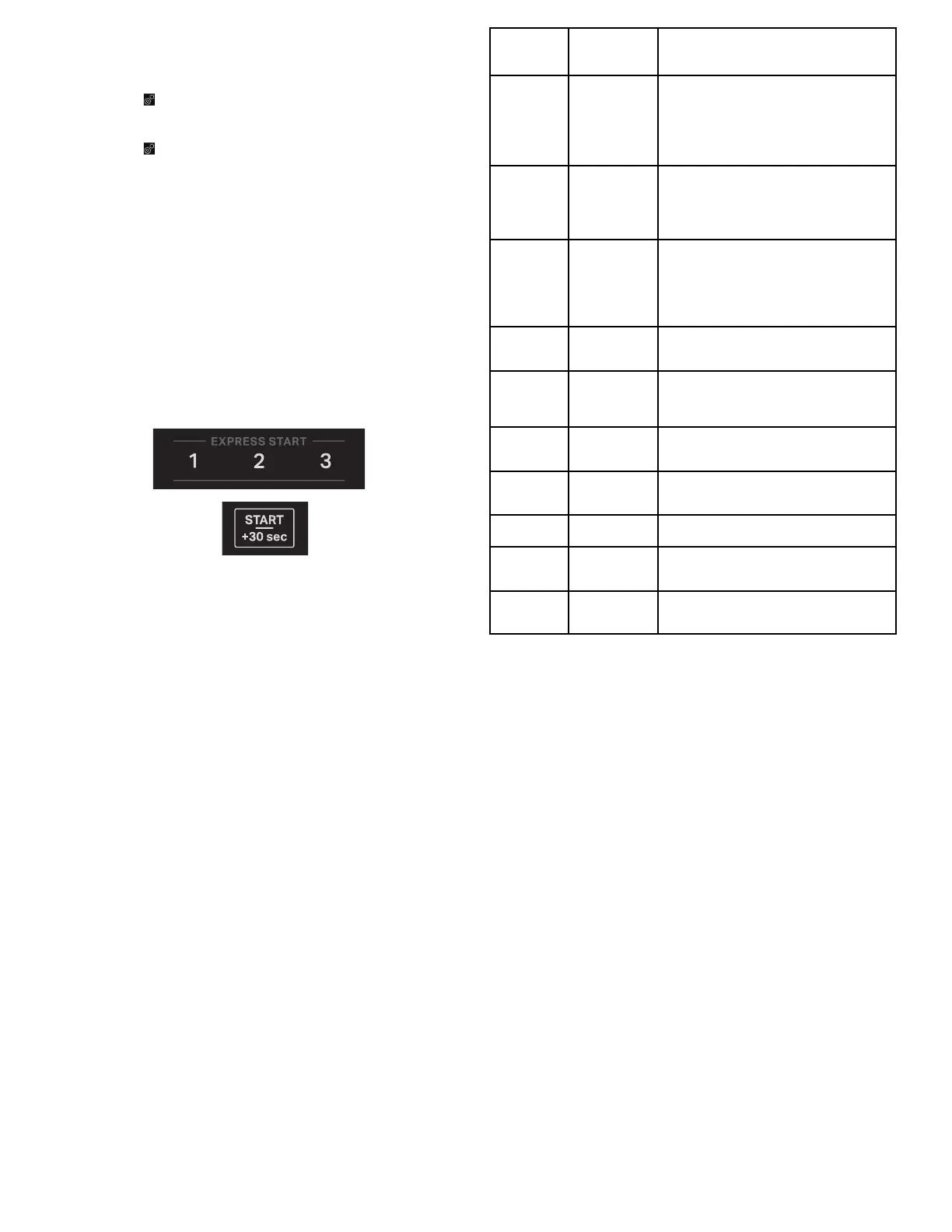
Use the +30 sec and 1, 2 and 3 minutes express start buttons to
quickly start a cycle or add time mid cycle.
Start/+30 sec
Each press of the button “Start/+30 sec” will add 30 seconds more
to the cooking time.
Express Start “1”
Each press of the button “1” will add 1 minute more to the cooking
time.
Express Start “2”
Each press of the button “2” will add 2 minute more to the cooking
time.
Express Start “3”
Each press of the button “3” will add 3 minute more to the cooking
time.
NOTE: If you want to change the cooking time or power level, see
the manual cooking section for details.
Cook Time/Power
Use the Cook Time/Power to set manual cooking. Place food in
microwave-safe container.
For example to cook for 1 minute 45 seconds at 80% power level.
1. Press the Cook Time/Power button once.
2. Press the number buttons “1 4 5”.
3. Press the Cook Time/Power button again to set the power
level.
4. Press the number buttons “8 0”.
5. Close the door.
6. Pressing the Start button to start.
Percent/
Name
Number Use
100% 100
Quick heating convenience foods
and foods with high water content,
such as cooking soups with raw
ingredients, heating beverages, and
cooking most vegetables.
90% 90
Cooking small, tender pieces of
meat, ground meat, poultry pieces,
and fish fillets. Heating cream
soups.
80% 80
Heating rice, pasta, or casseroles.
Cooking and heating foods that
need a cook power lower than high,
for example, whole fish and meat
loaf.
70% 70
Reheating ready-cooked food,
single or multiple dishes.
60% 60
Cooking sensitive foods such as
cheese and egg dishes, pudding,
and custards.
50% 50
Cooking non-stirrable casseroles,
such as lasagna.
40% 40
Cooking ham, whole poultry, and
pot roasts.
30% 30
Simmering stews, melting butter.
20% 20
Defrosting, melting chocolate.
Heating bread, rolls, and pastries.
10% 10
Taking chill out of fruit, Softening
butter, cheese, and ice cream.
Tips and suggestions:
For a better cooking performance, it is recommended to stir/turn
and let the food stand 1 minutes after cooking and reheat.
Popcorn
Sense 3.0 or 3.5 oz (85 or 99 g)
� Do not use regular paper bags or glassware.
� Follow manufacturer’s instructions when using a microwave
popcorn popper.
� Listen for popping to slow to one pop every 1 or 2 seconds,
and then stop the cycle. Do not repop unpopped kernels.
� For best results, use fresh bags of popcorn.
� Cooking results may vary by brand and fat content. Follow the
instructions provided by the microwave popcorn manufacturer.
1. Press the Popcorn button, Senses 3.0-3.5 oz.
2. Press the Start button to cook.
Potato
1. Press the Potato button repeatedly to select potato size (see
below chart).
2. Press the number buttons to select food amounts/weight.
3. Close the door.
4. Press the Start button to cook.





 To Next Page