EasyManua.ls Logo

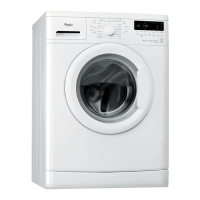
Whirlpool WWDC 7410 - User Manual

Whirlpool WWDC 7410
13 pages
Print Icon
To Next Page IconTo Next Page
Loading...
DEFINITION OF USE
Keep these Instructions for Use and the
Programme Chart; if you pass on the washing
machine to another person, also give him/her
Instructions for Use and Programme Chart.
This washing machine is exclusively destined to wash
and spin machine washable laundry in quantities which
are usual for private households.
Observe the instructions given in these Instructions
for Use and the Programme Chart when using the
washing machine.
BEFORE USING THE WASHING MACHINE
1. Removing the packaging and inspection
After unpacking, make sure that the washing
machine is undamaged. If in doubt, do not use the
washing machine. Contact After-Sales Service or
your local retailer.
Check that the accessories and supplied parts are
all present.
Keep the packaging materials (plastic bags,
polystyrene parts, etc.) out of reach of children,
as they are potentially dangerous.
If the appliance was exposed to the cold prior to
delivery, keep it at room temperature for a few
hours before operating.
2. Remove the transport bolts
The washing machine is fitted with transport
bolts to avoid any possible damage to the interior
during transport. Before using the machine, it is
imperative that the transport bolts are removed.
After their removal, cover the openings with the
4 enclosed plastic caps.
3. Install the washing machine
Remove the protective film from the control panel
(if available on your model).
Move the appliance without lifting it by the worktop.
Install the appliance on a solid and level floor
surface, preferably in a corner of the room.
Make sure that all four feet are stable and resting
on the floor and then check that the washing
machine is perfectly level (use a spirit level).
In case of wooden or so-called “floating floors”
(for instance certain parquet or laminate floors),
place the appliance on a 60 x 60 cm sheet of
plywood at least 3 cm in thickness which is
secured to the floor.
Make sure that the ventilation openings in the base
of your washing machine (if available on your
model) are not obstructed by a carpet or other
material.
4. Water inlet
Connect the water inlet hose(s) to the drinking
water supply in accordance with the regulations
of your local water company.
For models with one inlet valve: cold water
For models with two inlet valves: cold AND hot
water, or cold water only (see chapter “Installation
Guide”).
Water tap: 3/4” threaded hose connector
Water pressure
(flow pressure): 100-1000 kPa (1-10 bar).
Use only new hoses to connect the washing
machine to the water supply. Used hoses must
not be used and should be discarded.
For models with hot fill: the hot water inlet
temperature must not exceed 60°C.
5. Drain
Firmly connect the drain hose to the siphon, or
another outlet for drain water.
If the washing machine is connected to an
integrated drainage system, ensure the latter is
equipped with a vent to avoid simultaneous
loading and draining of water (siphoning effect).
6. Electrical connection
Electrical connections must be carried out by a
qualified technician in compliance with the
manufacturer’s instructions and current standard
safety regulations.
Data regarding voltage, power consumption and
protection requirements is given on the inside of
the door.
The appliance must be connected to the mains by
means of a socket with an earth connection in
accordance with current regulations.
The washing machine must be earthed by law.
The manufacturer declines all liability for damage
to property or injury to persons or animals due to
non-compliance with the directions given above.
Do not use extension leads or multiple sockets.
Before any maintenance on the washing machine
disconnect it from the mains supply.
After installation, access to the mains plug or to
disconnection from mains supply must be
ensured at all times via a double-pole switch.
Do not operate the washing machine if it has
been damaged during transport. Inform the
After-Sales Service.
Mains cable replacement is only to be carried out
by After-Sales Service.
The appliance must only be used in the
household for the prescribed uses.
Minimum housing dimensions:
Width: 600 mm
Height: 850 mm
Depth: 600 mm
GB 1

Questions and Answers

  • M
    Mrs. Veronica EdwardsAug 17, 2025
    What to do if my Whirlpool Washer says 'Water tap closed'?
    • C
      connie39Aug 17, 2025
      If your Whirlpool Washer displays the message 'Water tap closed', it means the appliance isn't getting enough water. Here's what to check: * Ensure the water tap is fully open and the water supply pressure is adequate. * Inspect the water inlet hose for any kinks. * Check if the mesh filter of the water inlet hose is blocked. * Make sure the water hose isn't frozen. * If your appliance has a water supply hose with a safety valve inspection window, and it's red, replace the hose. After resolving the issue, restart the program by pressing 'Start(Pause)'.
  • M
    Michael CookAug 19, 2025
    Why does my Whirlpool WWDC 7410 vibrate during the spin cycle?
    • G
      garciaanthonyAug 20, 2025
      If your Whirlpool Washer vibrates excessively during the spin cycle, it could be due to a couple of reasons: * The transport bolts might not have been removed. Ensure these are taken out before using the appliance. * The appliance might not be level or standing firmly on all four feet. Adjust the feet to ensure it's stable.
  • H
    heatherwalkerAug 22, 2025
    How to fix poor final spin results in my Whirlpool Washer?
    • J
      johnsonadrienneAug 22, 2025
      If you're experiencing poor spin results with your Whirlpool Washer, here are a few things to check: * A heavy item might be preventing proper spinning. Try adding smaller items and repeating the spin cycle. * Excessive foam could be the issue. Select and start the Rinse & Spin program and avoid using too much detergent in the future. * The spin speed might be set too low. Check the Spin button setting.
  • M
    Mr. Alan OdonnellAug 25, 2025
    Why won't my Whirlpool WWDC 7410 start?
    • C
      Chelsea SmithAug 26, 2025
      If your Whirlpool Washer isn't starting and no indicator lights are on, check these items: * Make sure the plug is fully inserted into the socket. * Test the socket and fuse with another appliance like a table lamp. * Ensure the On/Off button has been pressed, if your model has one.
  • G
    Grace LucasAug 27, 2025
    What to do if my Whirlpool WWDC 7410 Washer stops mid-cycle and the start light blinks?
    • M
      Martin HillAug 28, 2025
      If your Whirlpool Washer stops during a cycle and the Start/Pause light is blinking, consider the following: * The Rinse Hold function might be activated. Press the Start/Pause button to start the drain program. * The program may have been changed. Reselect the desired program and press Start/Pause. * The door may have been opened. Close the door and press Start/Pause to restart the program. * The washer's safety system might have been activated. * The water tap might not be open, or the water inlet hose could be kinked or blocked.
  • R
    Roger RitterAug 30, 2025
    What to do if my Whirlpool WWDC 7410 detergent dispenser has residues?
    • C
      Christopher PriceAug 30, 2025
      If you notice detergent residues in the dispenser of your Whirlpool Washer, it could be due to insufficient water entering the machine. Check the mesh filters of the water supply, as they might be blocked.
  • P
    Pedro SimonSep 2, 2025
    How to resolve detergent residues on laundry after washing in my Whirlpool WWDC 7410 Washer?
    • C
      clewisSep 2, 2025
      If you find detergent residues on your clothes after washing in your Whirlpool Washer, especially whitish residues on dark fabrics, it's likely due to insoluble compounds in phosphate-free powder detergents. Try using liquid detergent, avoid overdosing on detergent, and select the Intensive Rinse option if available. You can also brush out the fabric after washing.
  • T
    tiffany77Sep 5, 2025
    What to do if my Whirlpool WWDC 7410 is at a standstill during the wash cycle?
    • J
      James KingSep 5, 2025
      If your Whirlpool Washer pauses for several minutes during a cycle, it's a normal function to optimize the rinse phase or reduce foam. If too much detergent was used, the machine interrupts the program to reduce the foam. This may repeat until the foam is reduced enough to continue. If the foam persists, a service indicator may appear.
  • J
    James HillSep 7, 2025
    What to do if my Whirlpool WWDC 7410 Washer won't start after pressing start?
    • R
      Ryan GarciaSep 8, 2025
      If your Whirlpool Washer doesn't start even after pressing the Start/Pause button, check the following: * Ensure that the door is properly closed. * See if the Child lock/Lock buttons feature is activated. If it is, unlock the buttons by pressing and holding the two buttons marked with the key symbol simultaneously for at least 3 seconds. The key symbol on the display should disappear, and then you can start the program.
  • D
    Daniel NguyenSep 12, 2025
    What does 'Clean pump' mean on my Whirlpool Washer and what should I do?
    • S
      sellersjohnnySep 12, 2025
      If your Whirlpool Washer displays 'Clean pump', it means waste water isn't being pumped out. Unplug the appliance and check for these issues: * Kinks or blockages in the drain hose. * A blocked filter or pump. * A frozen drain hose. After resolving the issue, push the Reset button for at least 3 seconds, then restart the desired program.

Summary

Before Using the Washing Machine

Removing Packaging and Inspection

Inspect the appliance for damage, check accessories, and keep packaging materials away from children.

Removing Transport Bolts

Essential step to prevent damage during transport; cover openings with plastic caps.

Installing the Washing Machine

Ensure a solid, level floor, check stability, and secure if on a floating floor.

Connecting the Water Inlet

Connect the drinking water supply hose according to regulations, using new hoses.

Connecting the Drain Hose

Connect the drain hose firmly to a siphon or outlet, ensuring no siphoning effect.

Electrical Connection Requirements

Must be done by a qualified technician, using an earthed socket and no extension leads.

Precautions and Recommendations

General Safety Instructions

For indoor use only, keep away from flammables, children, and operate within temperature limits.

Packaging Disposal

Packaging is recyclable; adhere to local regulations for disposal.

Scrapping Old Washing Machines

Dispose of responsibly according to WEEE directive and local regulations.

Protecting Against Frost

Do not place in frost-prone rooms; drain machine completely if exposed to cold.

Energy and Resource Saving Tips

Use optimal load sizes, correct detergent dosage, and energy-saving programmes.

EC Declaration of Conformity

Appliance conforms to Low Voltage and Electromagnetic Compatibility Directives.

Washing Machine Description

Operating the Door

Instructions on how to open and close the washing machine door.

First Wash Cycle Preparation

Run a short wash cycle without laundry to remove residual water from testing.

Preparing Laundry for Washing

Sorting Laundry

Sort by type, colour, and size; use a cloth bag for delicates with hooks.

Emptying Pockets

Remove coins, pins, and other items from pockets to prevent damage.

Securing Fasteners

Close zips and fasten buttons or hooks; tie loose belts or ribbons.

Stain Removal Techniques

Use automatic enzyme phase for some stains; apply stain remover or pretreat as needed.

Dyeing and Bleaching

Use machine-safe dyes/bleaches and follow manufacturer instructions.

Loading the Washing Machine

Load items loosely and avoid overfilling the drum for optimal results.

Detergents and Additives

Detergent Dosage Guidelines

Follow detergent pack recommendations based on load size, soiling, and water hardness.

Detergent Drawer Compartments

Prewash Chamber Use

For detergent for the prewash cycle.

Main Wash Chamber Use

For detergent, stain remover, or water softener.

Softener Chamber Use

For fabric softener or liquid starch.

Using Chlorine Bleach

Add to softener chamber; run Rinse & Spin afterwards. Do not mix with softener.

Using Starch

Pour starch solution into softener chamber during the rinse cycle.

Draining Water and Cleaning Filter

Opening Plinth and Draining Water

Steps to open the plinth and drain residual water using the emergency hose or directly.

Cleaning the Filter and Pump

Instructions for removing, cleaning, and re-inserting the filter and pump rotor.

Care and Maintenance

Cleaning Exterior and Control Panel

Use a soft damp cloth; avoid abrasive or solvent-based cleaners.

Cleaning Appliance Interior

Leave door open to dry; run a 95°C cycle occasionally without laundry.

Cleaning the Detergent Dispenser

Pull out drawer, remove siphon, wash parts under running water, and dry.

Checking Water Inlet Hoses

Check for brittleness/cracks; replace if safety valve window is red or hose coating darkens.

Cleaning Inlet Hose Mesh Filter

Close tap, loosen hose, clean filter, and reassemble, checking for leaks.

Door Seal Maintenance

Dry the door seal after each wash; check its condition periodically.

Filter Maintenance Schedule

Check and clean the filter at least two to three times a year.

Troubleshooting Guide

Appliance Not Starting (No Lights)

Check plug, socket, fuse, and the On/Off button.

Appliance Not Starting After Pressing Start

Ensure door is closed, child lock is off, and water tap is open.

Programme Stops Mid-Cycle (Start;Pause Blinks)

Check Rinse Hold, programme changes, safety system activation, or water supply issues.

Detergent Dispenser Residues

Water entering may be insufficient, or mesh filters may be blocked.

Excessive Vibration During Spin

Ensure transport bolts are removed and the appliance is level.

Poor Final Spin Results

Check for unbalanced loads, excessive foam, or low spin speed setting.

Programme Pause;Standstill

Likely due to excessive foam formation; the machine may reduce spin.

Detergent Residues on Laundry

Avoid overdosing, use liquid detergent, or select intensive rinse.

Variable Programme Duration

Machine adapts duration based on factors like foam, load balance, and water temperature.

Failure Indication Lights

Water Tap Closed Indication

Indicates no or insufficient water supply; check tap, hose, and filters.

Clean Pump Indication

Indicates waste water is not pumped out; check drain hose, filter, or pump.

Failure Indications (Display Codes)

Service Error Codes (F03-F43)

Indicates an electrical module fault; try resetting the appliance.

F24 Error Code

May appear for very water-soaking laundry or overloaded small load programmes.

F02 or FA Error Codes

Indicates a "Waterstop fault"; turn off water, unplug, and tilt machine to drain.

F18 or Fod Error Codes

Indicates "Overfoaming"; use less detergent or select Rinse & Spin.

After-Sales Service

Before Contacting After-Sales Service

Try to remedy the problem yourself using the troubleshooting guide.

Available Accessories

Information on optional items like Pedestal Drawer, Stacking Kit, and Cover Panel Kit.

Transporting and Handling the Machine

Steps to safely move the appliance, including unplugging, draining, and fitting transport bolts.

Electrical Connection Details

Fuse Replacement

Instructions for replacing a fuse in a BS 1363A plug.

Socket Outlet and Plug Suitability

Contact After-Sales Service if the plug is unsuitable; do not change it yourself.

Installation Guide

Removing Transport Bolts (Detailed)

Detailed steps for removing transport bolts and covering holes with plastic caps.

Adjusting the Feet

Ensure the appliance is level and stable by adjusting the feet.

Connecting the Water Inlet Hose

Connect the hose to the machine and tap, checking for leaks and hose condition.

Connecting the Drain Hose

Connect the drain hose to a siphon or outlet, ensuring no kinks and proper height.

Electrical Connection Safety

Use an earthed socket, no extension leads; consult a qualified technician.

Whirlpool WWDC 7410 Specifications

General IconGeneral
Model NumberWWDC 7410
BrandWhirlpool
Loading typeFront Load
Load Capacity7 kg
Spin Speed1400 RPM
Number of Programs14
ColorWhite
Delay StartYes
Child LockYes
Drum MaterialStainless Steel
TypeWasher-dryer combo
Dimensions (H x W x D)85 x 60 x 54 cm

Related product manuals