EasyManua.ls Logo

White SuperLock - SETTING UP YOUR MACHINE; FOOT CONTROL; POWER;LIGHT SWITCH; OPENING FRONT COVER

White SuperLock
34 pages
Print Icon
To Next Page IconTo Next Page
To Previous Page IconTo Previous Page
Loading...
SETflNG
UP
YOUR
MACHINE
1.
Set
your
machine
on
a
sturdy,
flat
surface.
2.
As
your
machine
has
been thoroughly
oiled
at
the
factory,
be
sure
to
wipe
the
needle
plate
area
and
bed
plate
carefully
before
sewing
a
garment.
It
is
wise
to
practice
on
a
scrap
of
fabric so
any
surplus
oil
is
absorbed.
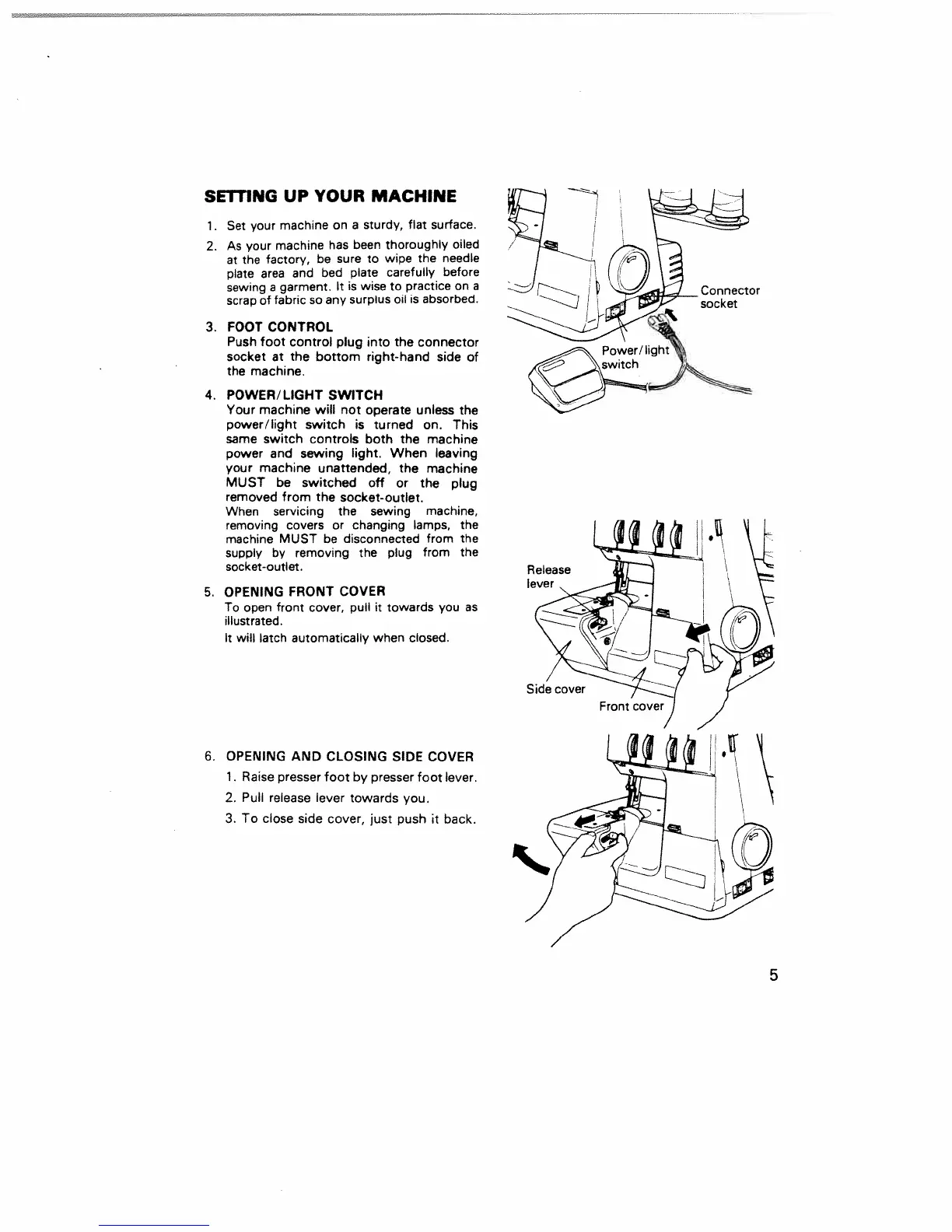
3.
FOOT
CONTROL
Push
foot
control
plug
into
the
connector
socket
at
the
bottom
right-hand
side
of
the
machine.
4.
POWER/LIGHT SWITCH
Your
machine
will
not
operate
unless
the
power/light
switch
is
turned
on.
This
same
switch
controls both the
machine
power and
sewing
light.
When
leaving
your
machine
unattended,
the
machine
MUST
be
switched
off
or
the
plug
removed from
the
socket-outlet.
When
servicing
the
sewing
machine,
removing
covers
or
changing
lamps,
the
machine
MUST
be
disconnected
from
the
supply
by
removing
the
plug
from
the
socket-outlet.
5.
OPENING
FRONT
COVER
To
open
front
cover,
pull
it
towards
you
as
illustrated.
It
will
latch
automatically when
closed.
6.
OPENING AND
CLOSING
SIDE
COVER
1.
Raise
presser
foot
by
presser
foot
lever.
2.
Pull
release
lever
towards
you.
3.
To
close
side cover,
just
push
it
back.
5

Related product manuals