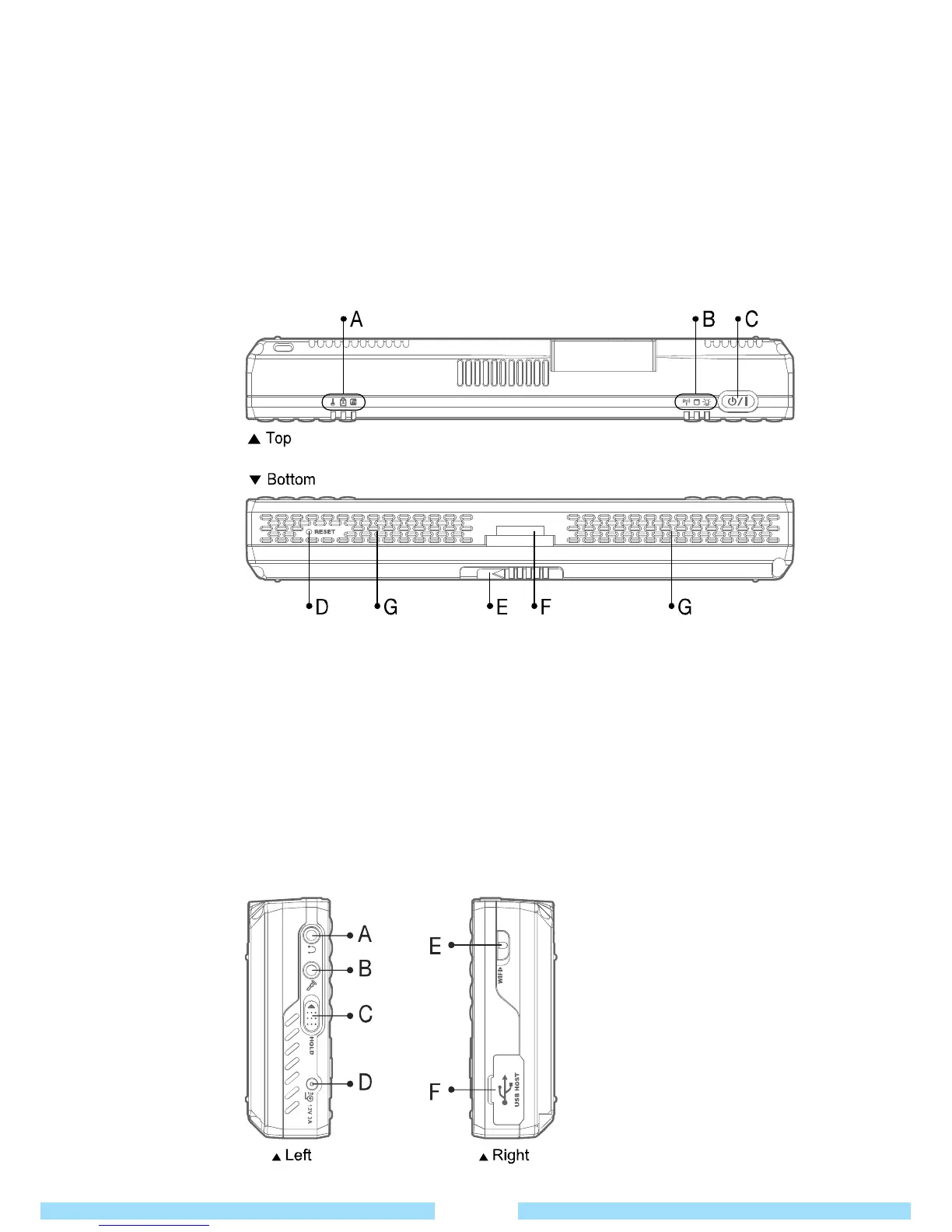
● Top & Bottom
View
● Left / Right
View
A/B
LED : Status indicators.
C
Power Button : Press to turn device on and off.
D
Reset : To reset the device (in emergency situations only) use the stylus pen to press button.
E
Battery Clip : To remove the battery, push clip to the right.
F
24 Pins Port : For external display, connect the 24PIN cable at this port.
G
Speakers : Generates sound from the product.
C
Hand Strap Hole : You can anchor the hand strap here.
D
Battery : A lithium-Ion rechargeable battery supplies power for the product.
E
Stylus Pen Slot : You can keep the stylus pen here.
The Stylus pen allows for utilization of touch screen functionality.
F
Vents : Releases heat generated by internal components.
Avoid blocking the vents as this may overheat the product.
G
Battery Clip : To remove battery, push the clip to the right.
17
A
Earphone Port : Connect earphones here.
B
Microphone In : Connect a microphone for
sound input here.
C
Hold Switch : Slide the switch upward to
lock the keys.
Lock status shows on LED
at the top of the device.



 To Next Page