2.4 Function Keys & Other Details
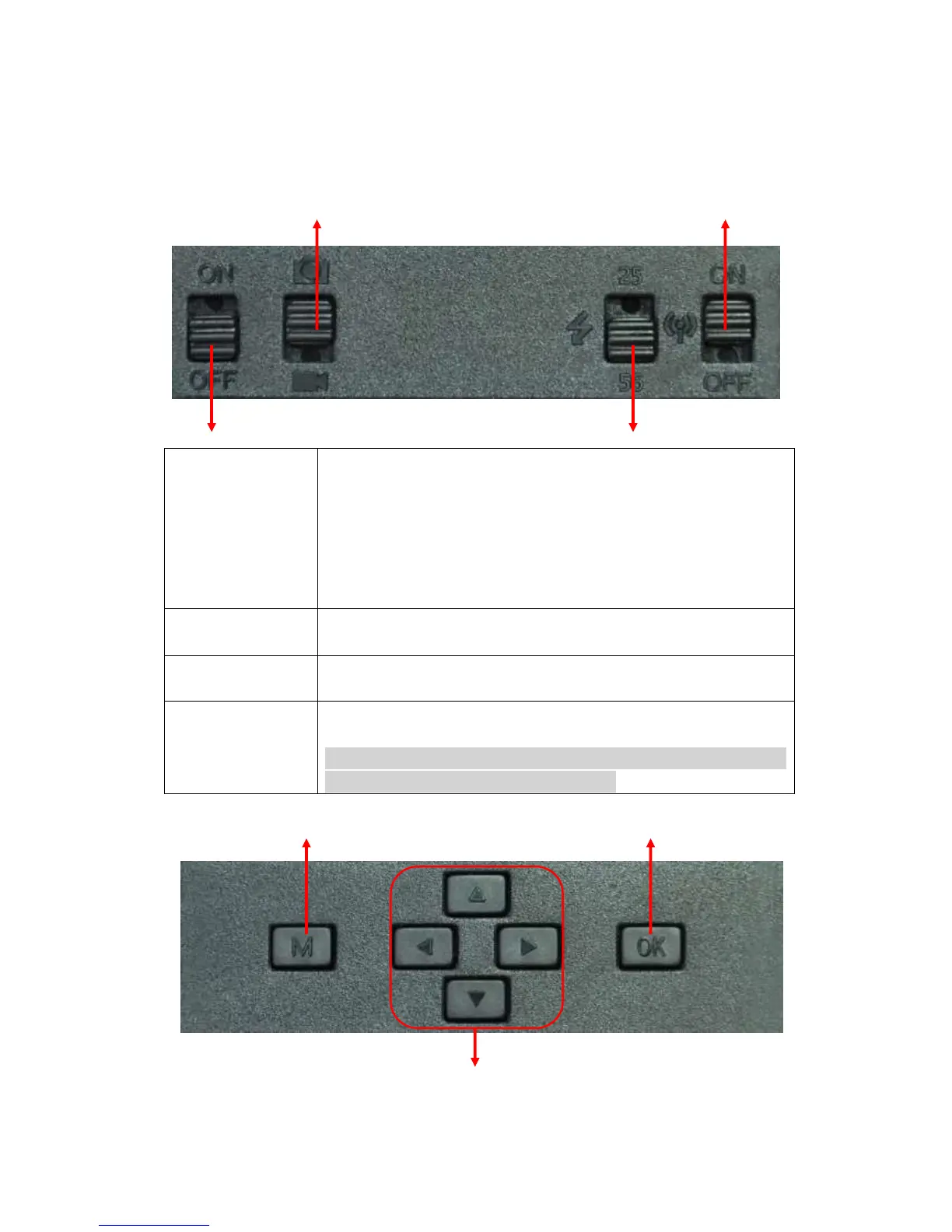
A. Switch Buttons
Camera/Video Switch GPRS Switch
Power Switch IR LEDs Group Switch
1) Switch ON to enable camera to work;
Note: indicator light flashes 5 times before camera starts to work on
PIR (PIR Auto Mode)
2) Switch ON, then press “OK” once to wake up camera LCD screen to
enter TEST Mode;
3) Press and hold button “OK” for 3 sec to get back to PIR Auto Mode
4) Switch OFF—Camera stops working.
Switch ON to Pic icon—Photographing mode, or PIC + Video mode
Switch Down to Video icon—Video Recording mode
Switch up: 25—up side 25 pcs IR LEDs work
Switch down: 56—all 56 pcs IR LEDs work
GPRS Switch
(3.0CG only, not
available)
Switch up: On—GPRS function enabled;
Switch down: Off—GPRS function disabled.
Note: When user wants to configure camera settings, suggest disabling
GPRS function to quick wake up LCD screen.
B. Buttons
Menu OK/ Photo & Video Record/ TEST Mode
Navigation


 To Next Page