This document serves as the operating manual for the Wilms DFL 3000 fan, providing essential information for its safe and effective use, maintenance, and troubleshooting. The manual emphasizes the importance of reading and understanding all instructions before initial start-up to prevent property damage or personal injuries.
Function Description:
The Wilms DFL 3000 is a fan designed to move air. It features a multi-level speed control, allowing the user to adjust the airflow as needed. An additional socket is integrated into the unit, enabling the operation of another electrical device concurrently with the fan. The fan is equipped with a thermal overload protection circuit to prevent overheating, ensuring safe operation.
Important Technical Specifications:
- Type: DFL 3000
- Voltage: 230 V ~
- Frequency: 50 Hz
- Motor Power: 0.56 kW
- Maximum Current: 2.41 A
- Levels: 3 (High, Medium, Low)
- Maximum Flow Rate: 1800 m³/h
- Height: 586 mm
- Width: 425 mm
- Length: 475 mm
- Weight: 17.45 kg
- Noise Level: 73.5 dB (A)
- Additional Socket Capacity: Max. 15 A / 3.5 kW
Usage Features:
- Start-up Procedure: Before connecting to power, ensure the control switch is in the OFF position. Connect the mains plug to a suitable 230 V – 50 Hz supply. Place the unit on a stable surface. Switch to the desired position (H=High, M=Medium, L=Low).
- Overheating Protection: The fan motor includes a thermal overload protection circuit. If an overheat temperature is reached, the unit will automatically shut off. Normal operation will resume once the appliance cools down.
- Manual Reset: In case of an overheat shutdown, switch the unit to the OFF position and remove the plug from the mains socket (without pulling the cable). Check for any obvious reasons for overheating, such as blocked air inlets or outlets. Wait for 15 minutes before reconnecting to the mains outlet to resume normal operation.
- Electrical Safety:
- Ensure the power supply parameters match the appliance's requirements.
- Use only a short extension cable suitable for outdoor use.
- Avoid contact with oils, lubricants, chemicals, hot surfaces, or sharp/rough objects.
- Always disconnect the cable from the power supply before any cleaning or maintenance.
- All repairs and maintenance must be carried out by authorized service personnel.
- Safety Instructions:
- Do not operate in rooms with explosion hazards or where the air contains oil, sulphur, chlorine, or salt.
- Avoid direct contact with water to prevent increased electrical hazard.
- Keep air intake and outlet clear.
- Do not cover the appliance during operation.
- Never place objects into the appliance.
- Do not transport the appliance while operating.
- Protect all external electrical cables from damage.
- Never service or clean the unit while it is plugged into a live electrical power source.
- Children should not be allowed near the appliance.
- Use the appliance only with mounted protective equipment to avoid contact with the fan.
- Do not hang the fan on ceilings or walls.
- Ignoring these safety precautions can result in serious personal injury.
Maintenance Features:
- Pre-use Inspection: Before each use, inspect the unit for damage, clogged inlet or outlet, or any excessive build-up of foreign material.
- Vibration Check: When first turned on, check for excessive vibration, which could indicate a major problem. If the unit vibrates, it must be carefully checked.
- Cleaning:
- Turn off the unit and unplug it from the power supply before cleaning.
- Use a soft cloth to wipe off dust.
- For heavy dirt, use a damp cloth and wipe dry.
- Do not use cleaning detergents, sprays, or other chemicals, as they can damage the unit.
- Storage: Store the unit in a ventilated dry area when not in use.
- Freight Damage: Inspect the unit upon receipt for any freight damages. Keep all original packaging for protection during return shipments. Contact the supplier if any damages are discovered.
Troubleshooting Guide:
- Fan works very slowly:
- Reason: Wrong power supply, damaged cable, or defective motor/switch.
- Solution: Check cable and socket. Verify the switch is not in the off-position.
- Low airflow:
- Reason: Air inlets are contaminated.
- Solution: Clean air inlets.
- Fan switches off (fuse):
- Reason: Extension cable too long, incorrect power supply parameter.
- Solution: Adjust the length of the cable. Connect the appliance to the correct circuit.
- Strange noises:
- Reason: Fan of the appliance is not in the correct position.
- Solution: Contact service.

 Need help?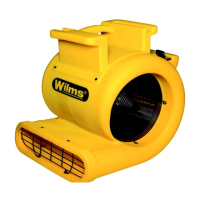

 To Next Page
 General