Adjusting the
Sleek
Arms
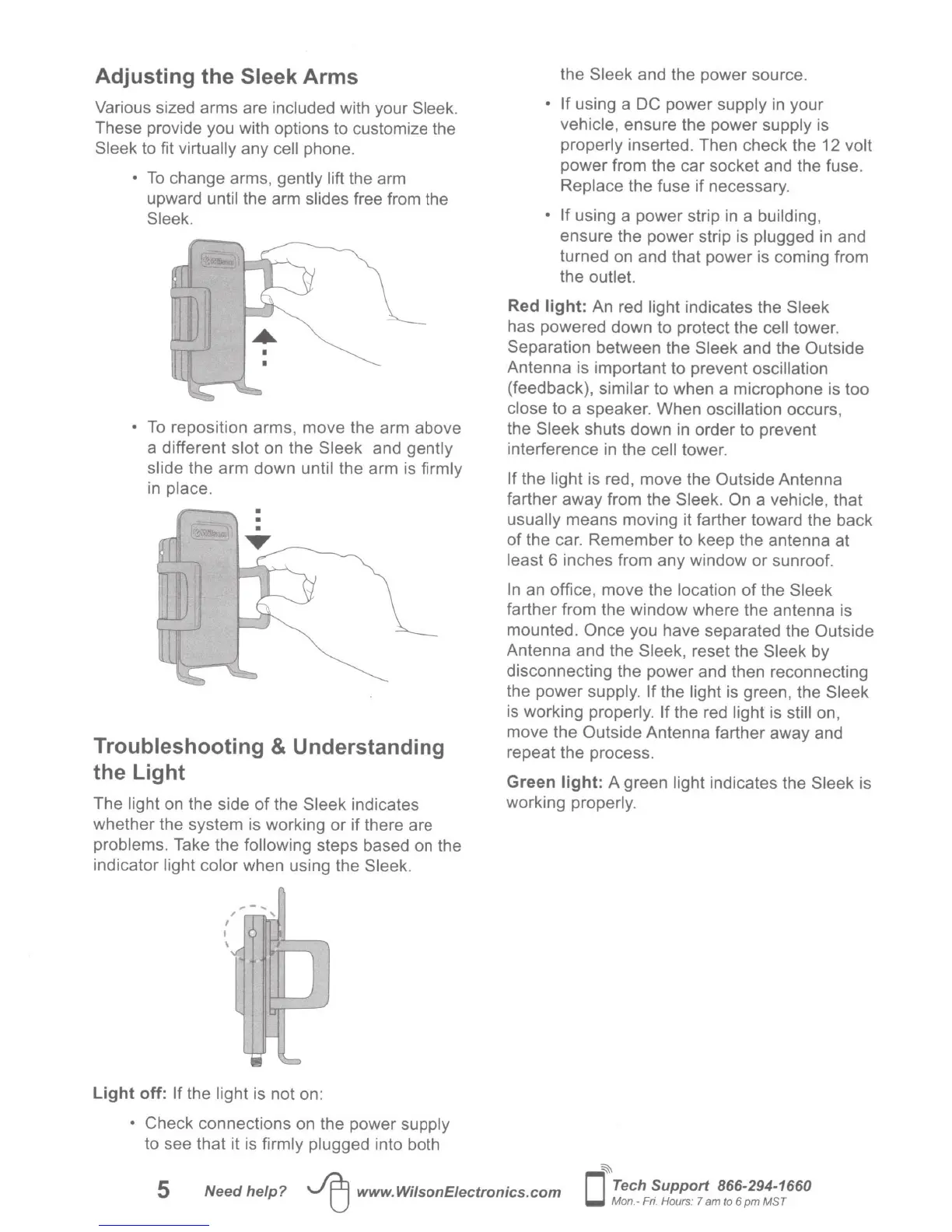
Various sized arms are included with your
Sleek.
These provide you with options to customize the
Sleek
to fit
virtually
any
cell
phone.
•
To
change arms, gently lift the arm
upward until the arm slides free from the
Sleek.
•
To
reposition arms, move the arm above
a different slot on the Sleek
and gently
slide the arm down until the arm is firmly
in place.
Troubleshooting
& Understanding
the Light
The light on the side of the
Sleek
indicates
whether the system is working
or
if
there are
problems. Take the
following
steps based on the
indicator light color when using the
Sleek.
;-
...
"
'
I
I
\
'
J
u
r-
II
~
Light
off:
If
the light is not on:
• Check
connections
on
the power supply
to see that it is firmly plugged into both
the
Sleek
and the power source.
• If
using a
DC
power supply
in
your
vehicle, ensure the power supply is
properly inserted. Then check the 12 volt
power from the car socket and the fuse.
Replace the fuse if necessary.
• If using a power strip
in
a building,
ensure the power strip is plugged
in
and
turned on and that power is coming from
the outlet.
Red
light:
An
red light indicates the
Sleek
has powered down to protect the cell
tower.
Separation between the
Sleek
and the
Outside
Antenna is important to prevent
oscillation
(feedback), similar to when a microphone is too
close
to a speaker. When oscillation occurs,
the
Sleek
shuts down
in
order to prevent
interference in the cell tower.
If
the light is red, move the Outside
Antenna
farther away from the
Sleek. On
a vehicle, that
usually
means moving it farther toward the back
of
the car. Remember to keep the antenna at
least 6 inches from any window or sunroof.
In
an office, move the location
of
the
Sleek
farther from the window where the antenna is
mounted.
Once
you have separated the
Outside
Antenna and the Sleek,
reset the
Sleek by
disconnecting the power and then reconnecting
the power supply.
If
the light is green, the Sleek
is working properly.
If
the red light is
still
on,
move the
Outside
Antenna farther away and
repeat the process.
Green
light:
A green light indicates the
Sleek
is
working properly.
5
Need
help?
~
www.WilsonEiectronics.com
~
0
Tech
Support
866-294-1660
Mon.- Fri. Hours: 7
am
to 6
pm
MST






 To Next Page