EasyManua.ls Logo

Wimius P60 - Connect USB Disk; Connect the Devices via the HDMI ports

Wimius P60
26 pages
Print Icon
To Next Page IconTo Next Page
To Previous Page IconTo Previous Page
Loading...
(X0
Support01@wimius.com
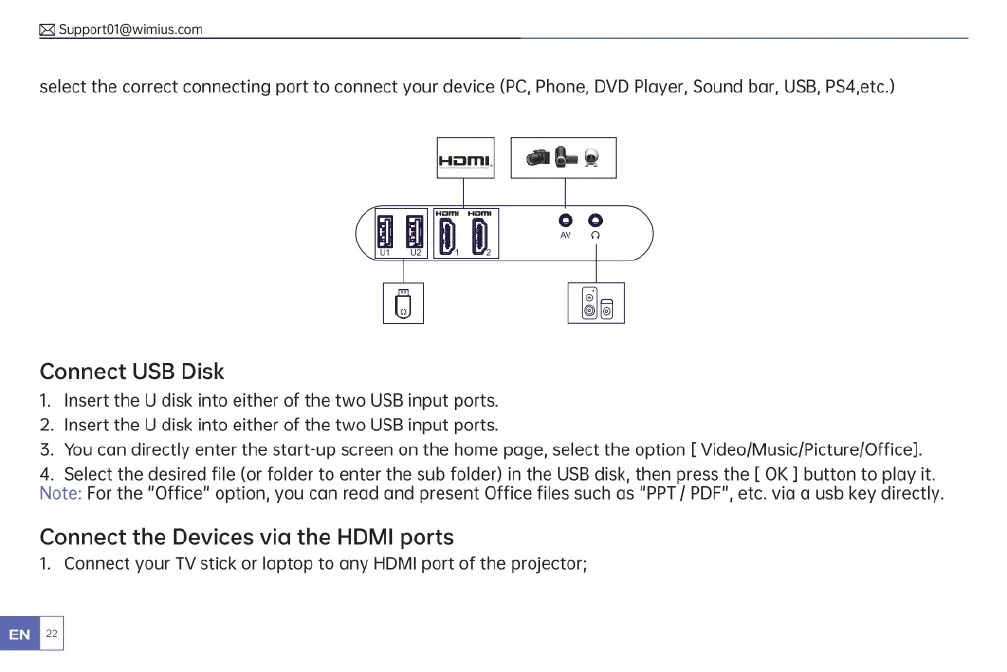
select
the
correct
connecting
port
to
connect
your
device
(PC,
Phone,
DVD
Player,
Sound
bar,
USB,
PS4,etc.)
o]
|
oG
@
(BogE
°c
)
Connect
USB
Disk
1.
Insert
the
U
disk
into
either
of
the
two
USB
input
ports.
2.
Insert
the
U
disk
into
either
of
the
two
USB
input
ports.
3.
You can
directly
enter
the
start-up
screen
on
the
home
page,
select
the
option
[
Video/Music/Picture/Office].
4.
Select
the
desired
file
(or
folder
to
enter
the
sub
folder)
in
the
USB
disk,
then
press
the
[
OK
]
button
to
play
it.
Note:
For
the
"Office"
option,
you can
read
and
present
Office
files
such
as
"PPT
/
PDF",
etc.
via
a
usb
key
directly.
Connect
the
Devices
via
the
HDMI
ports
1.
Connect
your
TV
stick
or
laptop
to
any
HDMI
port
of
the
projector;

Related product manuals