THE TYPEWRITER KEYS
The typewriter keys are arranged in a standard typewriter layout. The Caps Lock key
corresponds to the Shift Lock key on a typewriter, with one important exception. The Caps Lock
key only affects letter keys. In order to use the symbols above the number keys and the
alternative punctuation marks, you must still press the Shift key.
Note that when the Caps Lock key is engaged, the Caps Lock status indicator icon comes on.
Pressing the Shift key and typing a letter at this time will result in a lower case, rather than an
upper case letter.
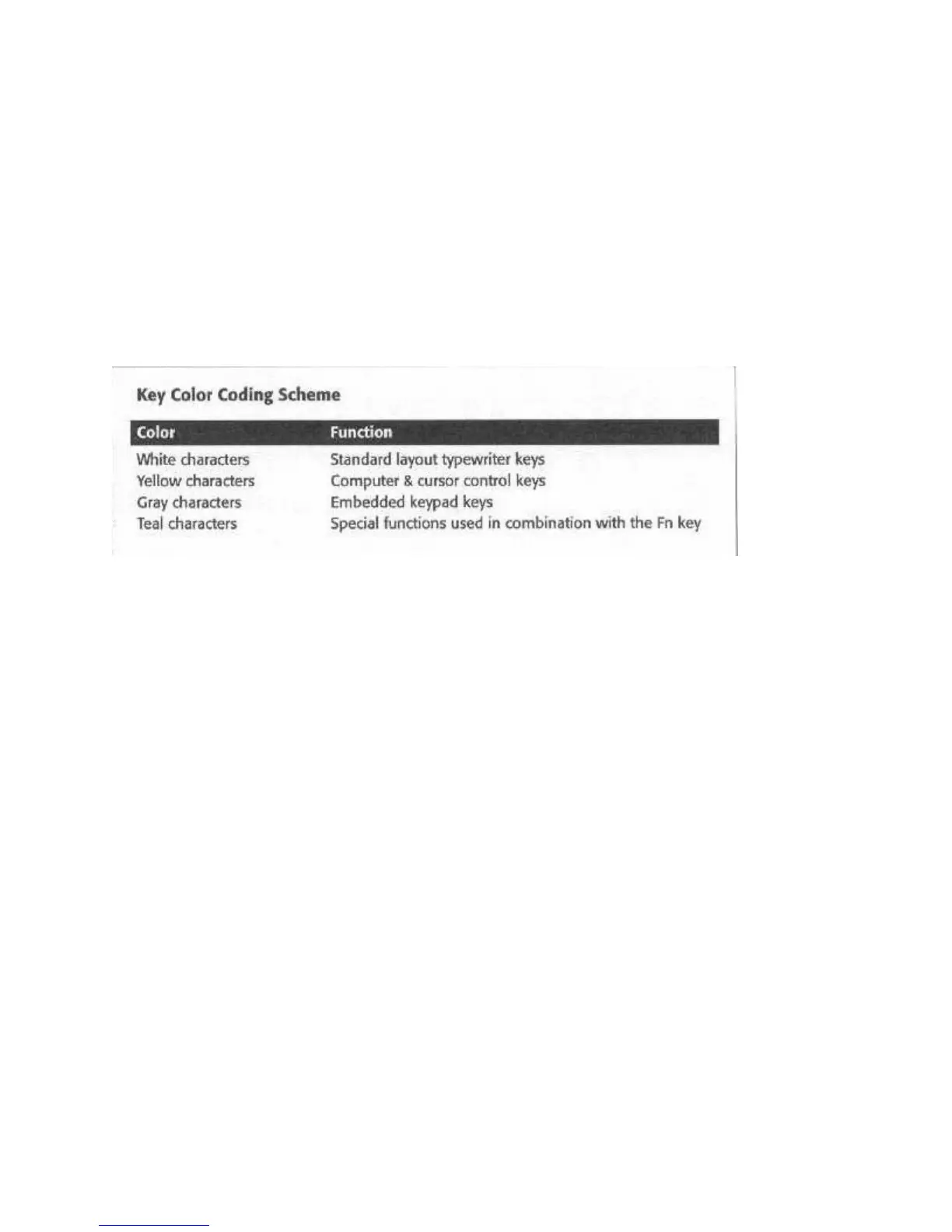
Key Color Coding Scheme
THE FUNCTION KEYS
There are 12 dedicated function keys located across the top edge of the keyboard. They are
labeled F1 to F12. These keys are used in many different ways, depending on the operating
system and software in use. They are also programmable. See your operating system and
software user’s manuals for detailed information.
THE CONTROL KEYS
There are a number of non-typing keys that issue commands or enable functions as listed below.
Escape
Command: ‘Esc’
Many applications use this key to cancel a command or exit the application. Refer to your
application manual for details.
Simulscan
Command: ‘Fn’ + ‘F6’
Overrides the current BIOS setup selection governing whether both the LCD and CRT screens
are active at the same time. Changes are temporary, and revert to BIOS setup settings when the
system is rebooted. Command is active under DOS and Windows.
Expand



 To Next Page