Need help?
Do you have a question about the Wincor Nixdorf TA85 and is the answer not in the manual?
Guidelines for safe cable management, protection from environment, and foreign objects.
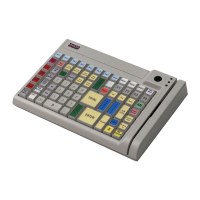
Describes keyboard's 84 keys, flexible layout, key switch, and power-up self-test functionality.
Instructions for swiping cards and precautions for magnetic card handling.
Guide for plugging an additional PC keyboard into the TA85P for input or programming.
Lists utility and data files provided on the diskette for keyboard programming.
Explains TA85P modes: Windows, DOS, and Programmed, and their uses.
Details the capabilities of the KBUTI.EXE utility for key and component programming.
Instructions for creating custom keyboard tables using KBUTI.EXE in various operating environments.
Procedures for loading and saving keyboard tables using utilities and batch files.
A table listing default keyboard scan codes and their corresponding key assignments.
 General
| Brand | Wincor Nixdorf |
|---|---|
| Model | TA85 |
| Category | Touch terminals |
| Language | English |

 To Next Page