1110
Display Introduction How to Use Headlight & Horn
1. There are five buttons on the operating unit, the power button , the plus button , the minus button ,
the headlight button and the switch .
2. After long pressing the key, the instrument starts to work and the working power of the controller is turned on. In the power-on
state, short press the key to turn off the power of the electric bicycle.
3. Press and hold the button to enter the electric-assist promotion state. The electic bike travels at a constant speed of 6 kilometers
per hour. At the same time, the screen displays . By releasing the button
The electric bicycle will immediately stop power output and return to the state before power-assisted pushing.
The power-assisted push function can only be used when the user is pushing the electric vehicle, please do not use it while riding.
4. Short press the key to make the controller turn on the headlights and the instrument backlight dims; press the key again to
make the controller turn off the headlights and the instrument backlight restores brightness.
5. Short press the / button to switch the electric vehicle power assist gear, thereby changing the motor output power.
6. Press and hold the
the next number selection. After entering the initial password "1313", double-click the key to enter settings and switch the unit to miles.
keys to enter settings. Press the or key to select a number, and press the key to switch to and
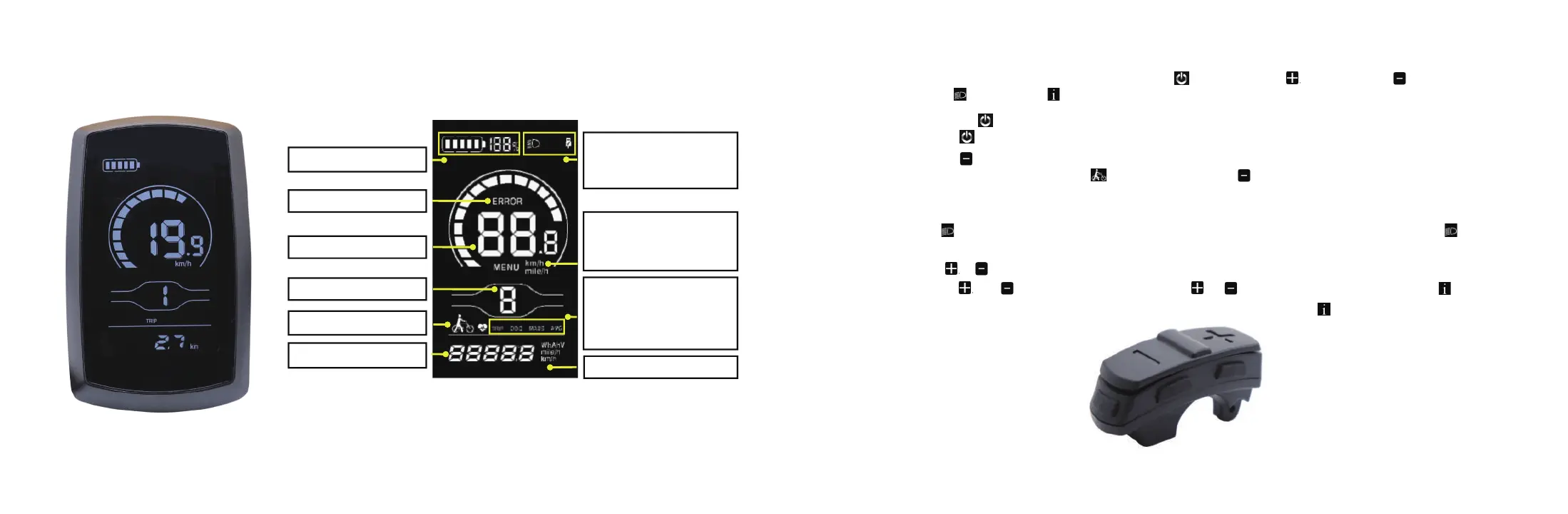
Battery level indicator
Fault indicator
Speed indicator
Assist level indicator
Push assistance indicator
Numeric indicator
Headlight indicator
Bluetooth connection indicator
USB connection indicator
Speed unit indicator
Metric system: km/h
Imperial system: mile/h
Trip distance indicator
ODO
Maximum speed indicator
Average speed indicato
Unit indicator


 To Next Page