3.4 Forwarding Voicemails As E-mails
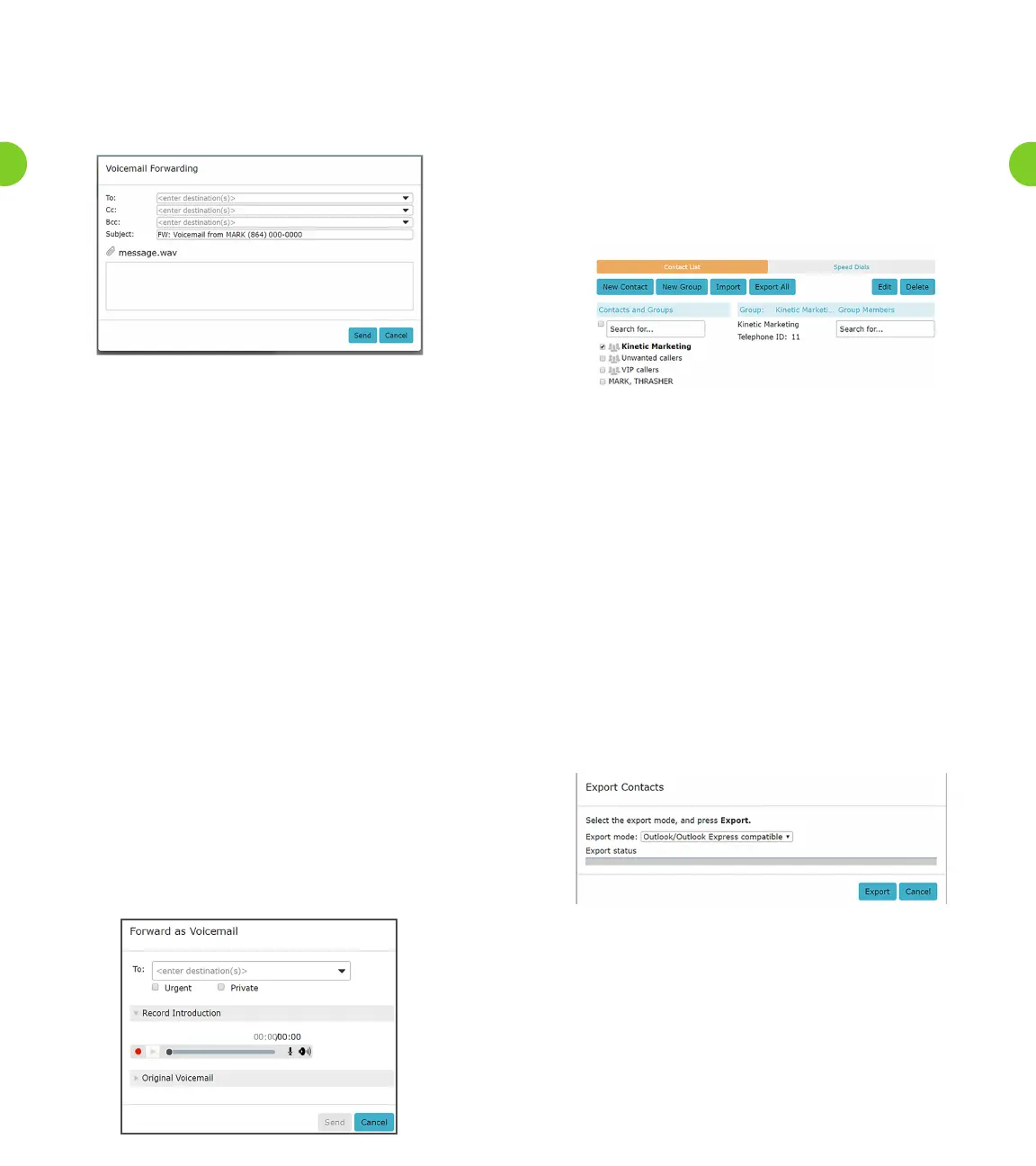
The Voicemail Forwarding pop-up appears when you select the
Forward as E-mail menu option after clicking the icon alongside a
selected voicemail.
Figure 5. Voicemail Forwarding Pop-Up
•Youcantypeintherequirede-mailaddress(es)intheTo,CcandBcc
elds,separatedbyasemicolon(“;”)ifthereismorethanone
recipient.
•Alternatively,youcanentersometextintheseelds–forexample
therstnameoftherecipient
– to display a list of possible matches from the Contacts List that
can then be selected and automatically added. Clicking on the
downwardarrowalongsidetheseeldsdisplaysyourentire
Contact List, from which you can select one or more recipients.
• The source e-mail address is always set to an e-mail address
containing your telephone number. This cannot be changed and is
not displayed. The Reply-To address is always set to a “no-reply”
address at the Windstream domain.
•TheSubjectelddefaultstothatshownabove,butyoucanedit
this if you wish.
• A voicemail is always forwarded by e-mail as a .wav attachment.
•Youcantypeamessagefortherecipient(s)inthee-mailbody.
3.5 Forwarding Voicemails As Voicemails
The Forward as Voicemail pop-up appears when you select the
Forward as Voicemail menu option after clicking the icon alongside
a selected voicemail.
• As with the other forwarding options, you can select one or more
recipients, mark the message urgent or private.
• You can also record an introduction that will be played before the
original voicemail, or listen again to the original voicemail.
Figure 6. Forward Voicemail as Voicemail Pop-up
4.0 Contacts Tab
Contact lists allow you to associate the name and details of a caller
withoneormoretelephonenumbers(suchashome,ofceand
cellphonenumbers).Youcanalsorecordpostalande-mailaddresses
for your contacts.
The interface includes a powerful search facility, allowing you to
look up a contact by name, organization name, telephone number or
address.
Figure 7. Kinetic Voice Manager Contact List Display
As well as being useful simply as a way of storing and retrieving
contact details, Contact Lists enhance other services within Kinetic
Voice Manager
• The Messages and Calls tab makes use of the contact list to display
the names of callers rather than just their telephone numbers.
• The auto-complete function provides a list of suggestions retrieved
fromthecontactlistwhenyouenterdatainaTo,CcorBcceld,
while sending messages to other Voicemail users.
• Search Contacts by Groups.
4.1 Import And Export
Youcandownloadyourcontactstoacommaseparatedvaluele,
for use outside Kinetic Voice Manager by pressing the Export All
button.YoucanselecttheformatofCSVleyouwanttocreatefrom
Outlook/Outlook Express compatible, Windows Contact on Vista
and Native Format.
Figure 8. Export Pop-up
YoucanalsouploadalecontainingcontactsintoKineticVoice
Manager.
•Beforetheimportstarts,theVoicemailplatformwillcheckthele
issuitableforupload.ThelemustusetheWindowscomma
separatedvariableformat(CSV)andcontainasuitableheaderline
that describes the column contents for each contact. A maximum
of1000contactscanbeincludedinthisle.
29
28



 To Next Page