VERSION 2.0 01/03/2017
USER GUIDE WINEARM15 Page 12
Important :
After transport or handling, wait for 24 hours before plug in the air
conditioner.
3. START USING THE AIR CONDITIONER WINEMASTER
®
The thermostat indicates the temperature into the wine cellar with a precision of 2°C.
The thermostat is set at 12°C in the factory. During installation, the set temperature must be controlled
and adjusted following our process (§3.2.1).
3.1. Plug in the air conditioner
When you start the air conditioner, the room temperature is displayed:
- If the temperature is higher than the thermostat setting: the air conditioner starts after a delay of 2
minutes.
- If the temperature is lower than the thermostat setting: the compressor does not start.Only the fan
from inside unit works.
3.2. Using the air conditioner
3.2.1. Setting the temperature
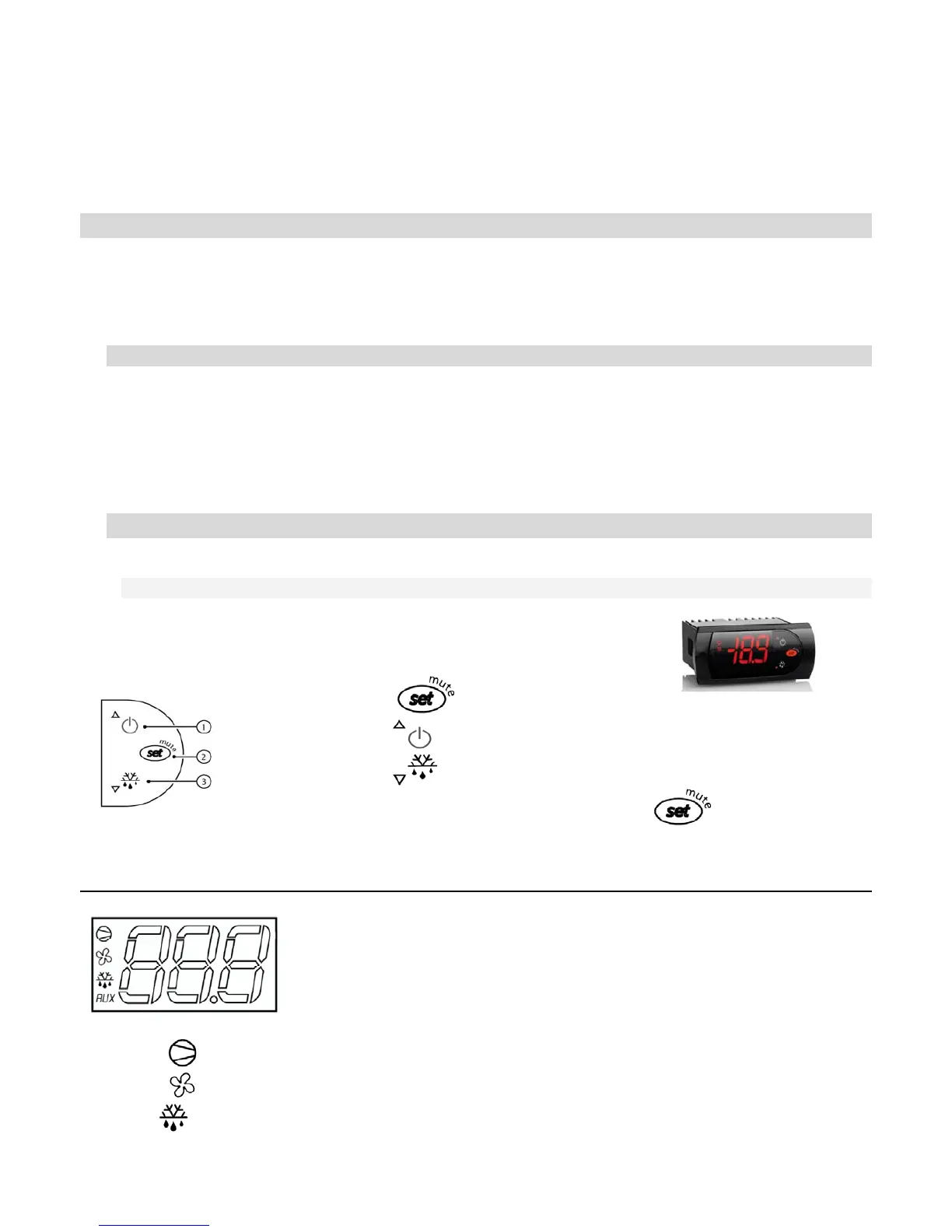
The setting of the targeted temperature is made as follows :
- Press on button one second until the set point temperature flashes.
- Use the button to increase the set point temperature.
- Use the button to decrease the set point temperature.
- When the right temperature is set, press on button to confirm.
Expanation of the main display symbols:
Red light = cold mode engaged (compressor)
Red light = cooling fan in high speed
Red light and
« dF » code = automatic defrost engaged


 To Next Page