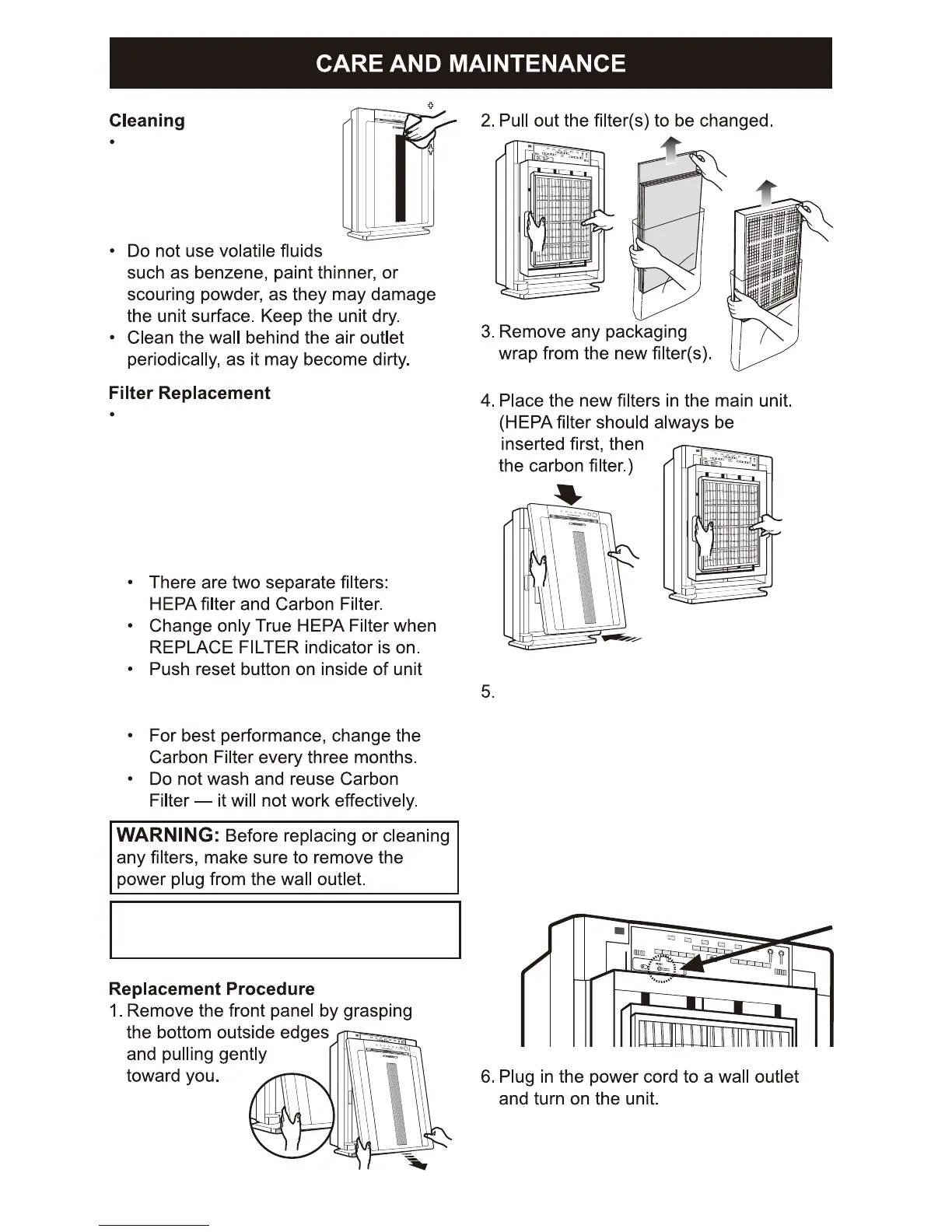
Clean outside of unit as
necessary by wiping with
a dry, soft cloth; for stub-
born stains, use a warm,
damp cloth.
To r es et t he f il te r on ce a n ew H EPA f i lt er i s in st al le d:
a. Plug the unit back in with the front cover off
b. Turn on the unit
c. Locate the filter reset button on
the display panel
d. Press and hold the filter reset
button for 3-5 seconds. A short beep
will be heard and the light should turn off.
e. Place the front panel back on the unit
and the air cleaner is ready to use
The REPLACEMENT FILTER INDICATOR
will illuminate when to replace the True
HEPA Filter. Please note that the carbon
filter needs to be changed every 3 months
or as needed. The replacement period
may vary depending on the hours of use,
air quality, and location of the unit.
NOTE: Do not wash and reuse True HEPA
Filter or Carbon Filter.
after changing filter. See Number 5
instruction on the right of the page
8


 To Next Page