Need help?
Do you have a question about the Winix ZERO 5 and is the answer not in the manual?
Turns the unit on or off.
Cycles through fan speed and operation modes.
Sets timer and controls Air Quality light.
Toggles the PlasmaWave® feature on/off.
Instructions to reduce risk of serious injury, death, or unit damage.
Steps for inserting filters in the correct order.
Filter maintenance schedule and replacement information.
Ensure filters are inserted before running unit.
Warning against inserting objects into vents.
Caution regarding wet hands and interior contact.
Key safety instructions for operation and handling.
Step-by-step guide to initial power-up.
Automatic operation based on air quality sensors.
Quiet operation mode for nighttime use.
Manually selecting fan speed (Low, Medium, High, Turbo).
Steps for inserting new filters in the correct order.
Warning against unauthorized repairs or modifications.
Safety warning for damaged power components.
Requirement to use only AC 220-240V.
Electrical shock prevention when handling plugs.
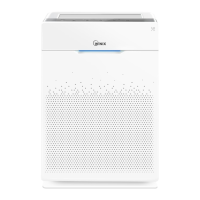
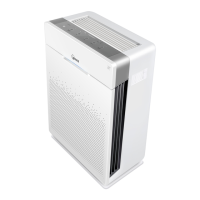
The Winix Zero 5 Air Purifier is a sophisticated device designed to improve indoor air quality through a comprehensive 5-stage filtration system. This user manual provides detailed instructions for its operation, maintenance, and safety, ensuring optimal performance and longevity of the unit.
The primary function of the Winix Zero 5 Air Purifier is to remove airborne contaminants, including dust, ultrafine particles, odors, and allergens, from the indoor environment. It achieves this through a multi-stage filtration process that includes a Pre-filter, Pet filter, Deodorization filter, True HEPA filter, and PlasmaWave® technology.
The Pre-filter is the first line of defense, capturing larger dust particles and pet hair, which helps extend the life of subsequent filters. Following this, the dedicated Pet filter specifically targets pet dander and other pet-related allergens, making it ideal for households with animals. The Deodorization filter is designed to absorb and neutralize unpleasant odors from cooking, pets, smoke, and other sources, contributing to a fresher indoor environment. The True HEPA filter is crucial for capturing 99.97% of airborne particles as small as 0.3 microns, including pollen, mold spores, dust mites, and bacteria. Finally, the PlasmaWave® feature generates hydroxyls to break down airborne pollutants at a molecular level, without producing harmful ozone, further enhancing air purification.
The device offers various operating modes to suit different needs and preferences. The Auto Mode utilizes smart sensors to detect indoor air quality and automatically adjusts the fan speed accordingly. As air quality improves, the fan speed decreases, and vice versa. The Sleep Mode operates at a low fan speed with dimmed LED lights, ensuring quiet operation for an undisturbed night's rest. For more control, Manual Mode allows users to select specific fan speeds (Low, Medium, High, Turbo) based on their immediate air purification requirements.
Additional features include a Timer function, enabling users to set the unit to run for predetermined durations (1hr, 4hr, 8hr), and a Child Lock feature, which prevents accidental changes to settings by locking the control panel. The Air Quality LED Light provides a visual indication of the current indoor air quality, displaying different colors (BLUE/GREEN/AMBER/RED) to represent varying levels of purity.
To ensure proper functioning and safety, several usage guidelines are provided. The unit should be placed indoors on a hard, flat surface, allowing 30-45 cm of space between the purifier and other electronic devices to prevent electromagnetic interference. It should be kept away from direct sunlight, heating elements, and excessively humid areas. Users are cautioned against using the unit near flammable materials, industrial oils, or in transport vehicles.
Initial setup involves inserting the power cord into an electrical outlet and pressing the 'Power' button. During the first four minutes of operation, the Air Quality light will flash as the smart sensors calibrate to the environment. By default, the unit powers on in Auto Mode with PlasmaWave® enabled.
The control panel is intuitive, featuring buttons for Power, Mode/Fan Speed, PlasmaWave®, Timer/Air Quality Light, and Child Lock. The Mode/Fan Speed Button cycles through Auto, Sleep, Low, Medium, High, and Turbo settings. The PlasmaWave® Button allows users to enable or disable this advanced purification feature. The Timer/Air Quality Button sets the operating duration and can also be pressed and held for three seconds to toggle the Air Quality LED light on or off. The Child Lock Button, when pressed and held for three seconds, activates or deactivates the child lock, preventing unintended adjustments.
The Check Filter Indicator light illuminates when it's time to replace the True HEPA and Deodorization filters, ensuring continuous optimal performance. A Reset Button is available to reset the filter change indicator after new filters have been installed. A Light Sensor automatically adjusts the brightness of the LED indicators based on ambient light, enhancing user comfort, especially in dark rooms.
Regular maintenance is crucial for the Winix Zero 5 Air Purifier's efficiency and lifespan. The manual outlines specific care instructions for each filter and the unit itself.
Before initial use, all filters must be removed from their protective plastic wrap. The filters are installed in a specific order: True HEPA filter (rear), Deodorization filter (middle), and Pre-filter (front). The Pre-filter has tabs that click into place. When the Check Filter indicator light comes on, it signals the need to replace both the True HEPA and Deodorization filters. The Pre-filter is permanent and only requires cleaning.
The Pre-filter should be cleaned every 14 days. It can be cleaned using a vacuum cleaner or a soft brush. If excessively dirty, it can be washed with room temperature water. Only water should be used; volatile substances like alcohol or acetone are strictly prohibited as they can cause damage or discoloration. After washing, the Pre-filter must be allowed to dry completely in a well-ventilated area before reinstallation to prevent odors. If the Pre-filter becomes damaged, it needs to be replaced by contacting the local dealer.
These filters are not washable and have a lifespan of approximately 12 months, though this can vary depending on the environment and usage. They must be replaced when the Check Filter indicator light illuminates. The manual provides information on where to purchase replacement filters.
For optimal performance, the Dust Sensor, which detects airborne dust and ultrafine particles, should be cleaned every two months, or more frequently in dusty environments. To clean, open the Dust Sensor cover, wipe the lens and intake area with a damp cotton swab (using only water), and then dry with a clean cotton swab. The Dust Sensor cover can be cleaned with a vacuum cleaner.
The exterior of the unit should be wiped with a soft, damp cloth using room temperature water, followed by a clean, dry cloth. For optimal performance, the front panel should be cleaned 1-2 times a month. The interior of the unit can be cleaned with a vacuum cleaner, also 1-2 times a month for optimal performance.
Always unplug the power cord and allow the unit to cool off before cleaning or performing any maintenance. Users are warned against disassembling, repairing, or modifying the unit themselves. Flammable sprays, liquid detergents, benzene, alcohol, paint thinner, or hot water over 104°F should never be used for cleaning. Children should not be allowed to clean or maintain the unit.
By following these detailed instructions, users can ensure their Winix Zero 5 Air Purifier operates effectively and safely, providing clean and fresh air for an extended period.
 General
| PlasmaWave Technology | Yes |
|---|---|
| Auto Mode | Yes |
| Sleep Mode | Yes |
| Weight | 7.3 kg |
| Warranty | 2 years |
| Room Size | Up to 99 m² |
| Pre-filter | Yes |
| Activated Carbon Filter | Yes |
| Air Quality Sensor | Yes |
| Fan Speeds | 4 |
| Power Consumption | 70W |
| Room Coverage | 360 sq. ft. |
| Filter Life | HEPA Filter: 12 months, Activated Carbon Filter: 12 months |
| HEPA Filter | Yes (99.97% efficiency at 0.3 microns) |


 To Next Page