1615
❶
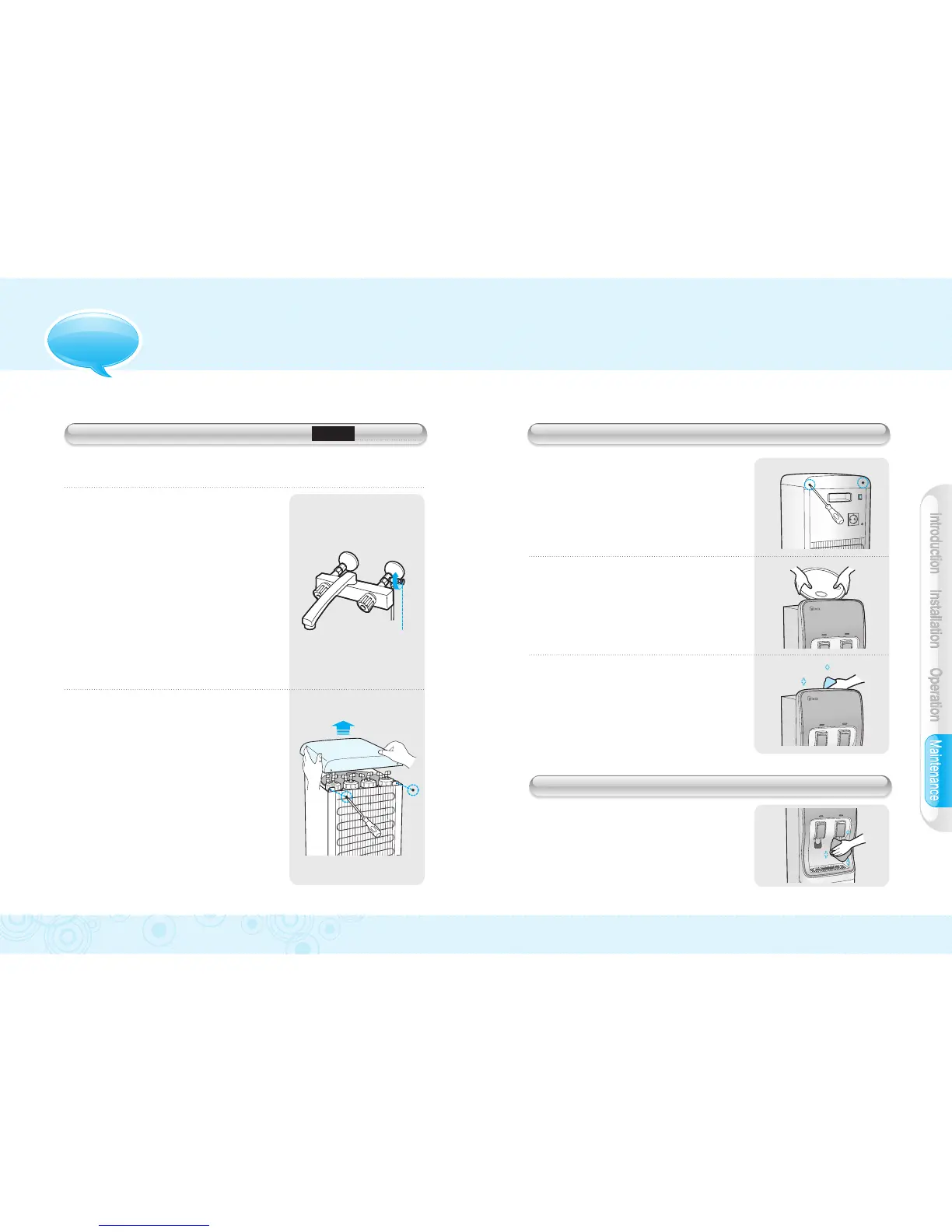
Remove screws on the back of the
top housing to remove top panel.
❷
Remove top lid cover from water tank.
❸
Clean dirty areas with soft wet cloth.
INSIDE PRODUCT CLEANING (EVERY 12-13 WEEKS)
●
Plastic areas`:`Clean with a piece
of soft cloth and a neutral detergent.
Do not use water.
●
Metal pipes / Back of the unit`:`
Use vacuum cleaner to get rid
of dust accumulation.
PRODUCT HOUSING CLEANING
OPTIONAL WATER FILTERS REPLACEMENT
Models
W-3TC, W-3TD
❶
Close water supply valve.
❷
Remove 2 screws at the back of
the machine to pull top cover
off/upward.
❸
Replace old filter with a new filter.
❹
Put top cover back on top of unit.
❺
Open water supply valve to resume
operation
■`
Replace Optional water filters on a regular basis to maintain
performance and efficiency of your product.
MAINTENANCE
Water supply
valve handle


 To Next Page