8-1
5 - DASH / AUTO
SECTION 8 – ENTERTAINMENT
VIDEO SELECTION SYSTEM
–If Equipped
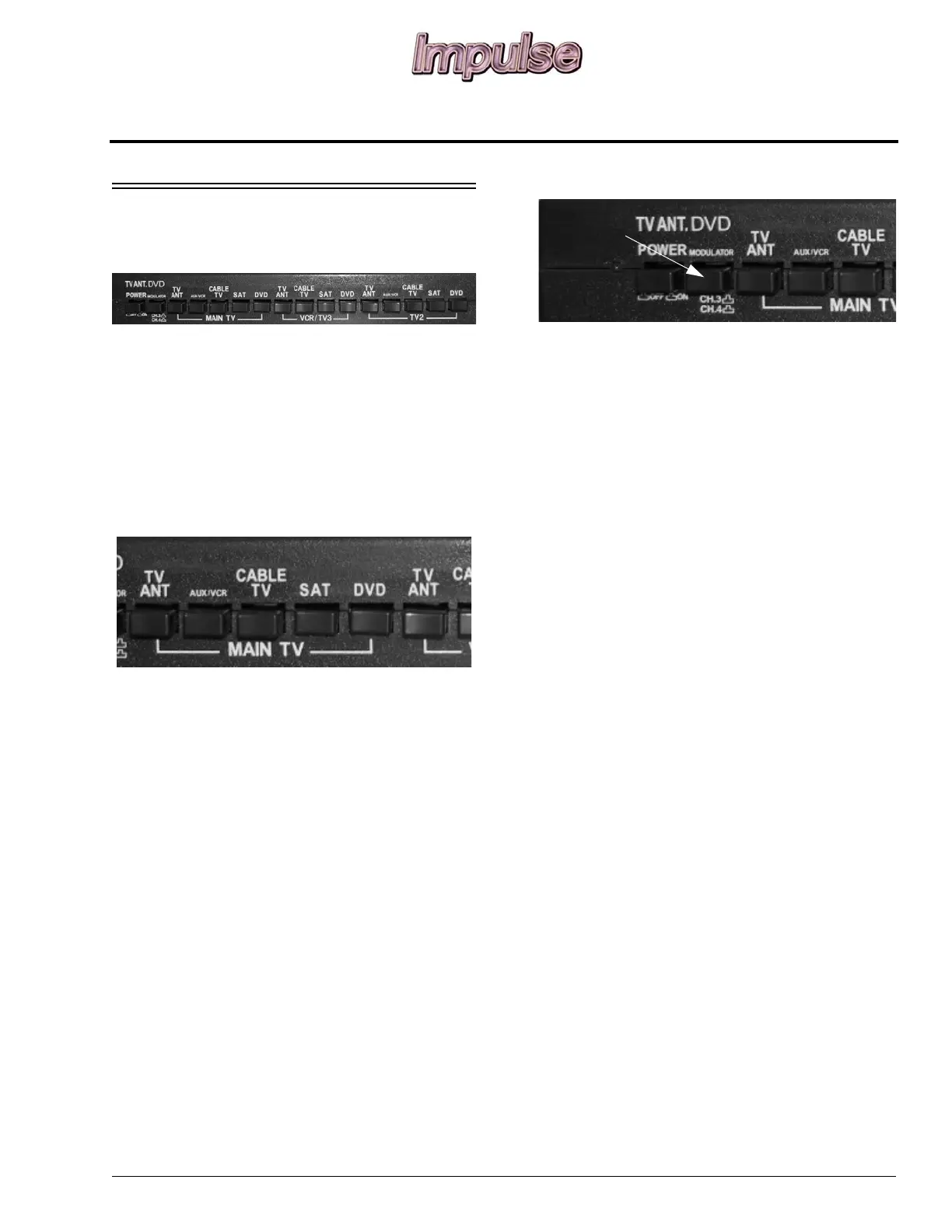
The video selection system allows you to
switch the antenna, AUX/VCR, cable TV,
satellite TV, or DVD signal to any TV set
location in the coach.
This means one person can watch a program
coming in on the roof antenna on the bedroom
TV while another person watches a satellite or
cable TV program or video on the front TV.
To Watch Broadcast TV (Antenna)
• Press TV ANT button on MAIN TV section of
Video Selection System panel.
To Watch Cable TV
• Press CABLE TV button on MAIN TV
section of Video Selection System panel.
To Watch Satellite TV (Dish)
-If Equipped
• Press SAT button on MAIN TV section of
Video Selection System panel.
To Watch DVD
• To watch a DVD on your main TV, change the
TV to either Channel 3 or 4 by pressing the
button with “Modulator” marked above the
switch and “Ch. 3/Ch. 4” marked below the
switch. If the switch is pressed in, you tune to
channel 4. If the switch is not pressed in, you
tune to Channel 3.
• The Video Selection System allows you to
watch DVD’s from either the lounge area
(main TV), bedroom, or the exterior
entertainment center (if equipped). Press the
button with “DVD” marked above the switch
and “Main TV” marked below the switch. To
watch a DVD on other TV’s, press the button
“DVD” marked above the switch in the
corresponding section of the unit.
To Watch VCR (if self-installed)
• Press VCR button on MAIN TV section of
Video Selection System panel.
To Watch Rear/Bedroom TV
(if equipped)
• Video selection for the rear TV is similar to
front TV viewing except all selections are
made with buttons in the TV2 grouping.
VCR Group Buttons
• The buttons in the VCR group are for
selecting the signal input to a self-installed
VCR for taping programs.
• If you wish to tape a program from cable TV
press CABLE button. If the program is on the
dish, press SAT, and so forth.
Further Information
For further information, see the Video
Selection System operating instructions included
in your InfoCase.





 To Next Page