-0 7- -0 8-
8.1. Introduction to bottom menu operation;
a、Enter into bottom menu:
Press ESC under measurement
interface to enter into bottom
menu.
b、Select menu item:
Press UP or DOWN button to
select menu item.
c、Enter into selected menu item:
Press OK to enter into selected
menu item.
d、Exit menu item:
Press ESC button to exit bottom menu.
5)Chart
In this menu, you can view the data saved in the file inform of
trend graph.
a. View basic information such as data number, maximum
value, minimum value, and average value in this file.
b. Zoom the whole trend graph
c. Use cursor to view specific data value in the file.
6)Settings
Make other settings for the instrument under this menu, including:
a. Language
b. Automatic shutdown time
c. Button sound
d. Backlight brightness
e. Color
f. Software version number
g. Restore factory settings
Bottom menu
8、Bottom menu operation and function introduction
8.2. Introduction to bottom menu functions;
a. Storage:
Save current measured values to the selected file.
b. Delete:
Delete measured values and measurement information
(except for limit values).
c. Calibration:
Refer to calibration instruction for details.
d. Sound speed calibration:
Refer to sound speed calibration instruction for details.
9.1. Press ESC under measurement interface
to enter into bottom menu. Select
calibration item and press OK button.
9.2. The interface is displayed as shown on
the right:
9.3. The sound speed in calibration is
automatically set as 5900m/s during.
9.4. Press the probe on calibration sample to
calibrate. 5 circles on the bottom of
screen will be filled in turn.
9.5. After the calibration is completed, it will
automatically return to measurement
interface.
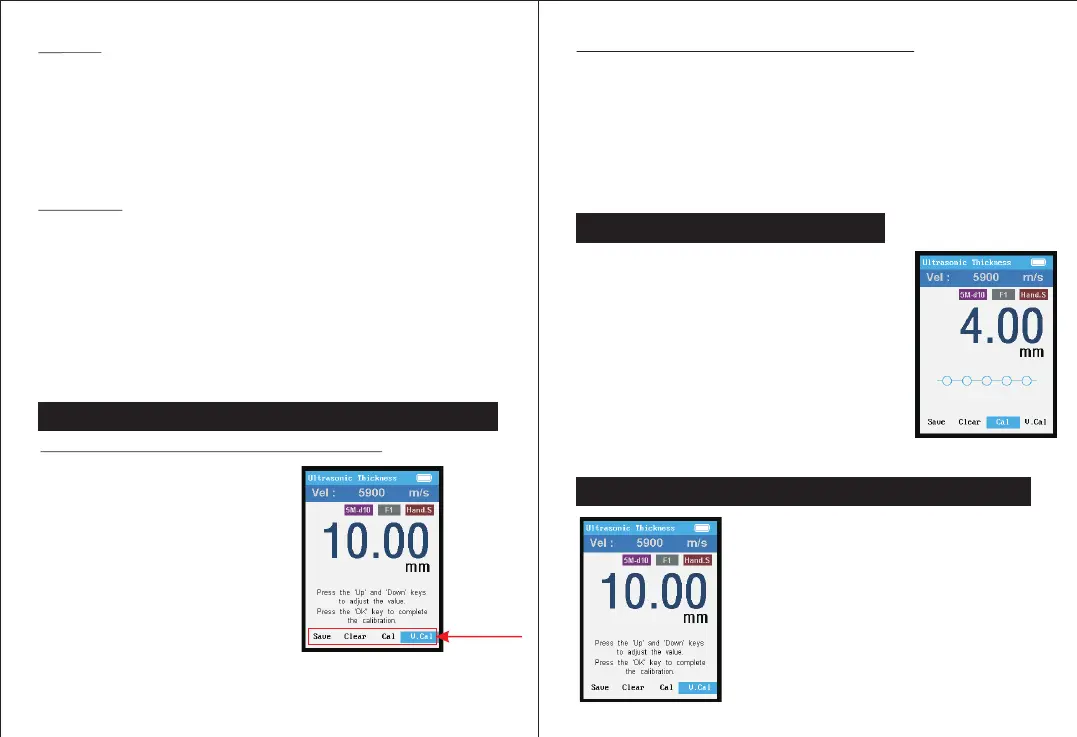
10.1. Enter into bottom menu and select
sound speed calibration item
10.2. The interface is displayed as shown
on the left:
10.3. As shown in the figure, press
UP/DOWN button to adjust value.
10.4. After the value adjustment is
completed, press OK to complete
calibration.
9、Calibration instruction
10、Instruction of sound speed calibration


 To Next Page