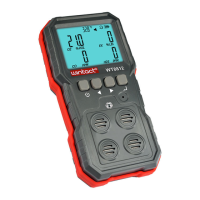
This document describes the WT8811 Compound Gas Monitor, an instruction manual for a device designed for safety monitoring in industrial settings.
Function Description
The WT8811 Compound Gas Monitor is a high-quality gas sensor device that provides accurate measurements and stable performance. It is designed for safety monitoring in industrial environments, offering excellent sensitivity, repeatability, and ease of use and maintenance. The device features a color-screen display with a user-friendly interface and supports bilingual choices (Chinese/English).
It measures the concentrations of four gases:
- Combustible gas (LEL)
- Oxygen (O2)
- Hydrogen sulfide (H2S)
- Carbon monoxide (CO)
The monitor incorporates three alarm forms: sound, light, and vibration, which can be individually turned on or off in the alarm settings. It also includes a data recording and review function, capable of continuously recording up to 120,000 data points. A charging function is also integrated.
The device conforms to several standards, including:
- GB3836.1-2010 Explosive Atmospheres Part 1: General Requirements for Equipment.
- GB3836.4-2010 Explosive Atmospheres Part 4: Equipment with Intrinsically Safe "I" Protection.
- GB15322.3-2003 Portable Combustible Gas Detectors Part 3: Portable Combustible Gas Detectors with a Measurement Range of (0~100) %LEL.
- JJG693-2011 Verification Standards for Combustible Gas Detection Alarm.
- JJG 365-2008 Verification Procedures for Electrochemical Oxygen Tester.
- JJG695-2003 Verification Procedure for Hydrogen Sulfide Gas Detector.
- JJG915-2008 Verification Procedures for Carbon Monoxide Detection Alarm.
Important Technical Specifications
Measuring Items and Ranges:
- Combustible gas (LEL): 0~100 %LEL (Resolution: 0.1)
- Oxygen (O2): 0~30 %VOL (Resolution: 0.1)
- Hydrogen sulfide (H2S): 0~100 µmol/mol (Resolution: 0.1)
- Carbon monoxide (CO): 0~1000 µmol/mol (Resolution: 1)
General Specifications:
- Accuracy: ≤±5%FS
- Response time (90%): Less than 30 seconds
- Indication mode: LCD displays real-time data and system state; LED, sound, and vibration indicate alarms.
- Storage Conditions: Temperature: -10~55°C; Humidity: <85%RH
- Operation Conditions: Temperature: -20~50°C; Humidity: <95%RH non-condensing
- Working voltage: DC 3.7V (Lithium battery capacity 1800mAh)
- Charging time: 6~8h
- Standby time: More than 8h (may slightly change with working state)
- Dimensions: 7115349mm
- Weight: 218.7g (With battery)
The shell of the device is constructed from high-strength engineering plastics and compound non-slip rubber, making it dust and explosion-proof, with a high strength and smooth handfeel.
Usage Features
The device is widely used in various industries, including petroleum, chemical, environmental protection, metallurgy, refining, gas transmission and distribution, biochemical medicine, and agricultural research.
Navigation and Interface:
- Main Menu: Accessed by long-pressing the on/off button for about 2 seconds. After a 20-second stabilization countdown, the main menu appears with icons for single measurement, multiple measurement, viewing records, alarm settings, system settings, and calibration.
- Buttons:
- Return button (U): Long press for on/off, short press to return.
- Left button (◄): Moves left, forward, upward, decreases.
- Right button (►): Moves right, forward, downward, increases.
- Confirm button (J): Confirms selections.
- Single Measurement Interface: Displays a single gas concentration value, along with maximum, minimum, and average values (average over the last 4 minutes). It also shows high and low alarm values and real-time readings. A "Danger" icon appears during an alarm state, otherwise "Safety" is displayed.
- Multiple Measurement Interface: Simultaneously displays real-time values for all four measured gases. Values exceeding the range will flash, and an alarm will trigger if enabled.
- Record Checking Interface: Allows users to review recorded data, showing the record number, start time, number of record groups, and record interval. Each record can store up to 1019 data points, with a total capacity of 125 groups. The interface supports page selection, viewing, and deletion of records.
- Alarm Setting Interface: Allows individual setting of high and low alarm values for each sensor. The three alarm modes (light, sound, vibration) can be toggled on/off. High alarms have a more urgent and faster frequency than low alarms.
- System Settings Interface: Includes options for language (Chinese/English), date and time, auto storage, auto power off, backlight settings (three levels), and resetting to default parameters. Auto storage saves data at set intervals, and auto power off shuts down the device after a period of inactivity.
Charging Function:
When the battery is low or the device cannot power on due to undervoltage, it needs to be charged. During charging, the alarm light flashes, and the battery icon dynamically displays the charging status. Once fully charged, the icon stops changing. The screen turns black after 10 seconds of inactivity during charging to speed up the process, but can be reactivated by pressing any button. If the power reaches 80% and there is no operation for 2 minutes, the instrument will automatically shut down for charging.
Maintenance Features
Calibration Interface (ONLY FOR PROFESSIONAL):
The device supports sensor calibration, accessible through a dedicated interface.
- Sensor Selection: Users can select a specific sensor (O2, CO, H2S, LEL) for calibration.
- Calibration Parameters: For each sensor, the interface displays calibration points, corresponding parameters, real-time values, min/max/average values, and a curve of the sensor signal.
- Calibration Methods:
- Direct AD value input: Set concentration, expose to calibration gas, wait for signal stability, then input the real-time signal value to the calibration AD value.
- Manual Calibration: Set concentration, expose to calibration gas, wait for signal stability, select manual calibration, and confirm to add the real-time signal value to the calibration AD value.
- Timing Calibration: Set concentration, expose to calibration gas, select timing calibration, input the timing, and after the countdown, the real-time signal value is added to the calibration AD value.
- If calibration is incorrect, recalibration or restoration to factory settings via system settings is possible.
- When calibrating the zero point for carbon monoxide, hydrogen sulfide, and combustible gas, the calibration AD value can be increased by 5-9 to prevent unrecoverable readings.
General Maintenance and Precautions:
- Avoid collision, falling from high places, or violent vibration.
- Do not use in environments with extremely high gas concentrations, as it may affect proper functioning.
- Operate strictly according to instructions to avoid inaccurate results or damage.
- Avoid storing the instrument in places with water, heavy dust, corrosive gases (salt, sulfur), or other chemicals.
- Protect from high temperatures, high humidity, direct sunlight, and strong electromagnetic fields.
- Keep the sensor window clean; a dirty window can lead to inaccurate measurements.
- Clean the instrument surface gently with a clean, soft cloth dampened with water. Do not use alcohol, diluent, or other chemicals, especially on the LCD window.
- Regular calibration (at least once a year) is recommended to ensure accuracy.
- If the instrument malfunctions, contact professional personnel for repair. Do not attempt to change components or wiring yourself.
- Warning: Do not charge or disassemble batteries in an explosive environment.
- The device is equipped with a rechargeable battery. If it doesn't start upon receipt, connect it to the adapter for charging.
The company reserves the right to change product design and instruction contents without prior notice.

 Need help?
 General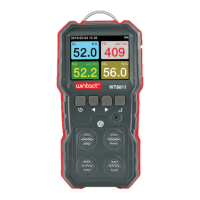

 To Next Page