A
1
2
3
4
5
6
A
DOCUMENT NO.: QR-208/A
B C D E
B
C
D E
1
2
3
4
5
6
SCALE
SIZE
DATENAME
APPROVALS
APP. BY
CUSTOMTER
DRAWN BY
CHECKED BY
1:1
A4
更 改 记 录
次 号
1.
2.
3.
VER.A0
SHEET
OF
PART Number: X-XXX-XXX-XX
1 1
WT8811 (WINTACT) 中 文 有 唛说明 书 示意图
日 期
更 改 内 容
71688811001
MJP
2018-04-09
SHENZHEN JUMAOYUAN SCIENCE AND TECHNOLOGY CO., LTD.
71688811001
WT8811 中文有唛说明书
材料:105G双铜;
页数: ( )
成品尺寸:190*130MM; 公差:+-1.0MM;
工艺:单色双面印刷,加工:装订成册说明书;骑马钉
20P 封二及封三留空白
130.00 mm
95.00 mm
-13--12-
time (including calibration parameters) in the instrument can be restored
to factory state;
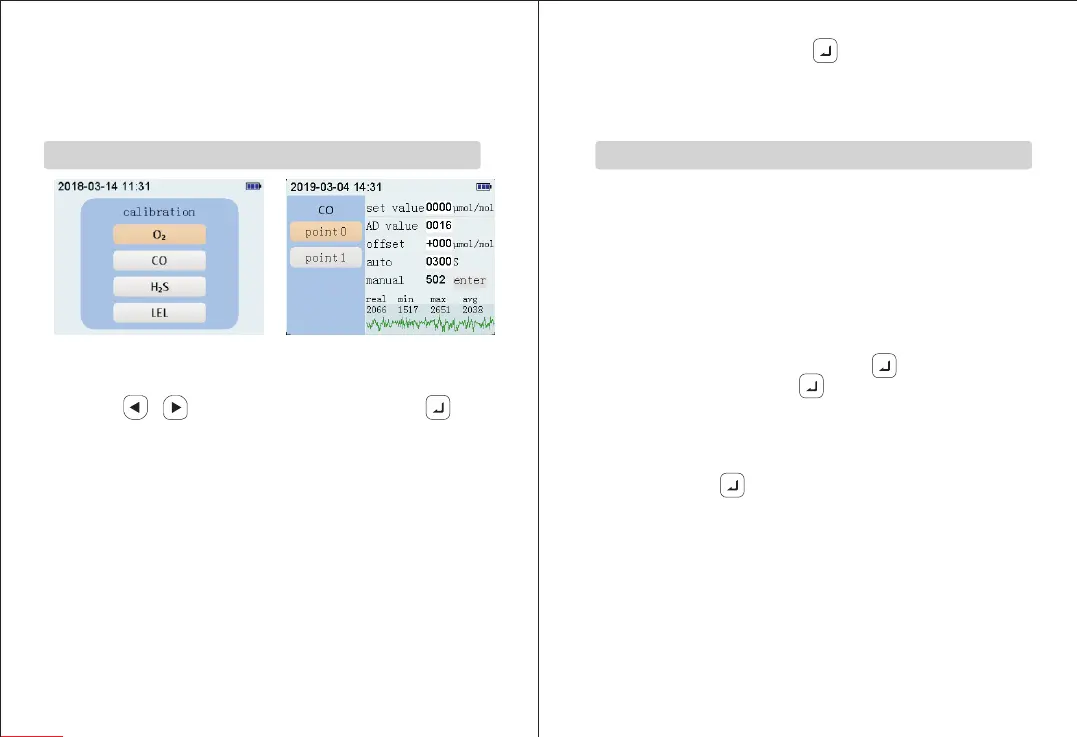
1. First enter the sensor calibration selection interface shown in Figure
8.1. Press“ ”/“ ” button to select a sensor; then press “ ” to
enter the single sensor calibration interface, as shown in Figure 8.2;
2. In the interface of Figure 8.2, the left side is the calibration point option,
the right side is the calibration parameter corresponding to each
calibration point, and the lower right area shows real-time value,
minimum value, maximum value, average value and curve of the sensor
signal; the concentration setting refers to setting the concentration value
to be calibrated; calibration AD value refers to the signal value output by
the sensor corresponding to the set concentration value; offset
adjustment refers to the reading plus or minus the set deviation on the
basis of the calibration point; timing calibration means that after the
timing calibration is on, the countdown of the set timing starts. When the
countdown reaches 0, the measured signal value is automatically stored
in the calibration AD value. Manual calibration means that when the
manual calibration is on, the real-time signal value is stored in the
3.Calibration Interface (ONLY FOR PROFESSIONAL)
Sensor Calibration Selection Interface
Sensor Calibration Selection
Interface (Figure 8.1)
calibration AD value by pressing “ ”button; the value between manual
calibration icon and ENTER icon is the real-time measured concentration
value.
Three Sensor Calibration Methods
1. there are three kinds of calibration methods:
1) Input the calibration AD value directly: a. Set concentration value;
b.Open to calibration gas which has set concentration value; c. Wait for
the signal curve at the lower right of screen to be stable; d. After the
signal is stable,input the real-time signal value to calibration AD value.
2) Manual Calibration: a. Set concentration value; b. Open to the
calibration gas which has set the concentration value; c. Wait for the
signal curve at the lower right of screen to be stable; d. After the signal
is stable, select manual calibration. Press “ ” button to confirm that
the icon will be selected. Press “ ” button again and the real-time
signal value will be added to the calibration AD value.
3) Timing calibration: a. Set the concentration value; b. Open to the
calibration gas with the set concentration value; c. Select timing
calibration, press “ ” button, input the timing, then countdown
starts, when the countdown reaches 0, the real-time signal value will
be added to the calibration AD value.
4) If the calibration is wrong, you can recalibrate or restore to factory
settings in system settings.
2. When calibrating the zero point of carbon monoxide, hydrogen sulfide,
and combustible gas, you can increase the calibration AD value by 5~9
to prevent the readings from appearing unrecoverable.
Sensor Calibration Interface
(Figure 8.2)


 To Next Page