15
WINYCAM Winner
How to use
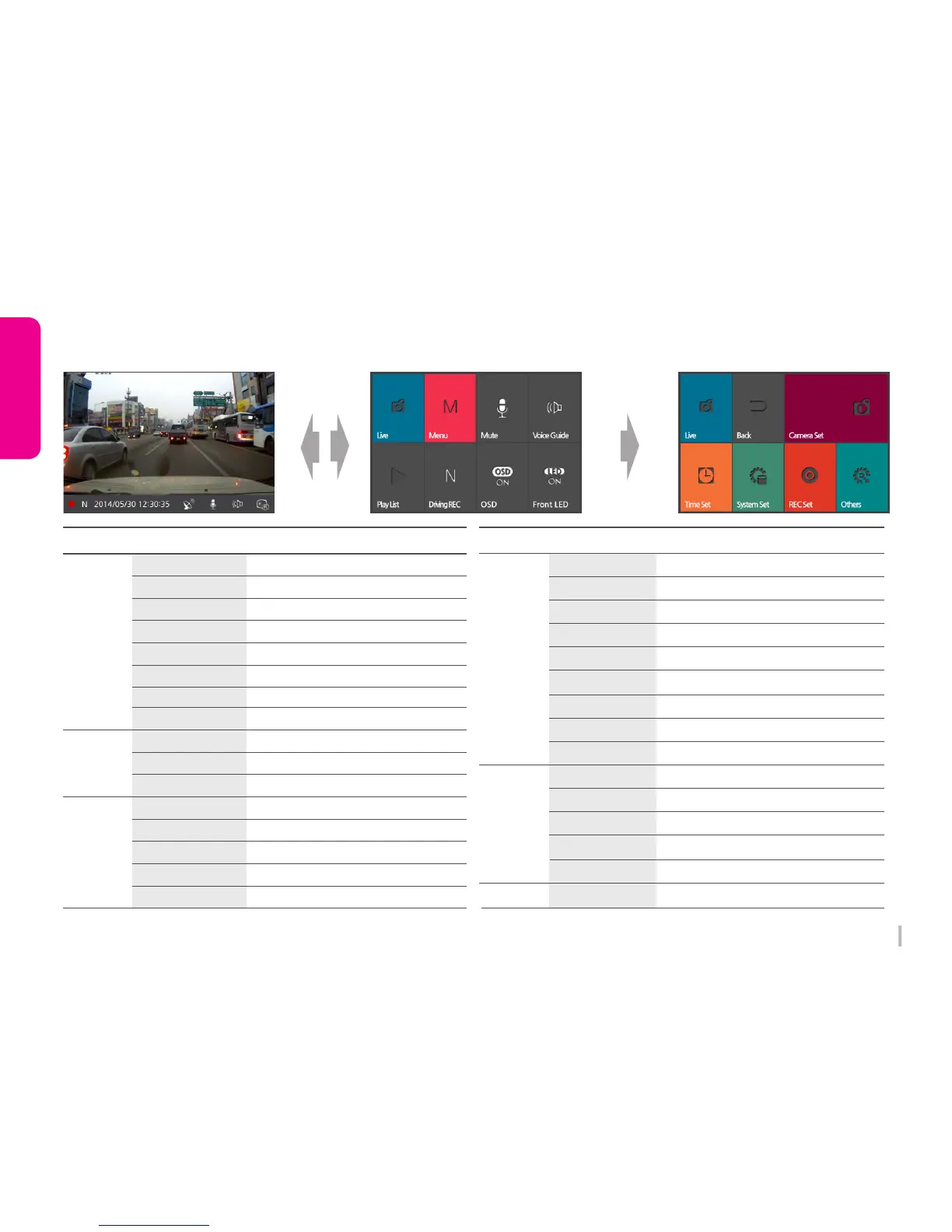
3-7. LCD Configuration
All configuration cab be set in LCD menu.
Driving/Event REC
Menu
Menu
Function
Function
Live
Live Image
Quick Menu
Time Set
System Set
Menu
Setting Menu
Mute
Voice REC ON/OFF
Voice Guide
Speaker ON/OFF
Time Set
Set Time on Winner
Play List
Driving/Parking REC
Playback List
N(Driving), P(Parking) REC
Standard Time Set
Set Standard Time
Summer Time
Set Summer Time
OSD
OSD On/Off
Cut Off Voltage
Set voltage for car constant power discharge
Front LED
LED On/Off
Auto LCD Off
Normally off after 30sec / on 60sec
TV-OUT
Set TV our format (OFF/NTSC)
High Temp Cutoff
Speaker Volume
Set High Temperature Cut off
Set Speaker Volume
REC Set
Others
REC CH
Memory Adjustment
Camera SetCamera Set
Set REC Mode
Adjust REC Folder Capacity Rate
Adjust Brightness, Contrast, Chroma on Camera
Set REC Channel
Front Video Quality Set Front Video Quality
Rear Video Quality Set Rear Video Quality
Drive REC Time Memory Capacity Saving
Mic Volume Set REC Volume
Shock Level(N) Set Shock Sensor Level (Driving)
Shock Level(P) Set Shock Sensor Level (Parking)
Motion Level Set Motion Sensor Level
System Info Display System Information
SD Card Format Format Micro SD Card
Touch Calibration Calibrate Touch Screen
Factory Init Initialize Configuration


 To Next Page