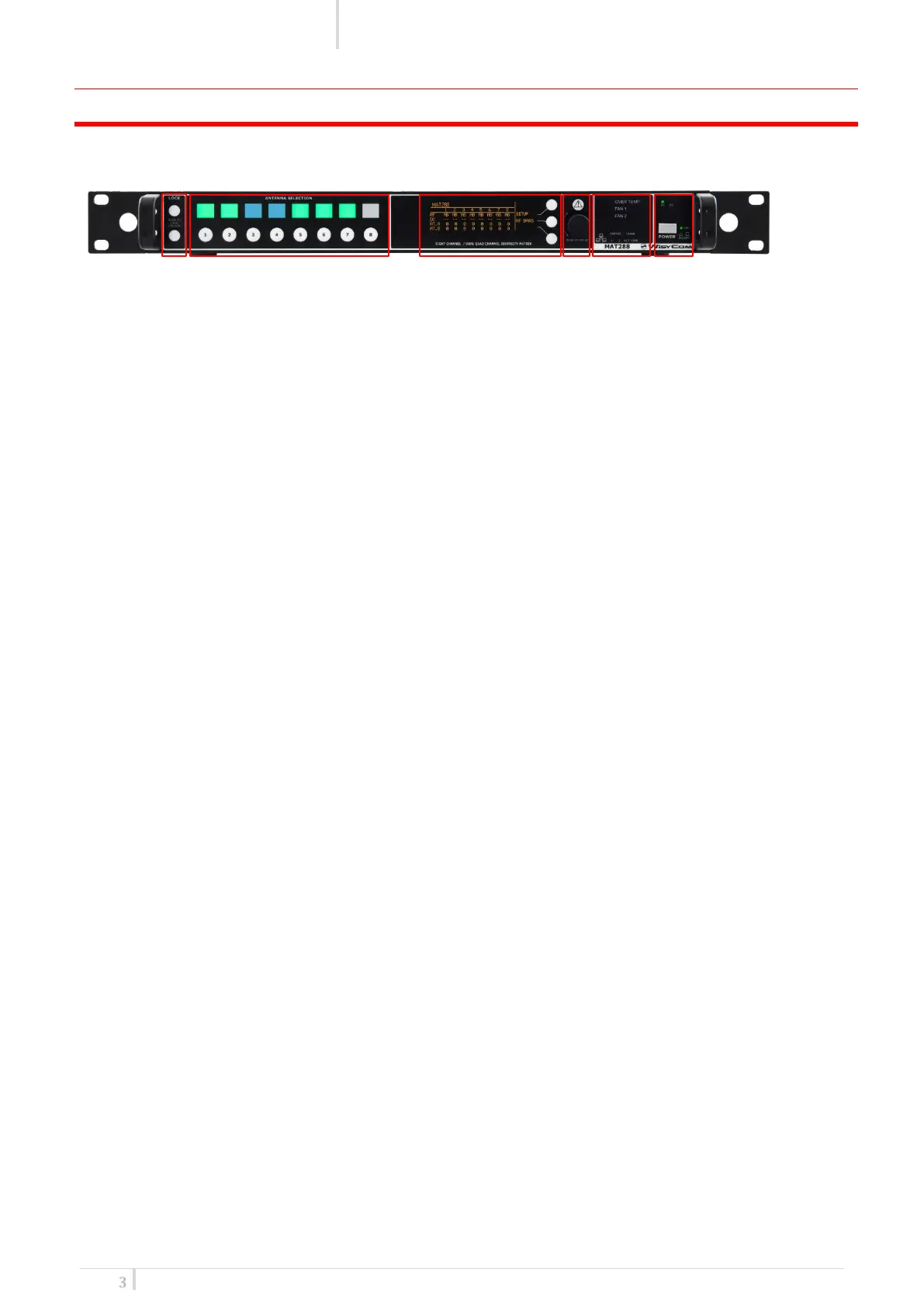
FRONT PANEL CONTROL AND FUNCTIONS
MAT244 allows an easy and quick configuration using buttons, push knobs and OLED display.
The front panel is functionally divided in the following section:
A – Lock/Unlock
To lock the MAT244 push the lock button in the front panel.
When the MAT is locked:
• the circle led upper the lock button is yellow lighted
• it is not possible to change any parameters on the status menu
• it is not possible to enable/disable the RF input with the square button
B – Input Channels status
Gives you details about the 8 input antennas divided between channel A and channel B.
Here you can check RF status, antenna DC power and antenna attenuation.
C - LCD display
64 x 254 yellow-lighted display. 3 push buttons (membrane). The function of each button (upper,
middle and lower) will be readable from the context menu on the display.
D – Rotary Knob/Alarm indicator
Push rotary knob. Rotate and push to select. Warning (YELLOW) and Alarm (RED) light indicator
E – Matrix Leds
Link led shows the status of the host connection, Act the traffic and STA1/STA2 are the Ethernet
interface’s led.
F – Power AC
ON/OFF square powering button turns on/off the Matrix. When in OFF position both phases are
disconnected from power.


 To Next Page