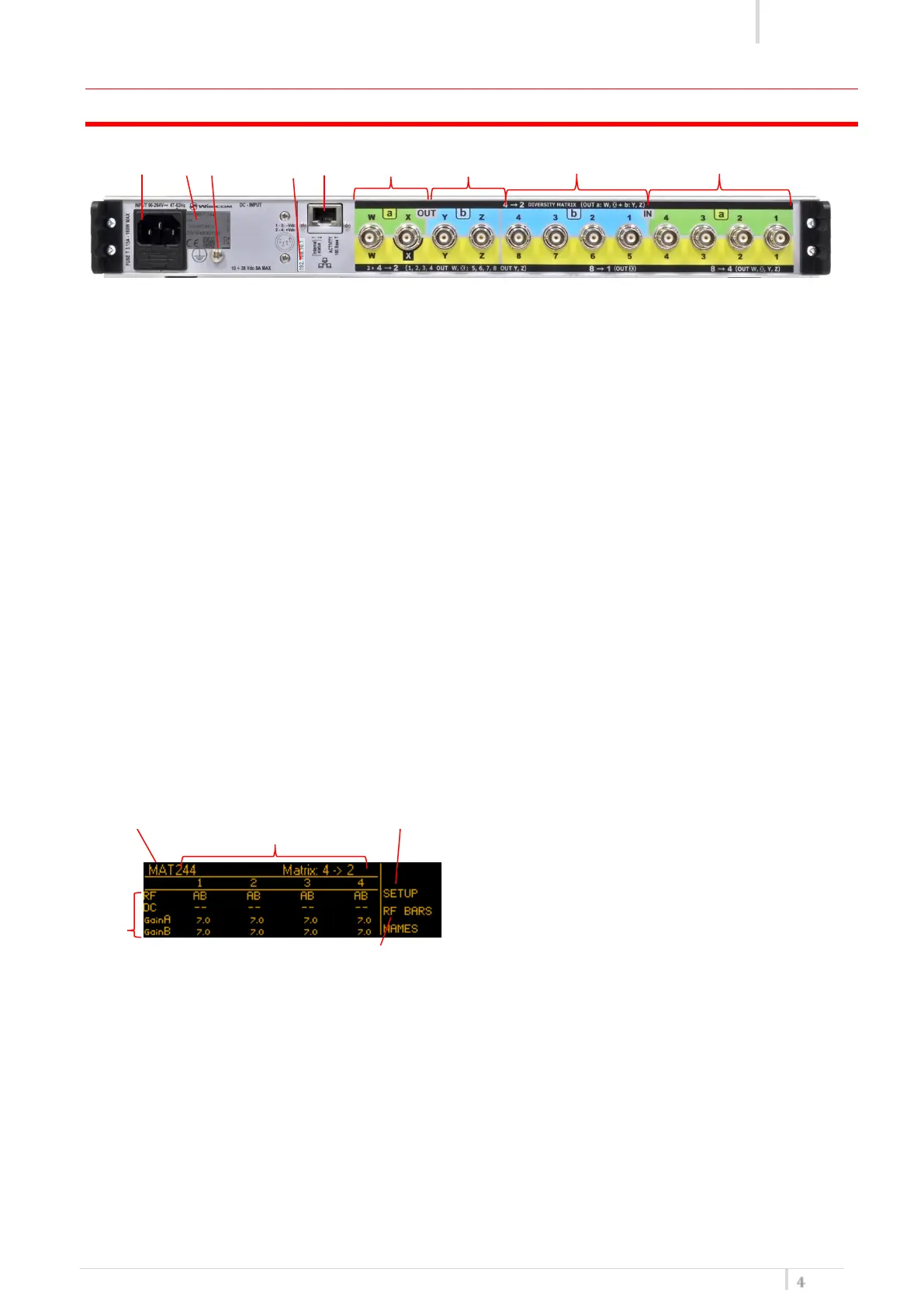
REAR PANEL
❶ ❷ ❸ ❹ ❺ ❻ ❼ ❽ ❾
❶ AC Power Plug AC mains power input, IEC Connector 90-264 Vac
❷ Product label with Serial Number, Options and Bandwidth
❸ Ground point To connect the rack to ground
❹ Label with IP address of Ethernet interface configured on the MAT244 (it can be modified
using the Manager application)
❺ Ethernet socket (RJ45) for connection to a network or computer
❻ Output W, X, channel A
❼ Output Y, Z channel B
❽ Input 1-4 channel A
❾ Input 1-4 channel B or 4-8
Status screen
After switch on, the matrix display the Status screen
❶ ❸ ❹
❷
❺
The main view has the following info:
❶ Device name
❷ main setting: RF, DC and attenuation parameters
❸ Channels 1-4 (diversity) or 1-8
❹ Setup menu (RF Matrix, antennas diagnosis, display brightness, info,…)
❺ RF bar menu to check the reception status of channels A and B


 To Next Page