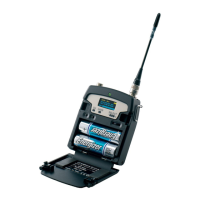
The MRK950 is a high performance microphone sys-
tem suitable for broadcast and high professional
application. Thanks to its exceptional selectivity and
intermodulation immunity, MRK950 is able to oper-
ate even in the presence of very high DVTB-T trans-
mitter’s signals.
The extreme bandwidth agility of 370 MHz al-
lows you to always nd & work on the best frequen-
cies available. MRK 950 is designed to be:
• “easy & quick to use” thanks to automatic setup
functions (i.e. frequencies, squelch), remote con-
guration utilities (USB/Ethernet), a display with
intuitive context menu navigation.
• “extremely exible”, with an incredible frequen-
cy agility of 330 MHz; more than one rack can be
connected together thru a simple USB cable to act
a multi-channel receiver. Moreover the DSP board
allows the units to work with several digital au-
dio outputs (i.e. AES/EBU, Ethersound, …), with
multi-companding compatibilities and other digital
features.
• “best in class performances”, thanks to the lat-
est Wisycom technology the unit has extreme RF
sensitivity and immunity and superb audio quality.
• “a durable & upgradable investment”, thanks
to the very robust design (aluminum housing) and
the possibility of upgrade/enhance units perfor-
mances with simple slot in card (pc-like thru the
DEXB expansion bus)
Moreover MRK 950 system is already set up for the
exclusive PTT function (remote command), devel-
oped and patented by Wisycom and now appreciated
in the broadcast world:
Simply pushing this button (PTT), the pre-
senter causes the remote switching of the
receiver’s output-line, from the “main line” to
the additional “intercom line”, in order to be
able to talk “off-air” directly with the technical
team. Then all PTT’s MICs can be connected
in pre-fading allowing a clever intercom
setup.
BRIEF DESCRIPTION . . . . . . . . . . . . . . . . . . . 3
Safety instruction . . . . . . . . . . . . . . . . . . . . . . . . 4
Main features . . . . . . . . . . . . . . . . . . . . . . . . . . 5
TECHNICAL DESCRIPTION . . . . . . . . . . . . . . . 5
USER GUIDE . . . . . . . . . . . . . . . . . . . . . . . . . . 7
Front panel functions . . . . . . . . . . . . . . . . . . . . . 7
SCAN & SQUELCH & INFRARED . . . . . . . . . . . . . 7
RECEIVER 1 and RECEIVER 2. . . . . . . . . . . . . . . 7
MONITOR . . . . . . . . . . . . . . . . . . . . . . . . . . . . 7
POWER & BOOSTER . . . . . . . . . . . . . . . . . . . . . 7
LCD display: Main view . . . . . . . . . . . . . . . . . . . 8
Menu tree . . . . . . . . . . . . . . . . . . . . . . . . . . . . . 8
Display view:
buttons logical & schematic diagram . . . . . . . . . 8
Radio menu . . . . . . . . . . . . . . . . . . . . . . . . . . . . 8
Chan-Group . . . . . . . . . . . . . . . . . . . . . . . . . . . 9
Gr. name . . . . . . . . . . . . . . . . . . . . . . . . . . . . . 9
Squelch . . . . . . . . . . . . . . . . . . . . . . . . . . . . . . 9
Walk test . . . . . . . . . . . . . . . . . . . . . . . . . . . . . 9
OPTIONS: . . . . . . . . . . . . . . . . . . . . . . . . . . . . 10
Name . . . . . . . . . . . . . . . . . . . . . . . . . . . . . . 10
LCD contr. & LCD light. . . . . . . . . . . . . . . . . . . 10
Info . . . . . . . . . . . . . . . . . . . . . . . . . . . . . . . 10
Restore preset . . . . . . . . . . . . . . . . . . . . . . . . 10
Audio menu . . . . . . . . . . . . . . . . . . . . . . . . . . 10
Tone sq. . . . . . . . . . . . . . . . . . . . . . . . . . . . . 10
Out level . . . . . . . . . . . . . . . . . . . . . . . . . . . . 11
Cal. tone . . . . . . . . . . . . . . . . . . . . . . . . . . . . 11
Sync . . . . . . . . . . . . . . . . . . . . . . . . . . . . . . . . 11
SQ (squelch autoset) . . . . . . . . . . . . . . . . . . . . 11
SCAN . . . . . . . . . . . . . . . . . . . . . . . . . . . . . . . 12
OPERATING INFORMATIONS . . . . . . . . . . . . . . . 13
RF Level led bars . . . . . . . . . . . . . . . . . . . . . . 13
Modulation led bar . . . . . . . . . . . . . . . . . . . . . 13
Battery indication . . . . . . . . . . . . . . . . . . . . . . 13
Rear panel . . . . . . . . . . . . . . . . . . . . . . . . . . . 14
RECEIVER CONNECTION . . . . . . . . . . . . . . . . . . 15
Antenna Connection . . . . . . . . . . . . . . . . . . . . 15
Analog audio connection . . . . . . . . . . . . . . . . . 15
Digital audio AES/EBU. . . . . . . . . . . . . . . . . . . 15
Digital audio Ethersound
©. . . . . . . . . . . . . . . . . .
Link Ethernet 10/100 Mbit/s . . . . . . . . . . . . . . . .
USB connection . . . . . . . . . . . . . . . . . . . . . . . . .
NETWORK CONNECTION . . . . . . . . . . . . . . . . . . . .
Digital audio Ethersound
© . . . . . . . . . . . . . .16
Link Ethernet 10/100 Mbit/s . . . . . . . . . . . . . . 16
USB connection . . . . . . . . . . . . . . . . . . . . . . . 16
NETWORK CONNECTION . . . . . . . . . . . . . . . . . . 16
Technical specification. . . . . . . . . . . . . . . . . . . . 17
Options specications: . . . . . . . . . . . . . . . . . . 18



 To Next Page