Pag. 8
MRK950 dual true diversity receiver
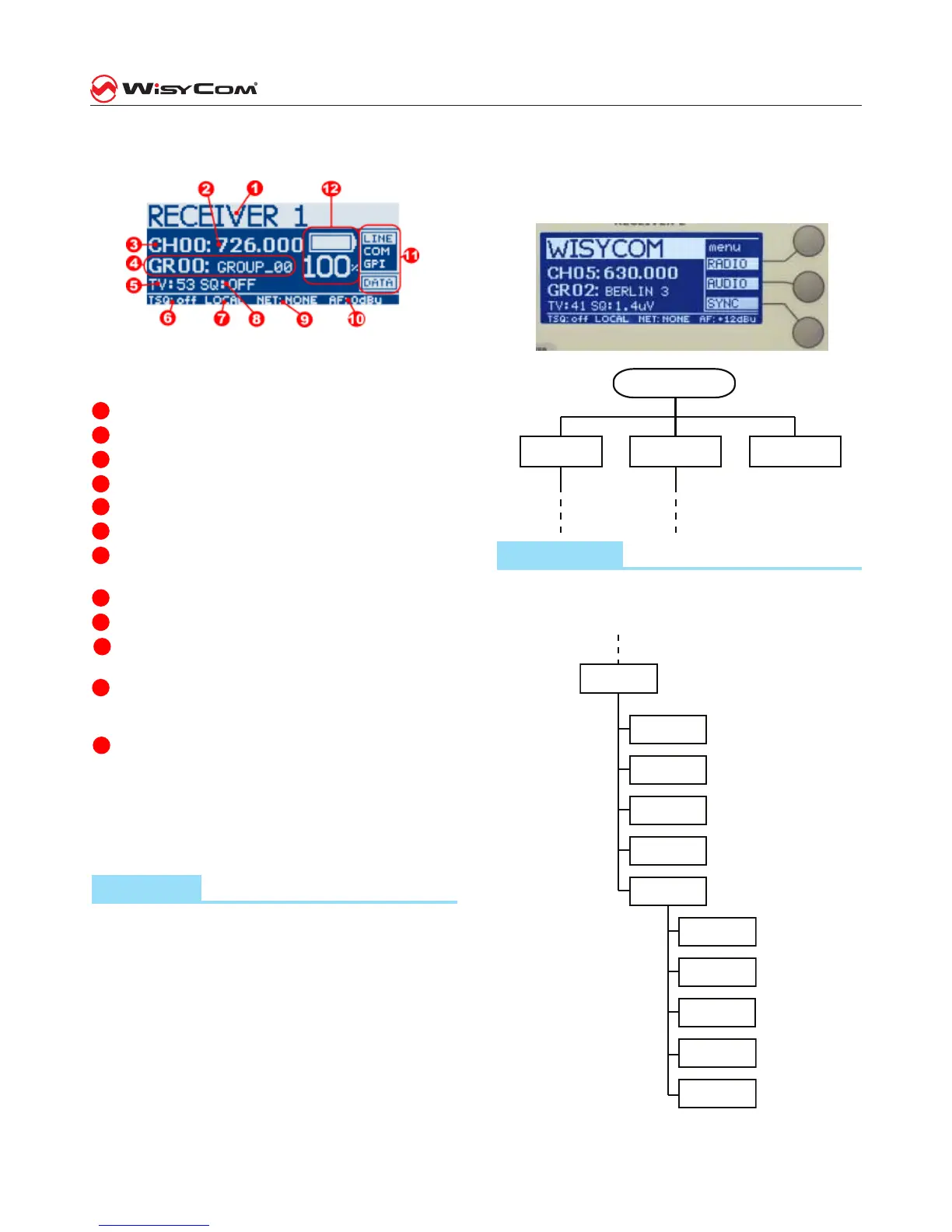
LCD display: Main view
All the basic information on the receiver status are
readable in the main view of the LCD display.
The main view has the following info:
1
receiver name,
2
current tuning frequency
3
current channel number
4
current group number and group name
5
TV channel used for the current frequency
6
Tone Squelch current setup
7
LOCAL or REMOTE receiver management, via
USB or Ethernet connection
8
Squelch level (microVolt)
9
NET connection to a host PC (USB or Ethernet)
10
Analog audio output level at nominal FM devia-
tion
11
status of the output lines (audio line, audio com,
gpi) and detection of the digital data carrier (i.e.
transmitter battery data carrier or tone squelch),
12
transmitter battery charge status.
Thru the main menu on the LCD display and the LED
bars for the RF level and modulation the user has
the complete monitoring in real time of the wireless
channel in use.
Menu tree
To access the conguration menu of the receiver
is necessary to press the rotary knob (at the right
of the display). This allows you to access the main
menu.
Pressing rt the rotary know shows a hidden window
(area 11 the image of the main view) with three
main headings: “RADIO”, “AUDIO”, “SYNC“.
To activate one of the items in the menu, press the
corresponding button to the right of the display (see
picture hereafter).
Press the knob
SYNCRADIO
AUDIO
Radio menu
The rst item on the menu tree is “RADIO”. Pressing
the upper button (RADIO), you go at the RF func-
tions menu of the receiver, as shown below:
RADIO
Chan-Group
Gr. name
Squelch
Walk test
Options
Name
LCD contr.
LCD light
Info
Restore
preset
Display view:
buttons logical & schematic diagram



 To Next Page