
 Need help?
Do you have a question about the Wittime WT4080 and is the answer not in the manual?
Device usage by children over 8 and individuals with reduced abilities, with supervision requirements.
Keeping the device away from children under 8 and ensuring they do not play with it.
Prohibition of immersion in liquids due to electric shock hazard.
Steps for removing the device from packaging and verifying contents.
List of items provided in the delivery package.
Lists main functionalities like atomic time, time zones, date, temperature, and humidity.
Visual identification of clock parts and operating elements.
Explains the specific actions performed by each operating button.
Instructions for the initial setup process before first use.
Process and conditions for the clock to receive accurate time signals.
How to select the correct geographical time zone for accurate time display.
Step-by-step guide to manually set time, date, and other parameters.
Guidance on selecting a suitable and safe place for the clock.
Interpretation of all symbols and information shown on the clock display.
How the clock automatically adjusts for daylight saving time.
Recognition and management of the low battery warning.
Key technical details like model, power, and measurement ranges.
Regulatory information regarding radio frequency emissions and interference.
Important notes on product changes and operational responsibilities.
This document provides operating instructions for the Wittime Digital Wall Clock, model WT4080.
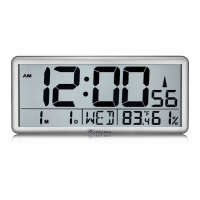
The Wittime Digital Wall Clock is designed to provide accurate time, date, and environmental information. Its primary function is to display the exact time, thanks to its ability to receive an atomic time signal (WWVB). It offers a 12- or 24-hour display format and supports four time zones: Pacific Standard Time (PST), Mountain Standard Time (MST), Central Standard Time (CST), and Eastern Standard Time (EST). Beyond time, the clock displays the current date and day of the week. It also features a temperature display, switchable between Celsius (°C) and Fahrenheit (°F), and a humidity display. The clock includes a DST (Daylight Saving Time) function, which automatically adjusts for summer and winter time changes if enabled. A low battery indicator is also present to alert users when batteries need replacement.
Initial Setup: To set up the clock, first open the battery compartment cover and insert 4 LR6 (AA) / 1.5 V batteries, ensuring correct polarity (+/-). Then, replace the battery compartment cover. It is crucial not to press any buttons while switching the device on during initial setup.
Atomic Signal Reception: Upon battery insertion, the clock automatically begins searching for the WWVB atomic time signal. If the signal is received with sufficient strength, the date and time will be displayed. The atomic time signal icon will flash during searching and become solid once connected. The clock searches for the atomic signal daily at 1:00 AM, 2:00 AM, 3:00 AM, 4:00 AM, and 5:00 AM. If no WWVB reception occurs, it will search every hour until the signal is received. Users can manually initiate a search for the WWVB time signal by pressing and releasing the "SET/RCC" button from the normal time display. Signal reception is generally better at night and in clear weather. The atomic signal may take a few hours to synchronize, so manual time and date setting after powering on is recommended.
Setting the Time Zone: The time zone can be selected by pressing the "SET/RCC" button. The default time zone is PST. Users can choose between PST Pacific, MST Mountain, CST Central, and EST Eastern.
Manual Time and Date Setting: To manually set the time and date, press and hold the "SET/RCC" button until the DST display flashes. Use the "UP" and "DOWN" buttons to set DST ON/OFF. Press "SET/RCC" to store the setting, and the year will flash. Use "UP" and "DOWN" to set the year, then press "SET/RCC" to store. Continue this process for setting the month, day, hours, minutes, and RCC ON/OFF (time signal reception ON/OFF). Each value is adjusted with the "UP" and "DOWN" buttons and stored with the "SET/RCC" button.
Display Features: The display shows the hour format (12- or 24-hour), hour, minute, second, month, day, and day of the week. It also indicates the low battery status, radio signal reception, and DST status. The temperature is displayed in °C or °F, and humidity is shown as a percentage.
DST Function: If DST is set to ON, the clock automatically adjusts for summer and winter time. For summer time, on the second Sunday of March at 1:59:59 AM, the time changes to 3:00:00 AM. For winter time, on the first Sunday of November at 1:59:59 AM, the time changes to 1:00:00 AM. Users can manually set DST to ON or OFF during the DST period, and the time will adjust accordingly. The "S" symbol appears when DST is ON (during summer time) and disappears when DST is OFF (during winter time).
Placement: The device should be protected from dust, shocks, extreme temperatures, and direct sunlight. It must be placed in a dry, enclosed space to protect it from moisture. When installing on a wall, ensure no electrical cables, gas, or water pipes are present at the installation site to avoid electric shock. The clock has a loop for hanging and a fold-out stand for versatile placement.
Battery Replacement: When the low battery symbol appears on the display, the batteries need to be replaced. All settings will be lost upon battery change. Always exchange all batteries simultaneously and use only LR6 (AA) / 1.5 V batteries. Ensure correct polarity (+/-) when inserting new batteries. Clean the battery and device contacts if necessary before insertion. Dispose of old batteries in an environmentally friendly manner.
Cleaning: The manual does not explicitly detail cleaning instructions but implies general care by stating that cleaning and user maintenance should not be carried out by children unless supervised.
Safety Information: The device can be used by children over 8 years old and persons with reduced physical, sensory, or mental abilities, or lack of experience/knowledge, if supervised or instructed on safe use and understanding of hazards. Keep the device away from children under 8. Children must be supervised to prevent them from playing with the device. The device must not be immersed in water or other liquids, and should not be used in wet areas like sinks, due to electric shock hazard.
FCC Statement: The device complies with Part 15 of the FCC Rules, meaning it will not cause harmful interference and must accept any received interference. Users are warned that changes or modifications not expressly approved by the responsible party could void their authority to operate the equipment. The device has been tested and found to comply with Class B digital device limits, designed to provide reasonable protection against harmful interference in a residential installation. If interference occurs, users are advised to reorient/relocate the receiving antenna, increase separation between equipment and receiver, connect the equipment to a different circuit, or consult a dealer/experienced radio/TV technician.
Disclaimers: The manufacturer reserves the right to change product specifications. The manufacturer and supplier are not responsible for malfunctions caused by interference.

 To Next Page
 General