EasyManua.ls Logo

Wolck 1GE+1FE+WiFi+CATV - User Manual

Default Icon
10 pages
Print Icon
To Next Page IconTo Next Page
Loading...
Chapter1: Overview
1.1 Product Description
1GE+1FE+WiFi+CATV dual mode ONU meets telecom operators FTTO (office), FTTD(Desk),
FTTH(Home) broadband speed, SOHO broadband access, video surveillance and other
requirements and design an GPON/GEPON Gigabit Ethernet products. It is based on mature
GPON and Gigabit EPON technology, and has high ratio of performance to price, stable,
cost-effective, high reliability, easy management, configuration flexibility and good quality of service
(QoS) guarantees. It is fully compliant with GPON and EPON technical regulations such as ITU-T
G.984.x, IEEE802.3ah and technical requirement of EPON Equipment from China Telecom. Dual
mode ONU can detect and exchange PON mode automatically.
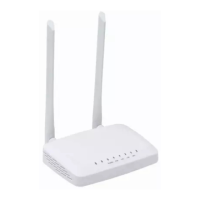
Figure 1 1GE+1FE+WiFi+CATV Dual Mode ONU
Question and Answer IconNeed help?

Do you have a question about the Wolck 1GE+1FE+WiFi+CATV and is the answer not in the manual?

Summary

Chapter 1: Overview

Product Description

Detailed description of the dual-mode ONU, its features, and compliance.

Application Chart

Illustrates the application diagram and network connectivity of the ONU.

Technical Parameters

Lists detailed technical specifications for the 1GE+1FE+WiFi+CATV ONU.

Equipment List

Lists the contents and quantities included in the ONU package.

Certification Card

Shows a certification card with inspection details.

Chapter 2: Installation

Installation Requirements

Precautions and environmental requirements for safe and proper ONU installation.

Panel Lights

Explains the meaning of various LED indicators on the ONU panel.

LAN Port Connection Definition

Defines the connection pinouts for FE and GE LAN ports.

Chapter 3: Web Management

Default Configuration and IP

Default username 'admin', password 'admin', and LAN IP address 192.168.1.1.

Device Information and Status

Displays current device status, system settings, and LAN configuration.

GPON Network Settings

Page for configuring GPON network access parameters like LOID and Serial Number.

WAN Connection Settings

Configures ONU WAN parameters including mode, VLAN, and IP address.

System Management (Backup, Restore, Upgrade)

Manages device firmware, backups, restores, and resets.

Chapter 4: Troubleshooting

Power and Indicator Light Issues

Solves issues related to power connection and indicator light status.

Device Operation and Overheating

Addresses device stops working issues, checking voltage and ventilation.

Fiber and PON Connection Issues

Troubleshoots LOS and PON LED flashing, indicating fiber or connection problems.

Overview

This document describes the WOLCK 1GE+1FE+WiFi+CATV Dual Mode ONU, a versatile Gigabit Ethernet product designed for broadband access in various settings, including offices (FTTO), desks (FTTD), and homes (FTTH), as well as SOHO broadband access and video surveillance applications. It leverages mature GPON and Gigabit EPON technology to offer a high performance-to-price ratio, stability, cost-effectiveness, high reliability, easy management, flexible configuration, and robust Quality of Service (QoS) guarantees. The device is fully compliant with GPON and EPON technical regulations, specifically ITU-T G.984.x, IEEE802.3ah, and the technical requirements for EPON Equipment from China Telecom. A key feature is its dual-mode capability, allowing it to automatically detect and switch between PON modes.

Function Description

The ONU serves as a gateway for broadband internet access, integrating multiple functionalities into a single device. It provides:

  • Broadband Connectivity: Supports both GPON and EPON technologies for high-speed internet.
  • Ethernet Ports: Includes one Gigabit Ethernet (1GE) port and one Fast Ethernet (1FE) port for wired connections.
  • Wireless Connectivity: Features integrated Wi-Fi for wireless network access.
  • CATV Services: Offers Cable TV (CATV) services, making it a comprehensive solution for triple-play (internet, voice, video) services.
  • Automatic Mode Detection: Automatically detects and switches between GPON and EPON modes, simplifying deployment and ensuring compatibility with different network infrastructures.
  • Web Management: Provides a simple web-based interface for managing device information, WAN connection settings, LAN management IP address, LOID, password, configuration file backup/restore, and firmware upgrades.

Important Technical Specifications

The WOLCK 1GE+1FE+WiFi+CATV Dual Mode ONU boasts a range of specifications designed for optimal performance and reliability:

General:

  • Model: 1GE+1FE+WiFi+CATV Dual Mode ONU
  • Dimensions: 185mm × 120mm × 34mm (L×W×H)
  • Net Weight: 0.3Kg
  • Power Supply: DC 12V/1A
  • Power Consumption: ≤7W

Optical Interface:

  • Connector Type: 1 WDM, SC/APC connector or 1 PON SC/UPC+CATV SC/APC connector (single/double fiber).
  • GPON Speeds: Uplink 1.25Gbps, Downlink 2.5Gbps.
  • EPON Speeds: Symmetric 1.25Gbps.
  • Wavelengths: PON Tx1310nm, Rx 1490nm; CATV 1550nm.

LAN Interface:

  • Ethernet Ports: 1x 10/100/1000Mbps Auto-negotiation Ethernet interface (GE) and 1x 10/100Mbps Auto-negotiation Ethernet interface (FE).

Wireless (Wi-Fi):

  • Standard: Compliant with IEEE802.11b/g/n.
  • Speed: 300Mbps.
  • Antenna: 2T2R (2 Transmit, 2 Receive), 2 external antennas.

CATV:

  • Type: SCTE type F.

LED Indicators:

  • Total LEDs: 7 indicators for POWER, LOS, PON, LAN, WiFi, CATV status.

Environmental Conditions:

  • Operating Temperature: -5℃ to 55℃
  • Operating Humidity: 10% to 90% (non-condensing)
  • Storing Temperature: -30℃ to 60℃
  • Storing Humidity: 10% to 90% (non-condensing)

Usage Features

The ONU is designed for ease of use and flexible deployment:

  • Desktop Installation: Can be simply placed on a clean, smooth workbench, ensuring sufficient space for heat dissipation and avoiding placing objects on top of the device.
  • Wall Mounting: Features two cruciform recesses on the chassis for easy wall mounting using screws. The device gently snaps into the recesses and hangs securely.
  • Web-Based Management: Accessible via a web browser using the default IP address 192.168.1.1/24. The default login credentials are username "admin" and password "admin".
  • Comprehensive Status Monitoring: The "Status" menu in the web interface displays current device information, including LAN, WAN, and PON details, CPU usage, memory usage, and firmware version.
  • PON Settings Configuration: Allows configuration of LOID, LOID password, PLOAM password, Serial Number (SN), and OMCI OLT Mode for GPON, as well as LLID MAC mapping for EPON.
  • WAN Configuration: Enables setting up ONU WAN parameters, including WAN mode, VLAN, IP address, NAPT, Admin Status, Connection Type, and IGMP-Proxy. Port mapping for LAN and WLAN interfaces is also configurable.
  • Backup and Restore: Users can back up the device configuration to a file and restore it from a previously saved file.
  • Factory Reset: Option to reset the device to its factory default settings.
  • Firmware Upgrade: Supports firmware upgrades through the web interface to ensure the device runs the latest software version.

Maintenance Features

Maintaining the WOLCK ONU is straightforward, with clear guidelines for installation and troubleshooting:

Installation Requirements:

  • Environmental Protection: Avoid placing the device near water or in damp places to prevent moisture ingress. Ensure it is placed on a stable surface to prevent falling.
  • Power Supply: Verify that the supply voltage matches the device's requirements.
  • Chassis Integrity: Do not open the equipment chassis without permission.
  • Cleaning: Unplug the power plug before cleaning; avoid using liquid cleaners.
  • Cooling: Ensure sufficient space around the ONU for proper heat dissipation.
  • Operating Conditions: Maintain an operating temperature between -5℃ and 55℃ and humidity between 10% and 90%.
  • Electromagnetic Environment: Avoid placing the device near radio transmitters, radar stations, or high-frequency interference from power equipment to prevent electromagnetic interference.
  • Cable Alignment: Indoor cable alignment may be required if outdoor lightning protection measures are in place.

Troubleshooting (LED Indicators): The device provides LED indicators to help diagnose common issues:

  • POWER LED:

    • On: Device is powered up.
    • Off: Device is powered down.
    • Troubleshooting: If off, check power cable connection and ensure power supply is on.
  • LOS (Optical Signal Loss) LED:

    • Blink: Device does not receive optical signals.
    • Off: Device has received optical signal.
    • Troubleshooting: If blinking, inspect fiber connection, ensure correct connector usage, and check optical power. Contact operator if issues persist (fiber failure, central office equipment failure).
  • REG (Registration) LED:

    • On: Device is registered to the PON system.
    • Off: Device is not registered to the PON system.
    • Blink: Device registration is incorrect.
    • Troubleshooting: If off or blinking, inspect fiber connection and contact operator (central office equipment failure).
  • LINK/ACT (LAN Interface) LED:

    • On: Port is connected properly (LINK).
    • Off: Port connection exception or not connected.
    • Blink: Port is sending or/and receiving data (ACT).
    • Troubleshooting: If off, check network cable for damage or loose connection, verify cable type, and ensure line length is within allowable range. Replace cable if necessary.
  • WiFi LED:

    • On: WiFi is working.
    • Off: WiFi is not working.
  • CATV LED:

    • On: CATV is working.
    • Off/Blink: CATV signal is abnormal.
    • Troubleshooting: If off or blinking, inspect fiber optic connector for looseness or dust. Contact operator if issues persist (central office equipment failure).

General Troubleshooting:

  • Device Stops Working: Check if the power supply is working correctly and if the equipment is overheating. Ensure proper ventilation.
  • PON LED Flashes: Inspect fiber optic connector for looseness or dust. Clean with an alcohol-swabbed cotton ball if necessary. Contact operator if issues persist.

This comprehensive set of features and guidelines ensures that the WOLCK 1GE+1FE+WiFi+CATV Dual Mode ONU is a reliable and manageable solution for various broadband access needs.

Wolck 1GE+1FE+WiFi+CATV Specifications

General IconGeneral
BrandWolck
Model1GE+1FE+WiFi+CATV
CategoryWireless Router
LanguageEnglish

Related product manuals