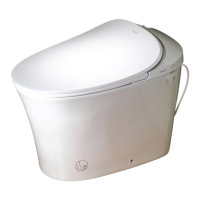
This document is a user manual for the WOODBRIDGE LT610 remote control, which operates a smart toilet. The manual provides detailed instructions for installation, usage, and various functions of the remote control and the toilet.
Function Description
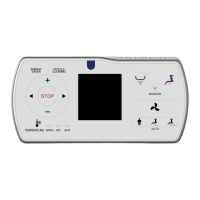
The WOODBRIDGE LT610 remote control is designed to provide comprehensive control over a smart toilet, offering a range of features for personal hygiene, comfort, and convenience. Key functions include:
- Rear/Front Cleaning: Initiates washing functions for personal hygiene. The remote allows for both stationary and moving cleaning (nozzle moves forward and backward to expand the cleaning area).
- Drying/Dryer Temperature Adjustment: Activates the drying function and allows users to adjust the air temperature across 5 levels (0-5 grade, with 0 being normal temperature).
- Water Volume Adjustment: Controls the intensity of the water spray during cleaning, offering 3 levels of adjustment.
- Spray Nozzle Position Adjustment: Allows users to fine-tune the nozzle's position across 5 levels for optimal cleaning.
- Energy Saver Mode: Activates an energy-saving mode where the seat temperature is lowered to level 1. This mode is temporarily suspended if the seat is occupied and resumes after the user leaves.
- Water Temperature Adjustment: Adjusts the water temperature for cleaning across 5 levels (0-5 grade, with 0 being normal temperature).
- Seat Temperature Adjustment: Controls the seat temperature across 5 levels (0-5 grade, with 0 being normal temperature).
- Night Light: Turns the toilet's night light on or off. It also features a "Smart mode" where the light activates based on ambient light levels.
- Full Flush/Half Flush: Initiates either a full or half flush of the toilet.
- Auto Flush Function: When enabled, the toilet automatically flushes after detecting the user leaving the seat.
- Lid/Seat Open/Close: Remotely opens or closes the toilet lid and seat. An auto lid open/close function can also be enabled.
- Deodorant Set: Activates an auto deodorization function that starts when the user is seated and stops when they leave. This function is paused if warm air drying is in progress.
- Pulse Flushing Function: (Applicable to products with pulse cleaning mode) Allows users to turn on/off pulse cleaning during front/rear cleaning.
- Sterilization Function: (Applicable to products with sterilization function) Activates plasma sterilization for 2 hours. This function automatically stops if any other button is pressed or the seat is occupied.
- Automatic Pre-wetting Function: (Applicable to toilets with automatic pre-wetting function) When enabled, the toilet performs a pre-wetting function when the user is detected to be seated.
- Foot Sense Switch: (Applicable to products with foot sense function) Turns the foot sense function on or off. This function is invalid when the seat is occupied.
- Quiet Mode: Activates a quiet operation mode for the toilet.
Important Technical Specifications
While specific technical specifications like power consumption or water pressure are not explicitly detailed in this remote control manual, the document implies certain operational parameters:
- Remote Control Battery: Requires batteries for operation (installation instructions provided).
- Installation: The remote control hanger can be installed by drilling a 6 mm hole (35 mm deep) or by using double-sided adhesive.
- Temperature Adjustment: Water, dryer, and seat temperatures are adjustable across 5 levels (0-5 grade).
- Water Volume Adjustment: Offers 3 levels of water volume adjustment.
- Nozzle Position Adjustment: Provides 5 levels of nozzle position adjustment.
- Communication: Operates via radio frequency (RF) for remote control, requiring a matching process between the remote and the toilet.
Usage Features
The WOODBRIDGE LT610 remote control is designed for intuitive and convenient use:
- Indicator Lights: Various functions are accompanied by indicator lights on the remote, showing current settings (e.g., water temperature level, dryer temperature range).
- User Feedback: The toilet provides audible feedback ("BEEP") when a button press is successfully received.
- Safety Features:
- The toilet's cleaning and drying functions only operate when the user is seated ("CLICK" sound indicates activation).
- Users are advised to sit backward on the seat to ensure proper cleansing position and prevent splashing.
- The nozzle continues to spray for 1-2 seconds after the user stands up during spray operation; users should press "STOP" before standing.
- The manual warns against installing the product in wet places or where it can be drenched.
- Memory Function (Implied): The energy-saving mode restores previous seat temperature settings after being suspended.
- Manual Override: In case of power cut during nozzle spray, the nozzle can be gently pushed back by hand.
Maintenance Features
The manual provides limited direct maintenance instructions for the remote control itself, primarily focusing on battery installation. However, it offers insights into the toilet's operational maintenance:
- Nozzle Cleaning (Implied): The ability to adjust nozzle position suggests the importance of maintaining nozzle cleanliness, though specific cleaning instructions are not in this document.
- Troubleshooting (Remote Control): If the buzzer doesn't sound after a button press, users are advised to adjust the remote control direction and repress the button, indicating potential signal issues.
- Remote Control Matching: Instructions are provided for matching the remote control with the toilet, which might be necessary after battery changes or power interruptions. This involves unplugging the toilet, pressing specific buttons on the remote, plugging the toilet back in, and pressing a "reset" button.
Overall, the WOODBRIDGE LT610 remote control aims to enhance the user experience of a smart toilet by centralizing control over its advanced features, emphasizing comfort, hygiene, and energy efficiency.

 Need help?
 General


 To Next Page
