EasyManua.ls Logo

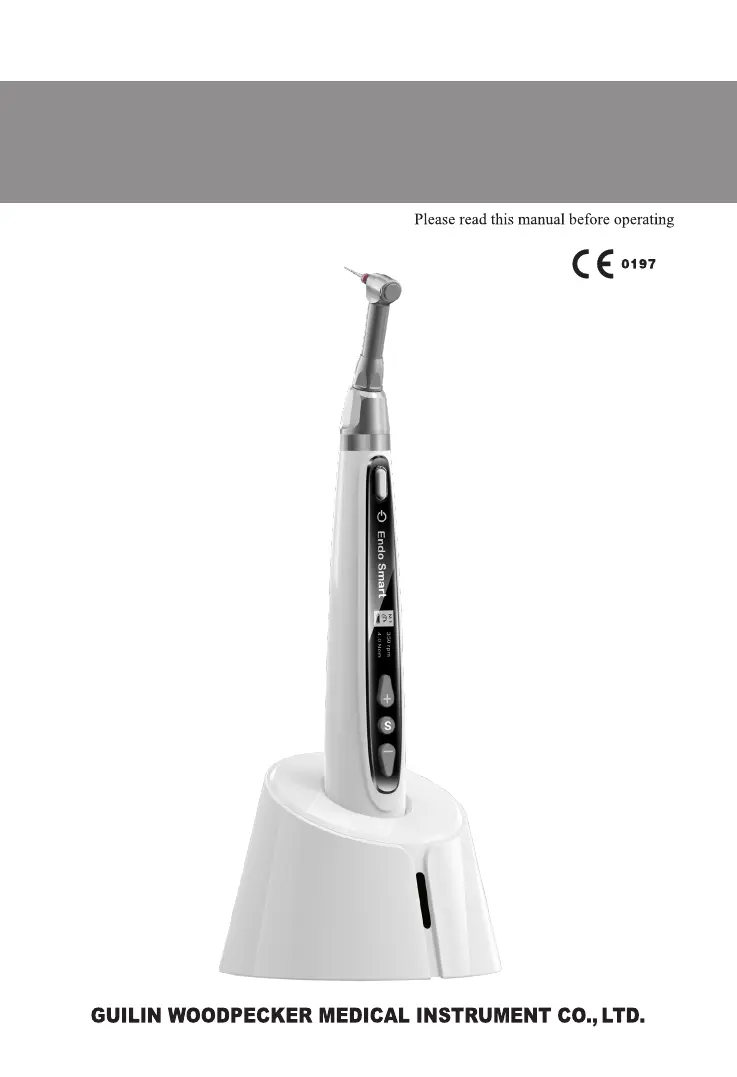
Woodpecker Endo Smart - User Manual

Woodpecker Endo Smart
28 pages
Print Icon
To Next Page IconTo Next Page
Loading...
Endo Smart Endo Motor
INSTRUCTION MANUAL

Questions and Answers

Summary

Product Introduction

1.1 Product Description

Describes the Endo Smart's use in endodontic treatment and its key features like torque control.

1.2 Model and Specification

Details the Endo Smart model name and refers to the packing list for device configurations.

1.3 Scope of Application

Specifies that the device is for root canal molding/cleaning by qualified dentists in clinics.

1.4 Performance and Composition

Lists the components of the Endo Smart device, including base, handpiece, contra-angle, and power adapter.

1.5 Contraindication

Warns patients with pacemakers or other electrical implants against using the device.

1.6 Warnings

Provides crucial safety warnings and precautions for operating the Endo Smart device.

1.7 Device Safety Classification

Details the safety classifications for electrical shock, water ingress, and flammable environments.

1.8 Primary Technical Specifications

Outlines the technical specifications, including battery, power adapter, torque, and speed.

1.9 Environment Parameters

Specifies the recommended operating temperature, humidity, and atmospheric pressure for the device.

Installation

2.1 Basic Accessories of Product

Illustrates and lists the essential accessories included with the Endo Smart device.

2.2 Instructions for Contra-angle

Provides instructions for cleaning, lubricating, sterilizing, and the service life of the contra-angle.

2.3 Installation and Removal of Contra-angle

Details the procedure for attaching and detaching the contra-angle to the handpiece.

2.4 Installation and Removal of File

Explains how to insert and remove the endodontic file from the contra-angle.

Function and Operation of Product

3.1 Schematic Drawing of Handpiece

Presents a diagram identifying the key parts of the Endo Smart handpiece.

3.2 OLED Display

Describes the information shown on the device's OLED screen during operation.

Operation Instruction

4.1 Starting and Stopping

Guides on how to turn the handpiece on, off, and switch between standby and operating modes.

4.2 Speed, Torque, and Operation Mode Setting

Explains how to adjust speed, torque, and select operation modes like Continuous Rotation or Reciprocating.

4.3 Customized Program Handover Setting

Describes how to switch between the 9 user-defined programs.

4.4 Contra-angle Calibration Setting

Details the calibration process required after replacing or attaching a contra-angle.

4.5 Power-off

Explains the different methods for shutting down the Endo Smart handpiece.

4.6 Standby and Operating State Interfaces

Illustrates the display interfaces for continuous rotation, reverse rotation, and reciprocating modes.

Automatic Reverse Function

Explains the automatic reverse feature that activates when torque limits are exceeded.

4.7 Battery Charging

Provides instructions on how to charge the handpiece's rechargeable lithium battery via wireless charging.

4.8 Replacing Battery

Details the step-by-step process for replacing the handpiece's internal lithium battery.

4.9 Lubricating the Contra-angle

Guides on the correct procedure for lubricating the contra-angle using the specific oil lubricator.

Troubleshooting

Continuous Beep Sounds

Addresses the issue of continuous beep sounds, often related to reverse rotation mode.

Contra-angle Calibration Failure

Explains causes and solutions for contra-angle calibration errors, often due to resistance.

Handpiece Heating

Discusses normal heating during charging and overheating during prolonged reciprocating use.

Charging Indicator Issues

Troubleshoots cases where the wireless charging indicator does not light up.

Reduced Endurance After Charging

Addresses issues where the battery life becomes shorter after charging, suggesting contact with support.

File Stuck in Root Canal

Provides solutions for when the rotating file gets stuck, involving mode changes and torque settings.

Cleaning and Sterilization

6.1 Foreword

Emphasizes the importance of cleaning and sterilizing the contra-angle for hygiene and safety.

6.2 General Recommendations

Lists general guidelines for cleaning, including approved detergents and personal protective equipment.

6.3 Step-by-Step Procedure

Details the step-by-step process for preparing, cleaning, inspecting, and packaging the contra-angle.

Contra-angle Preparation and Manual Cleaning

Covers preparation and manual cleaning steps for the contra-angle.

Automated Cleaning, Inspection, and Packaging

Details automated cleaning, inspection, and packaging of the contra-angle.

Contra-angle Sterilization and Storage

Explains the steam sterilization process and proper storage conditions for the contra-angle.

Storage, Maintenance, and Transportation

7.1 Storage

Specifies the recommended storage conditions, including humidity, temperature, and avoiding extreme temperatures.

7.2 Maintenance

Provides guidance on device maintenance, including repair, dry storage, and calibration recommendations.

7.3 Transportation

Outlines precautions for transporting the equipment, avoiding impact, shake, and dangerous goods.

Environmental Protection

After Service

Symbol Instruction

European Authorized Representative

Statement

EMC - Declaration of Conformity

Technical Description Concerning Electromagnetic Emission

Details the device's electromagnetic emissions and compliance with standards like CISPR 11.

Technical Description Concerning Electromagnetic Immunity

Covers the device's immunity to electromagnetic interference as per IEC 61000 standards.

Woodpecker Endo Smart Specifications

General IconGeneral
TypeEndodontic motor
DisplayOLED
Automatic ReverseYes
Apex Locator IntegrationYes
Auto-Reverse FunctionYes
Speed Range100 rpm - 1, 200 rpm
BatteryLithium-ion

Related product manuals