EasyManua.ls Logo

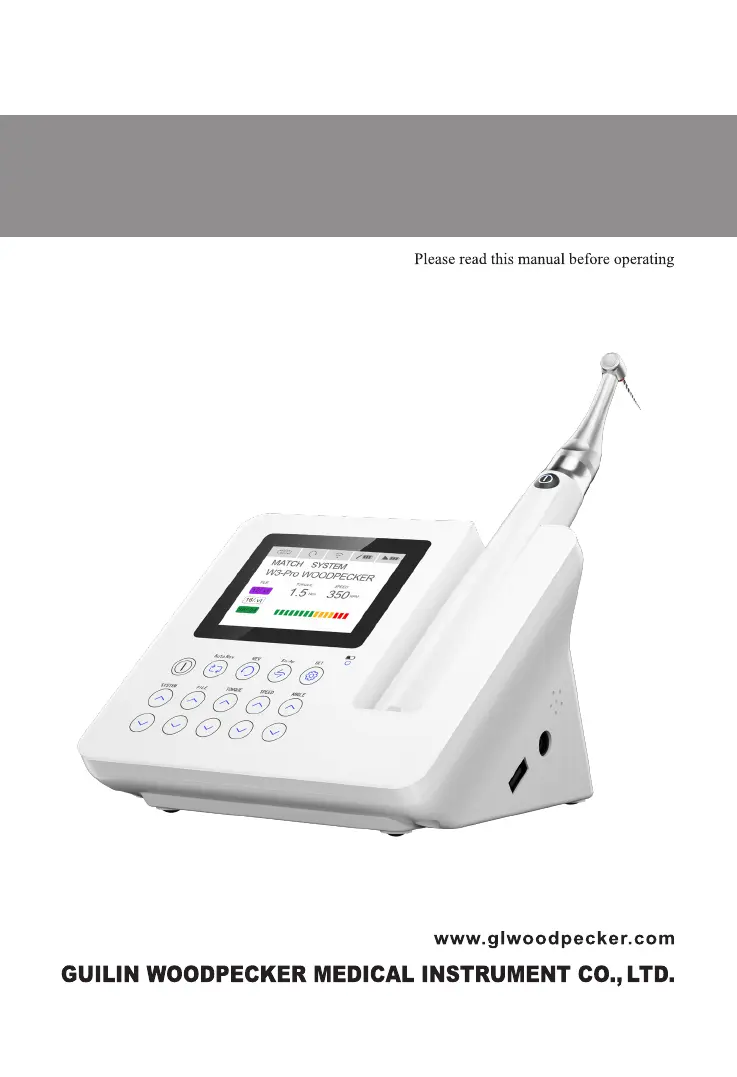
Woodpecker Endo Radar Pro - User Manual

Woodpecker Endo Radar Pro
45 pages
Print Icon
To Next Page IconTo Next Page
Loading...
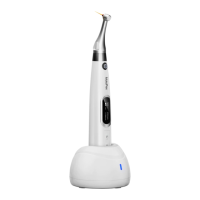
Endo Radar Pro Endo Motor
INSTRUCTION MANUAL

Questions and Answers

  • D
    David HoweAug 6, 2025
    What to do if a continuous rotary file blocks in the root canal with Woodpecker Endo Radar Pro?
    • H
      hrodriguezAug 6, 2025
      If a continuous rotary file blocks in the root canal when using Woodpecker dental equipment, it could be due to a wrong file setting. Try changing the rotational direction by pressing the REV key. Alternatively, you might be applying too much pressure on the instrument. In this case, start the handpiece and carefully pull out the file.
  • T
    Thomas BarrettAug 14, 2025
    What to do if reciprocating file blocks in the root canal in Woodpecker Endo Radar Pro Dental equipment?
    • J
      julia77Aug 14, 2025
      If a reciprocating file blocks in the root canal when using Woodpecker dental equipment, it is likely due to applying too much pressure on the instrument or not cleaning the file frequently enough. In either case, try to remove the file with pliers by gently pulling out and rotating the file clockwise.
  • G
    gwendolyncoxAug 21, 2025
    Why is my Woodpecker Endo Radar Pro Dental equipment motor handpiece getting hot?
    • S
      Sharon HoffmanAug 22, 2025
      If the Woodpecker motor handpiece is getting hot, it may be because the run time is too long with reciprocating mode. Allow the device to cool down before starting the motor handpiece again.
  • S
    Samuel WalterAug 28, 2025
    What to do if wireless connection fails between Woodpecker Dental equipment motor handpiece and base?
    • D
      Deborah CookeAug 28, 2025
      If the wireless connection between the motor handpiece and the base fails on your Woodpecker dental equipment, it may be due to a failed wireless connection or the handpiece being too far from the base. First, press the handpiece “ON/ OFF” button for more than 5 seconds to power it off and then on again. If that doesn't work, place the handpiece near the base and power it on.

Summary

Introduction and Configuration

1.2 Product Introduction

Introduces the Endo Radar Pro, its primary functions and intended use.

1.3 Product Configuration and Accessories

Details the main components and accessories included with the Endo Radar Pro device.

Specifications, Environment, and Safety

1.5-1.7 Usage, Contraindications, and Safety Classification

Defines usage, contraindications, and safety classifications for the device.

1.8 Primary technical specifications

Lists key technical specs: battery, power adapter, torque, speed ranges, and contra-angle details.

1.9 Working environment

Defines acceptable temperature, humidity, and atmospheric pressure for device operation.

Warnings

1.10 Safety Warnings

Compiles crucial safety warnings for usage, battery, heat, EMC, and USB port.

1.10 Component and Instrument Handling Warnings

Details warnings for contra-angle, instruments, moving parts, and mode usage.

Installation and Controls

2 Installation and setting

Guides users through the initial installation and setup procedures for the device.

2.5 Touch button of base (Motor alone mode)

Explains the function of each touch button on the base unit for motor-alone operation.

2.6 Touch button of base (Apex locator alone mode)

Details the touch buttons used for operating the device in Apex locator alone mode.

2.7 Touch button of base (Combined length determination mode)

Describes the touch buttons for parameter setting in combined length determination mode.

Operation Modes and LCD Screen

2.8 LCD screen

Explains the indicators and displays on the device's LCD screen.

2.9 ATR Mode and Standby

Explains the Adaptive Torque Reverse function and standby mode shutdown.

3 Motor alone mode

Provides instructions for operating the device in motor alone mode, including protection modes and torque display.

Apex Locator and Combined Modes

4 Apex locator alone mode

Detailed guide for using the device as an apex locator, including setup, testing, and operation.

5 Combined length determination mode

Guides users through setting up and operating the device in combined length determination mode.

Troubleshooting and Maintenance

6 Troubleshooting

Provides solutions for common problems encountered with the device.

7 Cleaning, Disinfection, and Sterilization

Comprehensive guide on cleaning, disinfection, and sterilization procedures for device components.

General Information and Compliance

8 Storage, Maintenance, and Transportation

Covers general guidelines for storing, maintaining, and transporting the device.

9-12 General Information and Statements

Covers disposal, warranty, symbol explanations, and legal statements.

13 EMC Declaration and Technical Descriptions

Details EMC compliance, electromagnetic emissions, and immunity specifications.

Table 4: RF Separation Distances

Specifies minimum separation distances for RF communication equipment to prevent interference.

Woodpecker Endo Radar Pro Specifications

General IconGeneral
BrandWoodpecker
ModelEndo Radar Pro
CategoryDental equipment
LanguageEnglish

Related product manuals