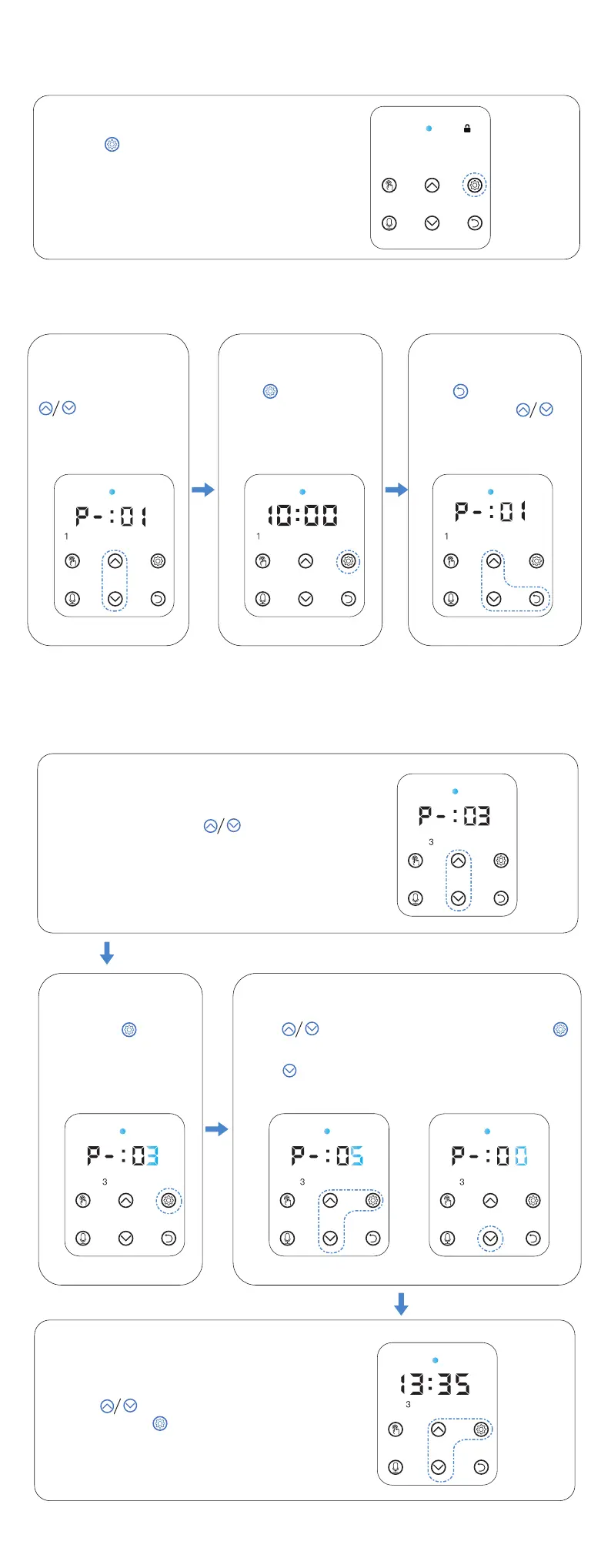
HOW TO UNLOCK FROM CHILD LOCK STATUS?
Press for 3 seconds to light
up the screen and unlock the
other buttons
HOW TO CHECK FEEDING PLAN?
HOW TO UPDATE SPECIFIED MEAL FEEDING?
(3rd meal as example)
STEP 1 STEP 2
[Unlock status] press
button to check
the meals feeding plan
STEP 3
Press button to set the portion to 5 and press
button to save as fig.(01)
Press button to set portion to 0 to cancel the meal
if needed as fig.(02)
Press button to update the feeding
time and press button to save.
STEP 4
STEP 2
[ Unlock Status ] press
button to number 3 (3 portions)
STEP 3
6
STEP 1
Press to check feeding
time
Press button then
continue to press
button to check next meal.
Long press button for
3 seconds until portion
and number 3 flash
fig.(01) fig.(02)



 To Next Page