Key (accessories)
9
Greenstar 8000 + – 6721890764 (2024/06)
S Advance: Switch to S Advance to move to the next on or off time and
directly switch on or off heating.
5 Key (accessories)
5.1 Installing the Key
Installing the Key will enable additional functions. For Pairing Æ Key
manual.
Always turn off the power to the appliance before installing Key
(accessories).
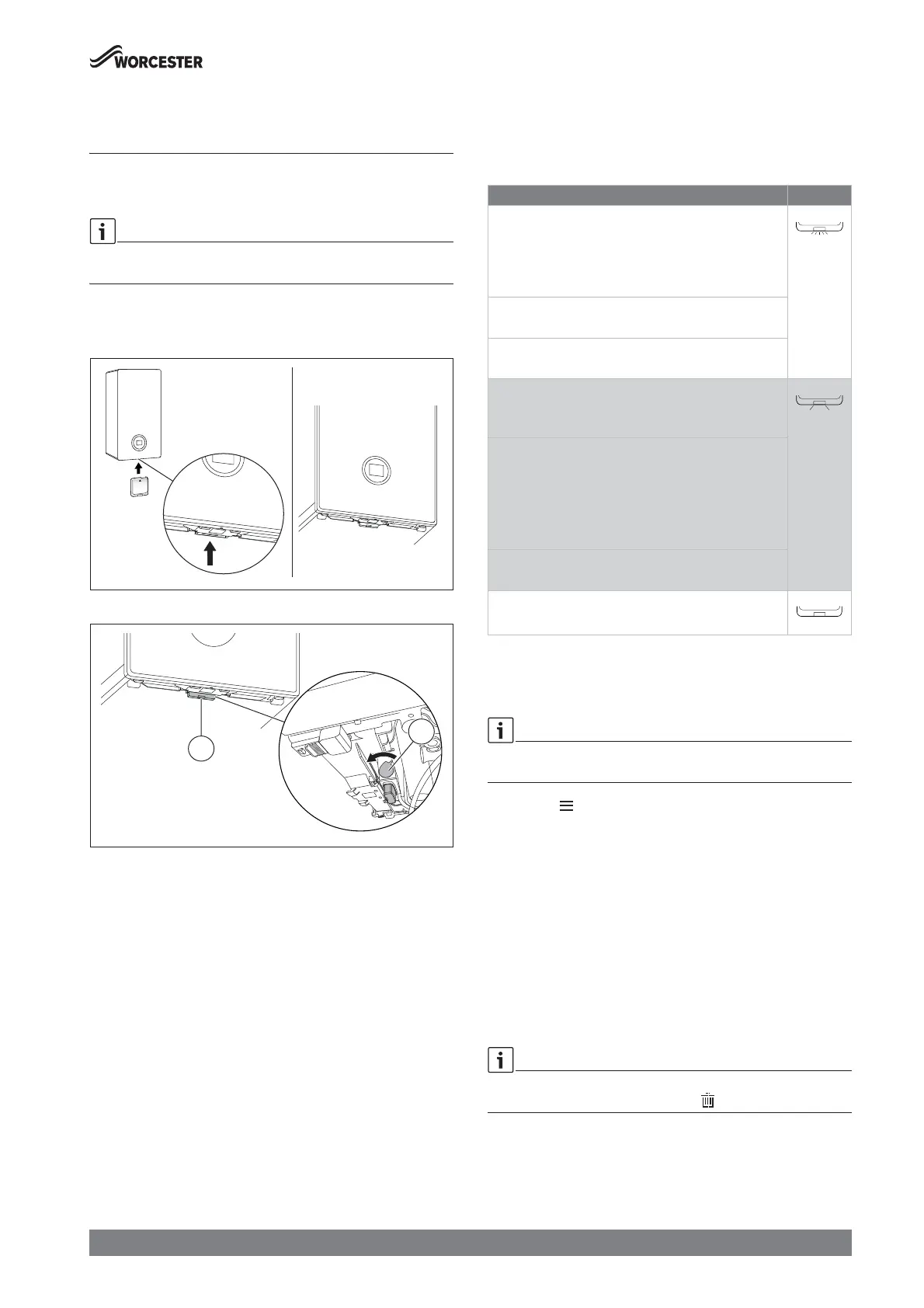
Ā Plug Key into Key housing.
Fig. 5 Position of Key housing
Fig. 6 Locking mechanism
Ā The lever [2] of the locking mechanism is located right hand side of
the Key housing. Ensure that it is in its Open position before inserting
the Key and pulling lever [2] towards front.
Ā Turn on the power.
LED [1] starts blinking green.
Ā Wait until LED is constantly yellow.
5.2 Key LED
Key LED status
The LED on the Key displays different states with flashing or constant
colours.
Table 5 LED status
5.3 Setting the time program
Time program
The same method for setting the time program for heating is used to set
the time program for hot water.
Ā Press the key.
Ā Select and confirm the Heat. time prog. or DHW time prog.menu.
Ā Select and confirm the Time program menu.
The menu items Mon - Fri, Sat - Sun, Mon ... Sun are displayed.
Possible items to change:
• Mon - Fri to change switching times for all weekdays together
• Mon ... Sun to change switching times for individual days
• Sat - Sun to change switching times for weekends
Ā Select and confirm item you want to change.
Ā Select and confirm time entry you want to change.
Ā To change the time, press the c or d key.
Ā Press the ok key.
The new time is saved. Next time entry is selected.
Add one additional switching time block by selecting +. Delete an
existing switching time block by selecting .
1
2
Description of the LED displays Example
Flashing red:
Fault, e.g. no communication between the Key and
appliance:
Ā Install the Key again, restore the last functioning
status.
Flashing yellow:
No fault, user please wait.
Flashing green:
No fault, initialisation process is running.
Constant red:
Temporary fault:
Ā Wait for normal operating condition to be resumed.
Constant yellow:
No fault, time and date not available:
Ā Set the time and date on the appliance.
-or-
Ā Key with touch-sensitive indicator: Press touch-
sensitive indicator on Key to start pairing.
Constant green:
No fault, normal operating condition.
LED Off:
No fault, power-saving mode or appliance without power.






 To Next Page