3
Introducon
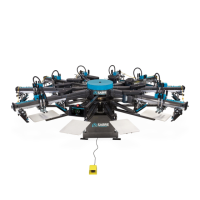
The Revoluonary FLASHBACK
Print, ash, and cool down all on the same print head.
For the rst me, prinng, ashing and cooling are all performed on the same print head! Aer the print stroke, the FLASHBACK
automacally slides its thin quartz element in between the garment and the screen. The garment is instantly ash dried and then
cooled. Choose between four ash modes:
PRINT FLASH / PRINT FLASH
This funcon allows the ash element to extend in and out aer every print stroke.
So if the Print head is selected to a single stroke the machine will ood the screen, the tables will raise make a Print stroke and
then the table will lower. When the machine lowers back down the Flashback will then get a signal to Flash. (The FLASHBACK will
extend in and automacally reverse its self back to its home posion).
That same Print head can be selected to double stroke which means when prinng, the head will ood the screen, the tables will
raise and Print then the tables will lower and then the ash will extend in and automacally reverse. The squeegee will then ood
the screen while the ash is extending and retracng waing for the element to return to its home posion so the table can raise
and make the second print stroke. Aer it makes a second stroke the tables will lower again and the ash will extend. This will
only happen in Automac mode as the printer will not double stroke in Manual mode. While in Auto mode though, you will not
normally want the table to turn before it ashes the second stroke so you will either need to run the machine in Foot Pedal mode
or turn the Delay me to around the 8 second mark allowing for the image to be completely ashed.
PRINT FLASH PRINT
This funcon allows the ash to extend in double mode only; the idea behind it is pung a one color on a dark shirt with no other
images to be applied. If the machine is set to single stroke the Flashback will not ash.
The machine will ood then the table will raise and make the Print stroke then lower, the ash will extend in automacally and
retract. It will ood as the element is extending in and out so when the element tray has returned to its home posion it will the
raise and makes its second print stroke. Aer that has happened, the ash will not extend again and the tables can turn immedi-
ately there is no need for delay at this point.
PRINT PRINT FLASH
This funcon allows for the printer to make two Strokes on a screen and then ash the design before the tables turn.
So the machine will ood the screen, then the table will raise and Print, aer, it will lower and ood again then the table will raise
and make the Print stroke the second me. Aer it makes the second Print stroke the machine will lower and the ash element
will extend in and automacally reverse.
The Delay mer will need to be set at around the 8 second mark to allow for the ash to extend and retract before the tables turn
again.


 To Next Page
 Loading...