9
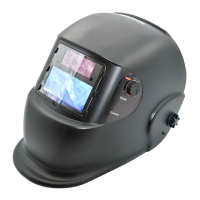
Auto-Darkening Filter Welding Helmet
WARNING: Read and understand all instruction before using !
This Auto-Darkening lter Welding Helmet is designed to protect the eyes and face from sparks, spatter,
and harmful radiation under normal welding conditions. Auto-darkening lter automatically changes
from a light state to a dark state when an arc is struck, and it returns to the light state when welding
stops.
Auto-Darkening lter Welding Helmet comes ready for use. The only thing you need to do before
your welding is to adjust the position of the headband and select the correct shade number for your
application.
GB
Before welding
• Check the front cover lens to make sure that they
are clean, and that no dirt is covering the two
sensors on the front of lter cartridge. Also check
the front/inside cover lens and the front lens retain-
ing frame to make sure that they are secure.
• Inspect all operating parts before use for signs
of wear or damage. Any scratched, cracked, or
pitted parts should be replaced immediately be-
fore using again to avoid severe personal injury.
• Check for light tightness before each use.
• Select the shade number you require at the turn
of a shade knob ( Seeing the Shade Guide Table
No.1 ). Finally, be sure that the shade number is
the correct setting for your application.
• Adjust headband so that the helmet is seated
as low as possible on the head and close to
your face. Adjust helmet's angle when in the low-
ered position by turning the adjustable limitation
washer.
Dark shade number selection
The shade number can be set manually between 9
-13 . Check the Shade Guide Table to determine
the proper shade number for your application.
Select a shade number by turning the shade knob
until the arrow points to the required setting (See
Shade Guide Table No.1).
Product features
• This model is designed & equipped with a
special turnover (up & down) headband
mechanism. When welder turns over the helmet
to welder’s head top, the headband mechanism
makes helmet’s gravity center to be more
lower, and be coincided with the center of
welder’s head. The design of welding helmet
greatly lowers the fatigue of welder’s head ( &
neck ) and make welder feel more comfortable
than before while at working.
• At the moment of starting welding, it automati-
cally changes lter screen from clear to dark in
0.2ms.
• Dark to clear delay adjustment : Operator can
vary the time for the lter to return to clear state.
• Outside sensitivity adjustable can make the opera-
tors more convenient while operating.
• At the moment of stopping welding, the lter
screen automatically changes from dark to light
state according to your per-set delay time.( Turn-
ing the time-setting switch to the “short”position-
-then, it can vary at 0.25s ~ 0.35s;Turning the
time-setting switch .to the “long” position -- then, it
can vary at 0.5s ~ 0.8s ).
• “WELDING”/ “GRINDING” can be selective.
• The helmet utilizes high performance solar cells
as power supply and has 2 built-in 3V lithium
batteries as power back-up. No charge of battery
is required. And the battery life is raised to a new
limit. Under normal welding conditions, users can
expect a battery has a lifetime of more than 6
years.


 To Next Page