Setup
Caution!
To prevent electric shock and damage to the device, make sure the power is switched
OFF on the drum and all related device before making any connection.
Connecting Pads and Pedals
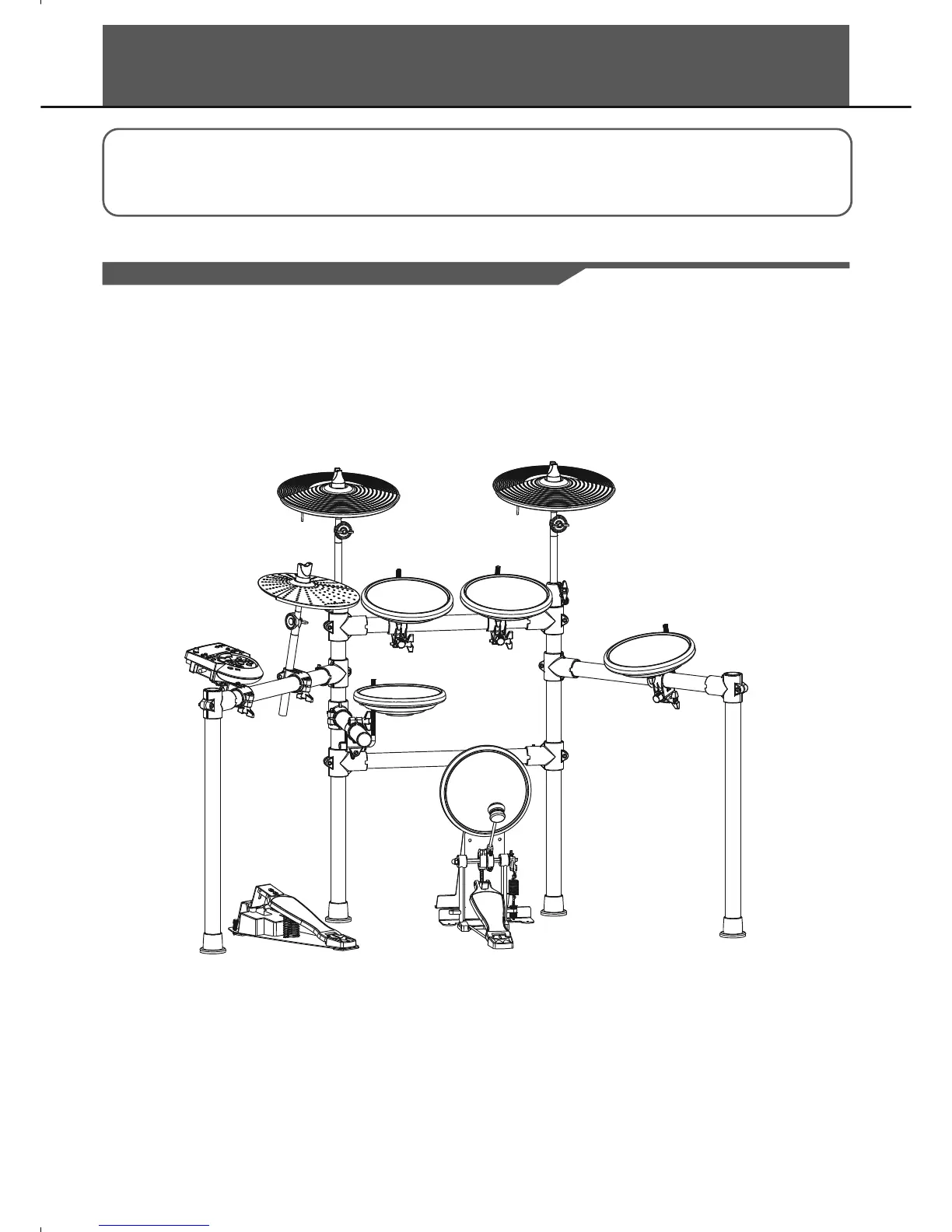
Standard: KICK, SNARE, TOM1-3, CRASH1, RIDE, HIHAT, HIHAT CONTROL PEDAL
Extended: CRASH2, TOM4
Using the provided cables, connect with kick, snare, tom1~tom3, ride, crash, hi-hat, hi-hat control triggers. Snare,
tom, ride, crash are stereo input, support double triggering (increase edge triggering); kick, hi-hat are mono input,
which can't response edge triggering. Hi-hat control pedal is stereo input.
Note:
For details on assembling the drum stand, attaching the digital drum and connecting pads, refer to the
Installation manual.
6
Drum Module
hi-hat
crash1
ride
tom1tom2
snare
hi-hat control
kick
tom3



 To Next Page