6
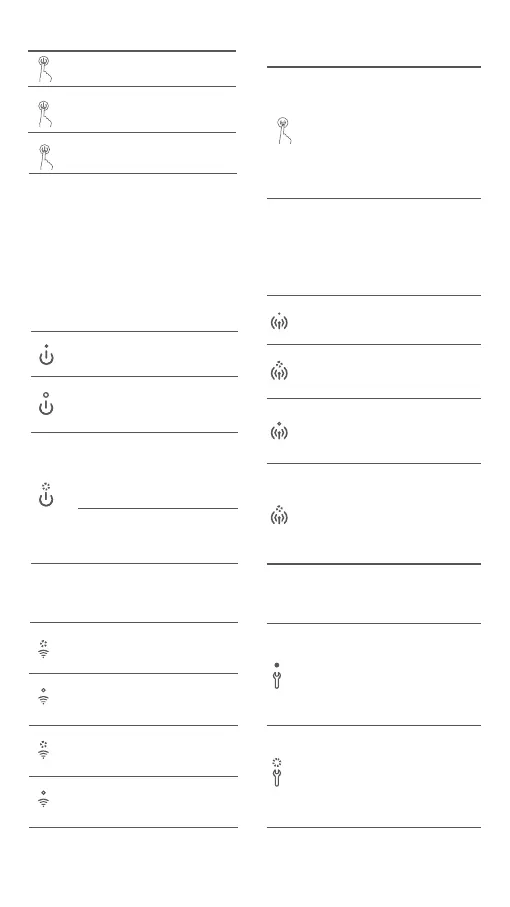
Power Buon Instructions
Reset the network
Press
Press and hold
for 6 seconds
Restore factory
seings
Continuously
press 6 times
Turn on/off
Press and hold
for 3 seconds
Enable/Disable the
direct connection
function
Direct Connection Buon
Instructions
Power Indicator Descriptions
Turned on
/Standby
On
Off
Blinking
rapidly
Turned off
Blinking
slowly
In sleep mode
Direct Connection Indicator
Descriptions
Off
Direct connection
function disabled
Blinking
orange
Awaiting
connection
Blue
Successfully
connected to
the printer
Blinking
blue
The device is awaiting
direct connection when
there is already another
device in direct connection
with the printer.
Wi-Fi Indicator Descriptions
Blinking
orange
Orange
Awaiting
connection
Couldn't
connect
Blinking
blue
Connecting
Blue
Connected
successfully
Error Indicator Descriptions
Blinking
orange
Off
The printer is working
normally.
Notes:
· Once the network is successfully reset, all
indicators will remain on for 1 second.
· Printing will not be interrupted by pressing or
pressing and holding the power buon.
· Updating firmware will not be interrupted by
pressing or pressing and holding the power buon.
· It is recommended to turn off and restart the
printer when an error occurs, and the printer will
try to fix the error automatically once restarted.
6 seconds
6 times
3 seconds
Note: The direct connection function cannot
be enabled during turning off and firmware
updating.
Printing
Updating the
firmware
Note: If the Wi-Fi indicator remains orange,
first check if the Wi-Fi can access the
Internet normally.
Printer error, follow the
instructions in the app
to solve the error.










 To Next Page