EasyManua.ls Logo

Xiaomi Buds 3T Pro - User Manual

Xiaomi Buds 3T Pro
13 pages
Print Icon
To Next Page IconTo Next Page
Loading...
Buds 3T Pro User Manual
Question and Answer IconNeed help?

Do you have a question about the Xiaomi Buds 3T Pro and is the answer not in the manual?

Summary

Product Overview

Package Contents

Instructions

Charging

Guidance on charging the earphones and the charging case using wired or wireless methods.

Checking Battery Status

Methods to check the battery level of the earphones and the charging case via indicators or phone.

Device Power and Sleep Modes

Instructions on turning the earphones on, entering sleep mode, and proper wearing.

Connecting and Pairing

Pairing with New Devices

Step-by-step guide to connect the earbuds to a new Bluetooth-enabled device.

Xiaomi;Redmi Quick Connection

Instructions for quick pairing with Xiaomi/Redmi phones using Bluetooth technology.

Connection Management

Information on automatic connection, passive connection, and clearing connection history.

Function Overview

Call and Music Controls

How to manage calls and music playback using the earphone's touch-sensitive pressure sensor area.

Specifications

Safety and Compliance

WEEE and Environmental Information

Information regarding the disposal of waste electrical and electronic equipment.

General Safety Warnings

Important safety precautions for product usage, including environmental, battery, and hearing safety.

Compliance and Certification Details

Details on RF exposure, SAR values, regulatory compliance, and trademarks.

Manufacturer and Importer Information

Summary

Product Overview

Package Contents

Instructions

Charging

Guidance on charging the earphones and the charging case using wired or wireless methods.

Checking Battery Status

Methods to check the battery level of the earphones and the charging case via indicators or phone.

Device Power and Sleep Modes

Instructions on turning the earphones on, entering sleep mode, and proper wearing.

Connecting and Pairing

Pairing with New Devices

Step-by-step guide to connect the earbuds to a new Bluetooth-enabled device.

Xiaomi;Redmi Quick Connection

Instructions for quick pairing with Xiaomi/Redmi phones using Bluetooth technology.

Connection Management

Information on automatic connection, passive connection, and clearing connection history.

Function Overview

Call and Music Controls

How to manage calls and music playback using the earphone's touch-sensitive pressure sensor area.

Specifications

Safety and Compliance

WEEE and Environmental Information

Information regarding the disposal of waste electrical and electronic equipment.

General Safety Warnings

Important safety precautions for product usage, including environmental, battery, and hearing safety.

Compliance and Certification Details

Details on RF exposure, SAR values, regulatory compliance, and trademarks.

Manufacturer and Importer Information

Overview

The Xiaomi Buds 3T Pro are wireless earphones designed for an immersive audio experience, featuring active noise cancellation and transparency mode. This user manual provides comprehensive instructions on their setup, usage, and maintenance.

Function Description

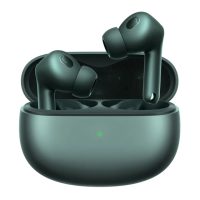
The device consists of two main components: the earphones and a charging case. The earphones feature a primary microphone, a secondary microphone, and a pressure sensor area on each earbud, allowing for intuitive control of various functions. The charging case includes an indicator light, a function button, and a Type-C charging port, supporting both wired and wireless charging.

Usage Features

Getting Started:

To begin, ensure the earphones are charged. When placed in the charging case, they will automatically start charging. The charging case itself can be charged using the provided Type-C cable or a compatible wireless charger. The indicator light on the charging case will be red during charging and turn green when fully charged.

Checking Battery Level:

You can check the battery level of the earphones on your phone's status bar after connecting them. Note that the status bar typically displays the battery level of the earphone with the lowest charge. For the charging case, open its lid or press the function button. If the battery is 40% or less, the indicator will show red for 7 seconds; if above 40%, it will show green for 7 seconds. A slowly blinking red light indicates a low battery and immediate charging is recommended. For Xiaomi/Redmi phones, you can get a detailed battery level notification by holding your phone close to the open charging case, provided your phone's software is updated.

Turning On and Sleep Mode:

The earphones automatically turn on when the charging case lid is opened. To enter sleep mode and disconnect, simply place the earphones back into the charging case and close the lid.

Wearing the Earphones:

Take the earphones out of the charging case and insert them into your ears, ensuring to match the left (L) and right (R) marks for proper fit and audio experience. Always return the earphones to the charging case after use to prolong their lifespan and prevent loss.

Connecting to Devices:

New Device Connection:

  1. Place the earphones in the charging case and open the lid. Press and hold the function button for two seconds until the indicator light blinks white, signaling that the earphones are ready for connection. If no connection is made within 1 minute, they will enter sleep mode.
  2. On your device, enable Bluetooth, search for "Xiaomi Buds 3T Pro," and connect. If prompted for a passcode, enter "0000." Initial Activation Note: For first-time use, place the earphones in the charging case and press and hold the function button for 5 seconds to activate them, after which they will automatically enter the awaiting connection state.

Xiaomi/Redmi Phone Quick Connection:

Place the earphones in the charging case, close the lid, and ensure Bluetooth is enabled on your Xiaomi/Redmi phone. Hold the phone near the charging case, then open the lid. Follow the on-screen prompts to connect. This quick connection feature is supported on select Xiaomi/Redmi phones with the latest stable software version.

Connection Interruption and Reconnection:

If Bluetooth is disabled on your device or the earphones are out of range, they will disconnect, emit a notification sound, and enter awaiting connection mode. After 5 minutes of disconnection, they enter passive connection mode, and after 10 minutes, sleep mode. Wearing the earphones again will wake them up and return them to awaiting connection mode. Passive connection requires you to manually select the earphones from your device's Bluetooth settings.

Automatic Connection:

When in the charging case, opening the lid will automatically connect the earphones to the most recently used Bluetooth device. If no history is found or connection fails, they will enter awaiting connection mode. If automatic connection fails, manual connection via Bluetooth settings is required.

Clearing Connection History:

  1. Place the earphones in the charging case.
  2. Press and hold the charging case's function button for at least 10 seconds. Release when the indicator light stays white. This resets the earphones, clears all previous connection history, and puts them back into pairing mode (indicator blinks white).

Functionality Overview:

Incoming Calls:

  • Answer/End Call: Tap the pressure sensor area on either earphone.
  • Decline Call: Double-tap the pressure sensor area on either earphone.

Music Playback and Noise Control:

While wearing both earphones:

  • Play/Pause: Tap the pressure sensor area.
  • Next Track: Double-tap the pressure sensor area.
  • Previous Track: Tap the pressure sensor area three times.
  • Cycle Noise Control Modes: Press and hold the pressure sensor area for two seconds to switch between "Enable noise cancellation," "Transparency mode," and "Disable noise cancellation."
  • Pause/Resume Music: Take out either earphone to pause; wear it back to resume playing.

While wearing one earphone:

  • Play/Pause: Tap the pressure sensor area.
  • Notes: When using only the left earphone, place the right earphone in the charging case and close the lid. Noise cancellation mode cannot be activated in single earphone mode.

Maintenance Features

General Care:

  • Avoid disassembling, repairing, or modifying the product yourself, as this can cause damage or fire.
  • Do not expose the product to extreme temperatures (below 0°C or above 45°C).
  • Keep the indicator light away from the eyes of children and animals during use.
  • Refrain from using the product during thunderstorms to prevent malfunction and electric shock.
  • Clean the product without alcohol or other volatile liquids.
  • Avoid contact with any liquids.
  • Do not puncture, crush, or expose the product to fire.
  • Discontinue use immediately if any swelling is observed.

Battery and Disposal:

  • Do not dispose of batteries in fire or a hot oven, or mechanically crush or cut them, as this can lead to an explosion.
  • Avoid leaving batteries in extremely high-temperature environments, which can cause explosions or leakage of flammable liquids/gases.
  • Batteries subjected to extremely low air pressure may also explode or leak flammable liquids/gases.
  • Product information and certification marks are located on the charging case.
  • Do not dispose of batteries in landfills. Always comply with local laws and regulations for battery disposal.

Hearing Protection:

  • To prevent hearing loss, avoid using the earphones at high volumes for extended periods.
  • Do not use the earphones while driving; always adhere to local traffic regulations.

Safety and Handling:

  • The earphones and their accessories contain small parts; keep them out of reach of children.
  • Replacement of a battery with an incorrect type can defeat safeguards, leading to fire, explosion, or leakage.
  • This equipment complies with RF radiation exposure limits for an uncontrolled environment.
  • The symbol with a crossed-out wheeled bin indicates that the product is waste electrical and electronic equipment (WEEE) and should not be mixed with unsorted household waste. It should be handed over to a designated collection point for recycling to protect human health and the environment.

Xiaomi Buds 3T Pro Specifications

General IconGeneral
Color nameCarbon Black
Headset typeBinaural
Product typeHeadset
Product colorBlack
Wearing styleIn-ear
Recommended usageCalls/Music
International Protection (IP) codeIP55
BluetoothYes
Wireless range10 m
Bluetooth version5.2
Bluetooth profilesA2DP, AVRCP, HFP
Connectivity technologyWireless
Impedance32 Ω
Ear couplingIntraaural
Noise canceling typeActive
Total Harmonic Distortion (THD)0.08 %
Microphone typeBuilt-in
Charging case connector typeUSB Type-C
Talk time (with charging case)24 h
Mobile operating systems supportedAndroid, iOS
Weight and Dimensions IconWeight and Dimensions
Weight48 g
Left earpiece weight4.9 g

Related product manuals