09
Docking & Charging
When the robot vacuum is working, press the button to pause the task,
and press the button again to send the robot vacuum to return to the dock
to charge.
When the robot vacuum is in standby mode and not connected to the
charging dock, press the button to send the robot vacuum to return to the
dock to charge. When a task is complete or the battery is too low, the robot
vacuum will automatically return to the dock to charge.
DND M
ode
In the do not disturb (DND) mode, the robot vacuum does not perform
scheduled cleanups, and the indicator turns off after one minute of charging.
The DND mode can be enabled or disabled in the app.
Note: For more functions, please go to the app.
Note: When using the robot vacuum for the first time, it is recommended to follow the
robot vacuum and remove any obstacles on the ground. If the robot vacuum may get
stuck or scratch the surface of the furniture in some areas, you can set physical barriers
to prevent the robot vacuum from entering those areas.
Adding Water or Cleaning the Mop
Press any button to pause the robot vacuum. Take out the water tank to add
water or clean the mop pad, and then put the water tank and dust
compartment back. Press the button to resume vacuuming and mopping.
Pausing
When the robot vacuum is running, press any button to pause. Press the
button to resume cleaning.
Note: The robot vacuum will enter sleep mode after being paused or in standby mode for
ten minutes. Press any button to wake it up.
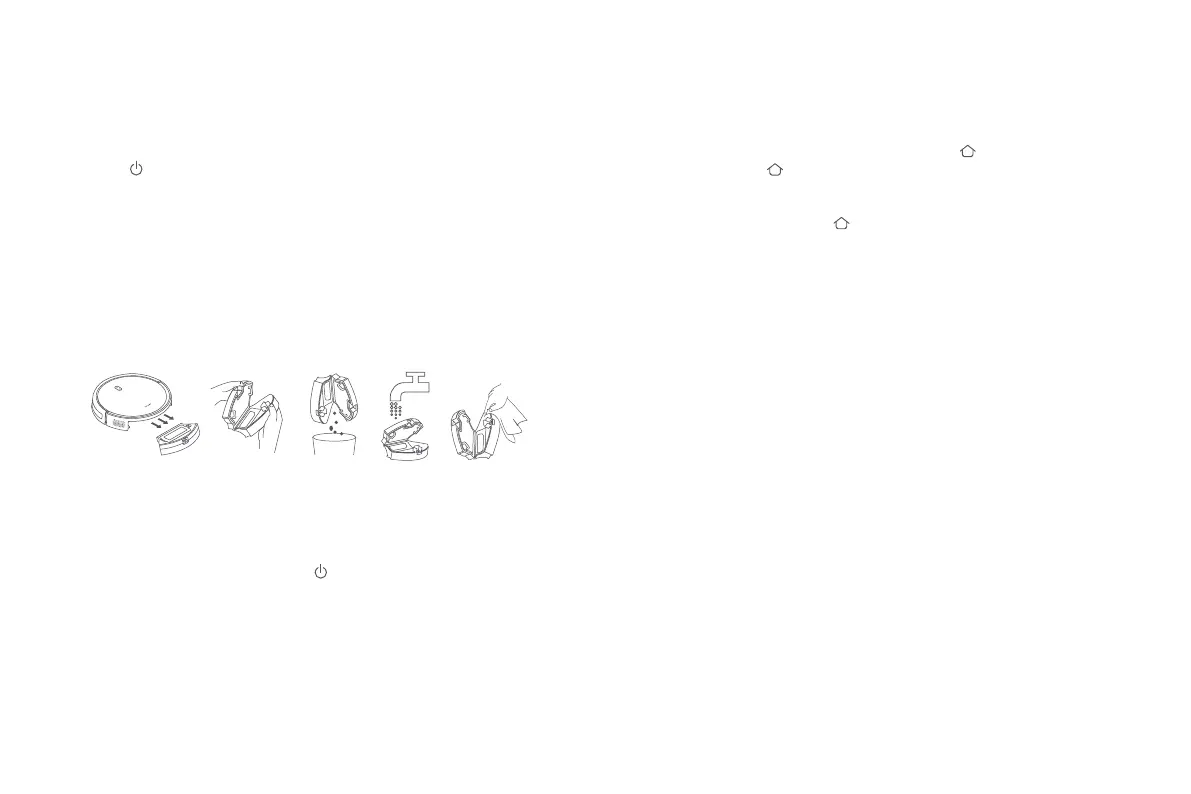
Cleaning the Dust Compartment
Press the dust compartment release button to remove the dust
compartment, and open it to empty the contents.
Note: Wipe the dust compartment dry after washing. Do not expose it to direct sunlight
for a long time.






 To Next Page