06
Product Overview
Indicator Status Descriptions
White
Breathing white
Blinking white
Off
Turned on/Working normally/Charging completed/Standby
Charging(battery level ≥30%)/Turning on
Returning to charge/Resetting system
Turned off
/In sleep
Wi-Fi disconnected
Resetting Wi-Fi/Error
Updating firmware/Connecting to the network
Yellow
Blinking yellow
Blinking blue
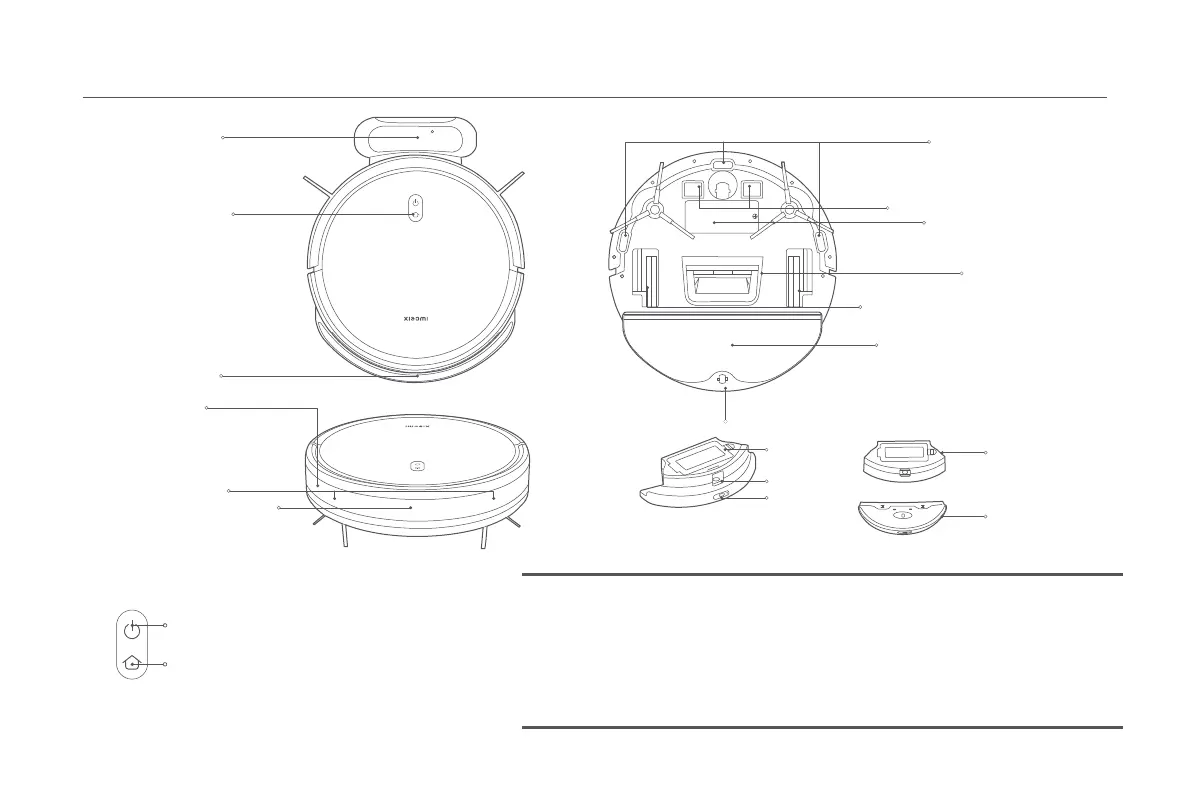
Collision Sensor Infrared
Obstacle Sensor
Edge Sensor
Charging Dock
Button/Indicator
Mop Pad Assembly
Battery Pack
Cliff Sensor
Charging Contacts
Dust Compartment & Water Tank
Filter Cover
Dust Compartment
Water Tank
Plug
Release Button
Water Tank
Suction Inlet
Left Wheel/Right Wheel
Press and hold for 3 seconds to turn on or off
Press to start or pause cleaning
Press to start or stop docking when on standby
Press to pause cleaning






 To Next Page