08
①
②
③ ④ ⑤
① ② ③
How to Use
Open the plug
and add water.
① ② ③
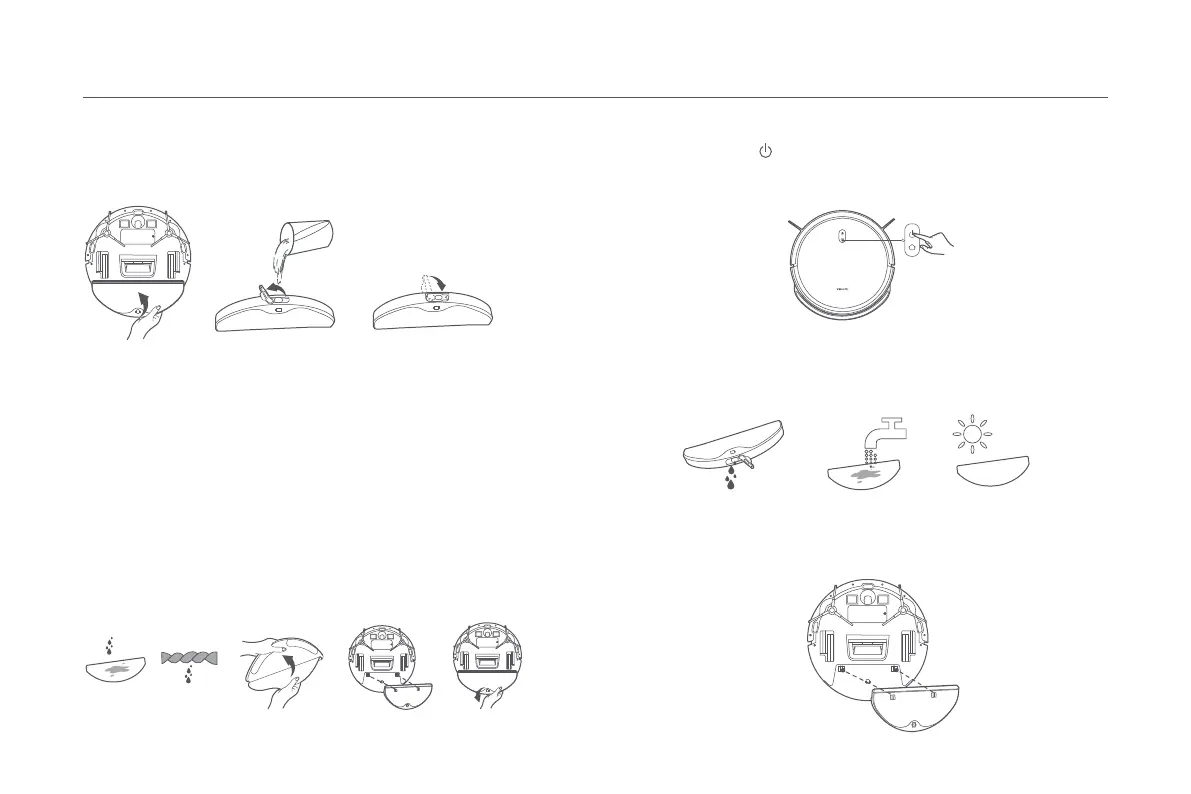
2. Before using the vacuuming & mopping function, wet and wring out
the mop pad first. Then insert the mop pad into the groove at the
bottom of the water tank, and attach the mop pad firmly to the velcro
on the water tank. Once the mop pad is installed, align and insert the
clips on the water tank into the slots on the dust compartment. The
water tank is secured in place when you hear a click.
Insert the plug
back.
Start Vacuuming & Mopping
1. Take out the water tank. Open the plug, and fill the tank up with
clean water. Then insert the plug back.
• Do not add any substances other than clean water.
• The functions of robot vacuums are tested before leaving the factory, so there
may be some water residues in the robot vacuum. This is normal.
CAUTIONS:
4. After a vacuuming & mopping task is completed, empty any remaining
water out of the water tank in a timely manner. Then clean and air-dry the
mop pad to prevent odor and mildew.
3. Press the button to vacuum and mop after completing the
installation.
Note: The water tank and mop pad can be omitted if only the vacuuming function is
used.






 To Next Page