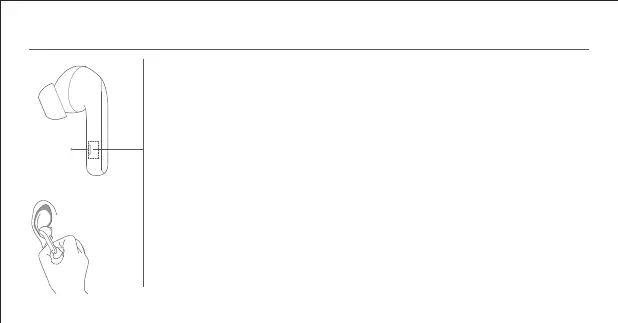
Function Overview
Incoming calls
Pinch the force sensor area on either side of the earphones: Answer/end a call
Double-pinch the force sensor area on either side of the earphones: Decline a call
Music and voice assistant
While wearing both earphones:
Pinch the force sensor area: Play/pause
Double-pinch the force sensor area: Next track
Triple-pinch the force sensor area: Previous track
Press and hold the force sensor area for two seconds to cycle through: Enable noise cancellation >
Transparency mode > Disable noise cancellation
Take out either earphone: Pause music and wear the earphone back to resume playing
While wearing one earphone:
Pinch the force sensor area: Play/pause
Notes:
● When only using one earphone, place the other into the charging case and close the lid.
● Noise cancellation mode cannot be set to on in single earphone mode.
Force Sensor
Area
Le Earphone
06














 To Next Page