Need help?
Do you have a question about the Xiaomi Mi 70mai Pro and is the answer not in the manual?
Place the electrostatic sticker on the windshield and remove air bubbles for proper adhesion.
Lock the dashcam securely into its mounting bracket until it snaps into place.
Mount the dashcam onto the electrostatic sticker, ensuring good contact with the adhesive.
Route the power cable along the windshield and connect to the car charger port.
Turn on the dashcam and adjust the viewing angle to face forward.
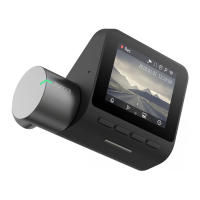
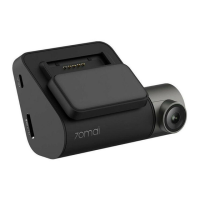
The Xiaomi Mi 70mai Pro Smart WiFi Dash Camera is a sophisticated in-car recording device designed to enhance driving safety and provide comprehensive video evidence in various situations. This dash camera is engineered for ease of installation and user-friendly operation, making it an ideal companion for any vehicle.
The primary function of the 70mai Pro Smart WiFi Dash Camera is to record high-quality video footage of your journeys. It continuously records the road ahead, capturing important details that can be crucial in the event of an accident, dispute, or simply for documenting scenic drives. The camera's wide field of view ensures that a broad area in front of your vehicle is covered, minimizing blind spots and maximizing the amount of information captured.
One of its key features is the integrated WiFi connectivity. This allows the dash camera to connect wirelessly to your smartphone via a dedicated application. Through the app, users can access live footage, review recorded videos, and download important clips directly to their mobile device without needing to remove the memory card from the camera. This seamless connectivity simplifies the process of managing your recordings and sharing them when necessary.
The dash camera is designed to be a reliable witness on the road. It typically includes features such as loop recording, which automatically overwrites the oldest footage when the memory card is full, ensuring continuous recording without manual intervention. In the event of an impact or sudden braking, the camera often employs a G-sensor to detect such events and automatically lock the current recording, preventing it from being overwritten. This ensures that critical incident footage is preserved.
Furthermore, the 70mai Pro Smart WiFi Dash Camera is built to operate consistently in a vehicle environment. It draws power from the car's cigarette lighter port, ensuring it remains charged and operational throughout your drive. The camera's design allows for discreet placement on the windshield, minimizing obstruction to the driver's view while still providing an optimal recording angle.
The installation process for the 70mai Pro Smart WiFi Dash Camera is straightforward and designed for user convenience. It begins with the application of an electrostatic sticker to the windshield. This sticker serves as a clean and secure base for mounting the dash camera, ensuring a strong adhesion without leaving residue on the glass. Users are advised to clean the windshield thoroughly before applying the sticker and to remove any air bubbles to ensure a smooth and firm attachment.
Once the electrostatic sticker is in place, the dash camera's bracket is connected to the main unit. This connection is typically a secure snap-in mechanism, providing a stable mount for the camera. After the bracket is attached to the dash camera, the protective sticker on the bracket's adhesive is removed, and the entire unit is then firmly pressed onto the center of the electrostatic sticker on the windshield. It is important to apply sufficient pressure to ensure the heat-resistant adhesive makes close contact with the electrostatic sticker, guaranteeing a secure and long-lasting mount.
Powering the dash camera involves routing the power cable from the camera along the top of the windshield, down the A-pillar, and around the passenger-side glove compartment to the car's cigarette lighter port. This method of cable management helps to keep the interior tidy and prevents the cable from interfering with driving. Once the car charger is connected to the power cable and plugged into the cigarette lighter port, the dash camera will receive power.
After installation and power connection, the camera's angle needs to be adjusted. Users can turn on the dash camera and use its preview screen to adjust the camera lens up or down. The goal is to ensure that the camera is facing directly forward, capturing the road ahead clearly and comprehensively. This adjustment is crucial for optimizing the recording field of view.
To unlock the full potential of the 70mai Pro Smart WiFi Dash Camera, activation through the 70mai app is required. Users need to download and install the official 70mai application on their smartphone. Within the app, they will select the "Add Device" option and follow the on-screen prompts to complete the activation process. This activation typically involves connecting the phone to the dash camera's WiFi network, allowing for initial setup, firmware updates, and access to all smart features. The app serves as a central hub for managing the dash camera, offering functionalities such as live view, video playback, settings adjustments, and emergency recording management.
Maintaining the 70mai Pro Smart WiFi Dash Camera is relatively simple, focusing on ensuring optimal performance and longevity. Regular cleaning of the camera lens is important to prevent smudges, dust, or dirt from affecting video quality. A soft, lint-free cloth should be used for this purpose, avoiding abrasive materials that could scratch the lens.
The electrostatic sticker, while designed for strong adhesion, may occasionally need reapplication if it loses its grip or if the camera needs to be moved. When reapplying, it's crucial to clean both the windshield and the sticker thoroughly to ensure a strong bond and prevent air bubbles, which can compromise adhesion and visibility.
Periodically checking the power cable connection to the dash camera and the cigarette lighter port is also recommended to ensure a secure and consistent power supply. Loose connections can lead to intermittent power, interrupting recordings.
Software maintenance is primarily handled through the 70mai app. Users should regularly check for firmware updates within the application. These updates often introduce new features, improve performance, and address any bugs, ensuring the dash camera operates with the latest enhancements. Keeping the firmware updated is vital for the camera's optimal functionality and security.
While the dash camera features loop recording, it's a good practice to periodically review the contents of the memory card, especially if you have experienced any incidents or want to save specific footage. Although the G-sensor locks important files, manually backing up critical videos to your phone or computer ensures their permanent preservation.
Overall, the Xiaomi Mi 70mai Pro Smart WiFi Dash Camera is designed for reliable, hands-off operation, with minimal maintenance required beyond initial setup and occasional checks. Its robust design and smart features aim to provide peace of mind and a secure driving experience.
 General
| Resolution | 2592 x 1944 |
|---|---|
| Display | 2.0-inch LCD |
| GPS | Yes |
| Wi-Fi | Yes |
| Battery | 500mAh |
| Chipset | HiSilicon Hi3556 V100 |
| Sensor | Sony IMX335 |
| Aperture | F1.8 |
| Storage | MicroSD up to 64GB |
| Features | Parking Mode |
| Field of View | 140 degrees |

 To Next Page