15
Maintenance and setting
1. Propeller
Propeller is one of parts, that easy wear. If you nd signs of wear of
propeller, replace it promptly. Otherwise, it will have a negative impact on
the use of quadcopter normally.
2. Protective cover
Protective cover is one of parts, that easy wear. If you nd signs of wear of
propeller, replace it promptly.
Safety Tips: Protective cover provides limited protective eect. Operator
must operate in accordance with safety regulations, direct the unit away
from people, animals and other items.
3. Battery
Do not put a battery in re; don`t hammer battery. The capacity of the
lithium battery at low temperatures is signicantly reduced. Do not use it at
temperatures below 50C.
4. Self-check of quadcopter
On every switch on the quadcopter performs some self-test operations. If
self-test failed, you will nd appropriate notication to the app.
5. Compass setting
If magnetic eld has changed, you need to re-adjust a compass for safe
ight. If you need to set a compass, open the app and nd the relevant
notication and instructions.
6 Remote control code
When replacing the remote control or kvadrokoptera you need to re-
synchronize the remote control code of quadcopter:
1. Switch on the quadcopter
2. The remote control is turned o. First, once press the power button, and
then press and hold until a button indicator ashes rapidly. Synchronization
mode of the remote control is on.
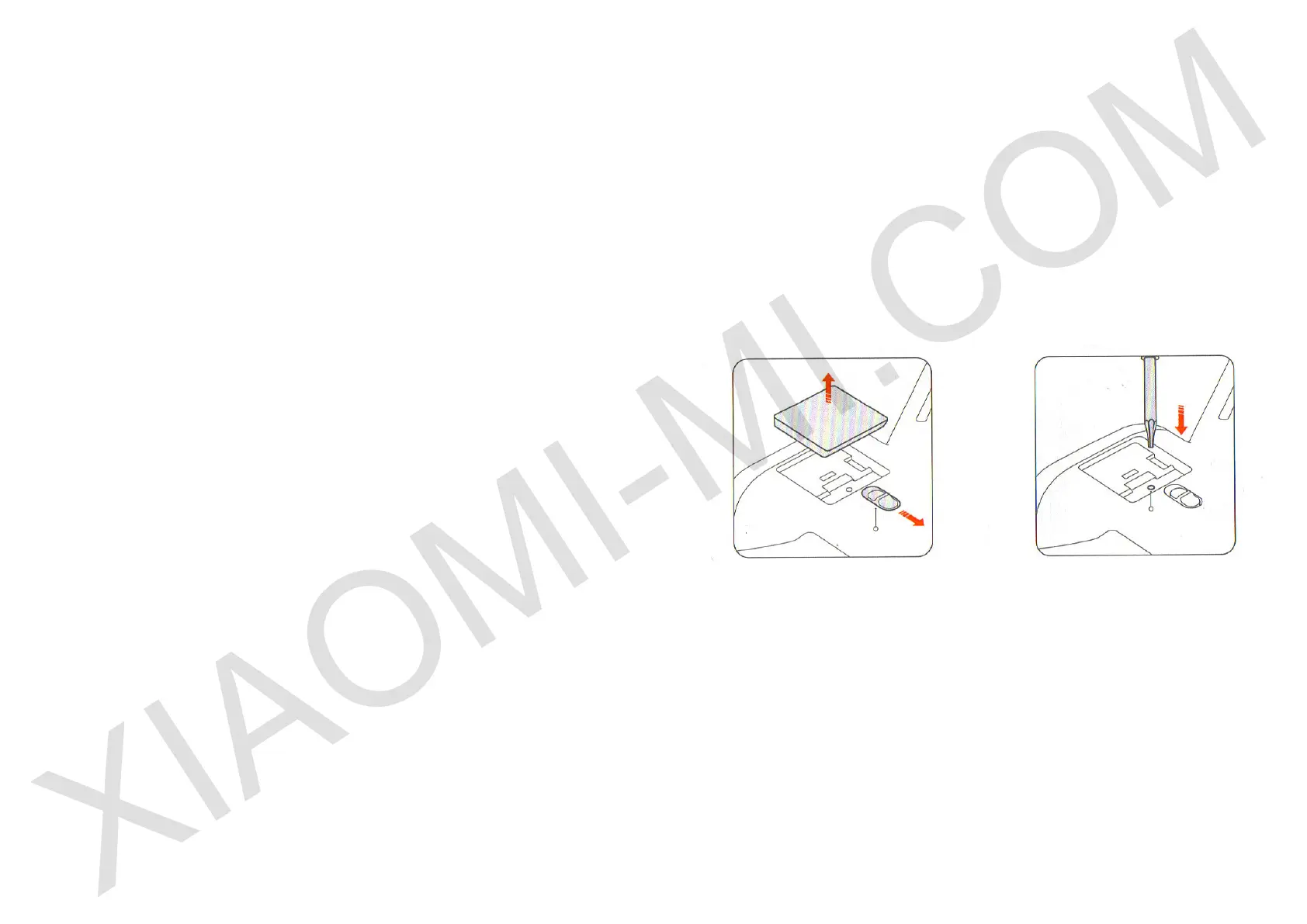
3. Set the PTZ camera installation / disassembly button, remove the cover
and locate the code hole. Using the supplied screwdriver to the main
assembly, press and hold this hole for 1 second. Three specic remote
control signals to indicate successful pairing. At the same time remote
control power button light will change color to white.
Installation / disassembly PTZ
camera button
Remote control code hole
7. Setting a remote control stick
If during ight you notice a discrepancy between ight unit and your actions
on the remote control, try setting the remote control stick. If there was a
gap to connect the remote control with quadcopter, make the necessary
settings in the app.


 To Next Page