Need help?
Do you have a question about the Xiaomi Mi Drone and is the answer not in the manual?
Connect battery to power adapter and plug into supply; indicator behavior during charging.
Connect remote control adapter; indicator behavior during charging.
Maintain propellers, covers, battery; perform quadcopter self-tests.
Steps to re-synchronize the remote control code with the quadcopter.
Essential safety rules covering age, environment, distance, and user responsibility.
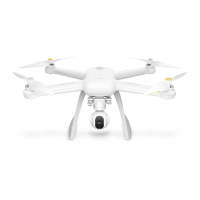
The Mi Drone is a quadcopter designed for aerial photography and videography, offering a range of features for both novice and experienced users. It is equipped with a built-in PTZ camera, allowing for high-quality image and video capture from the air. The drone is controlled via a remote control, which can be paired with a smartphone running the Mi Drone App for enhanced functionality and real-time feedback.
The Mi Drone's primary function is to provide an aerial platform for capturing photos and videos. It features self-tightened propellers for stable flight and protective covers for added safety during operation. The quadcopter is powered by a rechargeable battery, and the remote control also has its own power source.
The remote control is designed with a standard flight/back flight switch button, a smartphone clamp, left and right sticks for maneuvering, and buttons for video recording and photo shooting. It also includes an automatic take-off/landing button, simplifying the flight process for users. The remote control's antennas can be adjusted to optimize signal strength, and a USB port is available for connecting a smartphone.
The Mi Drone App, which needs to be installed on a smartphone, serves as a crucial interface for the device. It allows users to pair their phone with the remote control, access an introductory flight course, view an online map, and perform real-time aerial photography. The app also facilitates control settings and firmware updates, ensuring the drone operates with the latest features and improvements.
Before using the Mi Drone, it is essential to read the instructions carefully. The device is not recommended for persons under 18 years old or those incapable of operating it safely. During flight, maintaining a safe distance from people, animals, trees, cars, and buildings is crucial. Users should manage the device carefully, especially in areas with people.
The drone should not be used near airfields, railways, highways, high-rise buildings, power lines, or other dangerous objects. It is also advisable to avoid areas close to cellular base stations, ultra-high power antennas, or other sources of strong electromagnetic signals. Users must ensure that the take-off location, height, and flight distance comply with local legal regulations and restrictions. The device should not be used in places where operation is prohibited by law or where it violates time limits. To protect the legitimate rights and interests of users, it is important to follow the safety rules of quadcopter use.
The quadcopter battery is charged by connecting it to a power adapter and plugging it into a power supply. During charging, indicator lights blink to show the current charge level, and they turn off when fully charged. The remote control is charged similarly, with indicator lights showing the charge level and turning off when full.
To switch on the quadcopter or remote control, short press a button to view the current battery level. Then, one short press followed by a re-press and hold for 2 seconds will switch the device on or off.
The manual illustrates the basic principles of quadcopter management using the remote control sticks.
Propeller: Propellers are wear-and-tear parts. If signs of wear are found, replace them promptly to avoid negative impacts on quadcopter performance.
Protective Cover: Protective covers are also wear-and-tear parts. Replace them if worn. While they offer limited protection, operators must adhere to safety regulations and keep the unit away from people, animals, and other items.
Battery: Do not expose the battery to fire or hammer it. The capacity of the lithium battery significantly reduces at low temperatures, so avoid using it below 50°C.
Self-Check: The quadcopter performs self-test operations upon every switch-on. If a self-test fails, an appropriate notification will appear in the app.
Compass Setting: If the magnetic field changes, the compass needs to be re-adjusted for safe flight. Open the app to find relevant notifications and instructions for setting the compass.
Remote Control Code: When replacing the remote control or quadcopter, you need to re-synchronize the remote control code.
Remote Control Stick Setting: If a discrepancy is noticed between the flight unit and remote control actions during flight, try setting the remote control stick. If there was a gap in connecting the remote control with the quadcopter, make the necessary settings in the app.
 General
| Flight Time | 27 minutes |
|---|---|
| Battery Capacity | 5100 mAh |
| GPS | Yes |
| Gimbal | 3-axis |
| Max Speed | 18 m/s |
| Transmitter Frequency | 2.4 GHz |
| Return to Home | Yes |
| Follow Me Mode | Yes |
| Obstacle Avoidance | No |
| Operating Temperature Range | 40°C |
| Satellite Positioning Systems | GPS, GLONASS |
| Video Resolution | 4K |
| Max Transmission Distance | 4 km |
| Model | Mi Drone |

 To Next Page