EasyManua.ls Logo

Xiaomi Mi Drone mini - User Manual

Xiaomi Mi Drone mini
16 pages
Print Icon
To Next Page IconTo Next Page
Loading...
Mi Drone Mini User Manual · 1
Read this manual carefully before use, and retain it for future reference
Manual de usuario de Mi Drone Mini · 16
Lea detenidamente este manual antes de usar el producto y consérvelo para futuras consultas
Руководство пользователя Мини-дрона Mi · 29
Перед использованием устройства внимательно прочитайте данное руководство и сохраните его
Возможно, оно понадобится вам в будущем.
Manuale utente per Mi Drone Mini · 42
Leggere questo manuale aentamente prima dell’utilizzo e conservarlo per la consultazione in futuro
Mode d’emploi de MiDroneMini · 55
Lisez aentivement ce manuel avant toute utilisation et conservez-le pour pouvoir le consulter
ultérieurement
Question and Answer IconNeed help?

Do you have a question about the Xiaomi Mi Drone mini and is the answer not in the manual?

Summary

Safety Instructions

Product Overview

List of Product Accessories

Lists all included accessories for the Mi Drone Mini.

Component Instructions

Details and labels the various components of the Mi Drone Mini.

Installing and Disassembling

Installing and Disassembling the Battery

Instructions on how to install and remove the drone's battery.

Installing and Disassembling the Propellers

Guide on fitting and removing the drone's propellers.

Installing and Disassembling the Protective Frame

Steps for attaching and detaching the protective frame.

Preparing the drone

Recharge the battery

Instructions on how to charge the drone's battery.

Precautions before takeoff

Important checks and considerations before flying the drone.

Operating Instructions

Turn the drone on

How to power the drone on and off.

Download and install the Mi Drone Mini app

Steps to get the companion mobile application.

Connect the drone to your mobile phone and log in

Guide to pairing the drone with a smartphone via the app.

Joystick control

Explanation of drone movement controls using joysticks.

Photos;Video

Instructions on how to capture photos and record videos with the drone.

Smart flight and control

Overview of advanced flight modes and controls.

Pairing and connecting the drone to a Bluetooth Joystick

Steps for connecting a Bluetooth joystick to the drone.

Firmware upgrades

Information on updating the drone's firmware.

Indicator light definitions

Explains the meaning of the drone's status indicator lights.

Maintenance

The Propellers

Guidance on maintaining and replacing the drone's propellers.

The Protective Frame

Advice on maintaining and replacing the drone's protective frame.

The Battery

Important notes regarding battery care and usage.

Environmentally friendly disposal

Summary

Safety Instructions

Product Overview

List of Product Accessories

Lists all included accessories for the Mi Drone Mini.

Component Instructions

Details and labels the various components of the Mi Drone Mini.

Installing and Disassembling

Installing and Disassembling the Battery

Instructions on how to install and remove the drone's battery.

Installing and Disassembling the Propellers

Guide on fitting and removing the drone's propellers.

Installing and Disassembling the Protective Frame

Steps for attaching and detaching the protective frame.

Preparing the drone

Recharge the battery

Instructions on how to charge the drone's battery.

Precautions before takeoff

Important checks and considerations before flying the drone.

Operating Instructions

Turn the drone on

How to power the drone on and off.

Download and install the Mi Drone Mini app

Steps to get the companion mobile application.

Connect the drone to your mobile phone and log in

Guide to pairing the drone with a smartphone via the app.

Joystick control

Explanation of drone movement controls using joysticks.

Photos;Video

Instructions on how to capture photos and record videos with the drone.

Smart flight and control

Overview of advanced flight modes and controls.

Pairing and connecting the drone to a Bluetooth Joystick

Steps for connecting a Bluetooth joystick to the drone.

Firmware upgrades

Information on updating the drone's firmware.

Indicator light definitions

Explains the meaning of the drone's status indicator lights.

Maintenance

The Propellers

Guidance on maintaining and replacing the drone's propellers.

The Protective Frame

Advice on maintaining and replacing the drone's protective frame.

The Battery

Important notes regarding battery care and usage.

Environmentally friendly disposal

Overview

The Mi Drone Mini is a compact and lightweight drone designed for recreational use, offering a range of smart flight and control features. It is suitable for users aged 14 and above who are fully capable of operating such a device.

Function Description:

The Mi Drone Mini is a quadcopter drone equipped with propellers for flight, a camera for taking photos and videos, and infrared sensors for battle mode. It is controlled via a mobile app, which allows for joystick control, smart flight modes, and connection to Bluetooth joysticks. The drone is designed for indoor and outdoor use in non-windy environments with good lighting and clear terrain. It does not come equipped with GPS, so users must keep it within their line of sight and range of control at all times.

Important Technical Specifications:

  • Model: YKFJ01FM
  • Dimensions: 91 x 91 x 38 mm
  • Shaft Distance: 114 mm
  • Net Weight: 88 g
  • Battery Capacity: 920 mAh
  • Charging Time: Approximately 60 minutes
  • Battery Life: About 10 minutes
  • Operating Temperature: 0℃~40℃
  • Wireless Connectivity: Wi-Fi IEEE 802.11a 5GHz
  • Input: 5V 1A
  • Controllable Range: 50 m
  • Controllable Height: 25 m
  • Storage Space: 4 GB
  • Auxiliary Positioning Devices: Ultrasonic + Visual Sensor
  • Max. Photo Resolution: 1600 x 1200
  • Max. Video Resolution: 1280 x 720

Usage Features:

The Mi Drone Mini offers a user-friendly experience with several key usage features:

  • Power On/Off: To turn on, press the power button for 2 seconds or longer; the orange light at the base will illuminate. To turn off, press the power button for 3 seconds or longer; the indicator light will disappear.
  • App Control: The drone is primarily controlled through the Mi Drone Mini app, available for download. Users need to log in to the app and connect to the drone's Wi-Fi network ("MiDroneMini_XXXXXX" with default password "123456789"). If the Wi-Fi SSID or password is forgotten, it can be reset by pressing the power button eight times in a row, after which the drone will restart.
  • Joystick Control: The app provides a virtual joystick interface. The left joystick controls ascend/descend and rotate counter-clockwise/clockwise. The right joystick controls go forward/back and turn left/right. Joystick settings can be modified within the app.
  • Photos/Video: Users can take photos by tapping the camera icon and record videos by tapping the video icon to start and again to stop. Photos and videos can be downloaded directly to the phone via the app or to a computer via a data cable when the drone is on.
  • Smart Flight and Control Modes:
    • One Tap Ascend/Descend: After initialization, users can select "One Tap Ascend" or "Palm Takeoff." During flight, a tap will initiate an automatic, slow descent.
    • Palm Takeoff: After initialization, place the drone in the palm of your hand and tap the Palm Takeoff button. The propellers will gradually lift the drone up and away.
    • Infrared Battle: This mode allows interaction with other users.
    • G-Sensor Control Mode: Initiated via the G-Sensor icon, this mode allows the left joystick to control ascent, descent, and path, while the area to the right of the joystick controls left/right or forward/back movement based on the phone's G-Sensor.
    • Four-Directional Roll: This mode enables the drone to perform rolls forwards, backwards, left, and right.
    • Headless Mode: This mode locks the drone's forward direction to the one it was facing during initialization, ensuring it remains unchanged even if the drone is physically moved.
  • Bluetooth Joystick Pairing: The drone is compatible with third-party Bluetooth joysticks (e.g., Mi Bluetooth Handle). To pair, turn on the drone and wait for the orange light to blink slowly. Press the power button 3 times in succession until both orange and blue lights blink quickly, indicating Bluetooth pairing mode. Press the Bind Key on the Bluetooth Handle to initiate pairing. Once paired, the joystick indicator light will remain on, and the drone's lights will blink slowly.
  • Firmware Upgrades: It is recommended to upgrade the firmware as prompted by the Mi Drone Mini app to access the newest features.
  • Indicator Light Definitions: The drone's lights provide status information:
    • Orange light off, blue light blinking: During charging
    • Both lights on: Fully charged
    • Orange light blinking, blue light off: App (or Bluetooth Handle) not connected
    • Both lights blinking slowly: App (or Bluetooth Handle) connected
    • Both lights blinking rapidly: Low battery
    • Two lights blinking alternately: Ready to pair Bluetooth
    • Orange light on, blue light blinking: U-Disk Storage Mode

Maintenance Features:

Proper maintenance ensures the drone's longevity and safe operation:
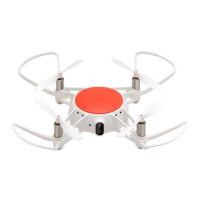
  • Propellers: Propellers are prone to damage. Replace them immediately if any wear, tear, or damage is observed to avoid affecting the drone's flight abilities. To install, align the orange-marked propeller with the orange-marked shaft and press into place. To disassemble, grip the machine with one hand and the propeller shaft with the other, then pull the shaft upwards forcefully. Avoid frequent disassembly to prevent loosening of interfaces. Check the firmness of connections if propellers have been dismantled multiple times.
  • Protective Frame: The protective frame can also be damaged. Replace it if deformation or damage occurs. To install, align the protruding points on the frame with the sunken grooves on the drone and press both sides until interlocked. To disassemble, lightly pull the clip on one end of the frame outwards until it separates from the drone.
  • Battery:
    • Do not expose the battery to flames, rough handling, or high temperatures (e.g., direct sunlight).
    • Lithium-ion battery capacity significantly reduces in very low temperatures. Do not use the batteries in environments under 0°C.
    • Discontinue use if the battery shows swelling or fluid leakage.
    • To install, align the arrow on the battery cartridge with the battery release, press the battery into the compartment until it clicks firmly into place.
    • To disassemble, press down on the battery release button until the battery turns upwards, then remove it.
    • Always disconnect the device from power sources and remove the battery if not in use for an extended period.
    • Recharge the battery using the provided USB cable connected to a 5V power-compatible device or mobile power supply. The blue light will flash during charging, and both blue and orange lights will stay on when fully charged.
  • Environmental Disposal: Old electrical appliances, including batteries, must be disposed of separately from residual waste at communal collecting points to facilitate recycling of raw materials and proper treatment of toxic substances.
  • Battery Safety: There is a risk of explosion if batteries are replaced by an incorrect type. Dispose of used batteries according to instructions.
  • FCC Compliance: The device complies with Part 15 of FCC Rules, ensuring it does not cause harmful interference and accepts any received interference. Users are cautioned against unauthorized modifications that could void their authority to operate the equipment. The device has been tested and found to comply with Class B digital device limits. It generates and radiates radio frequency energy, and proper installation and use are necessary to prevent interference with radio communications. The equipment also complies with FCC radiation exposure limits for an uncontrolled environment, and end-users must follow specific operating instructions for RF exposure compliance. The transmitter must not be co-located or operate in conjunction with any other antenna or transmitter.

Xiaomi Mi Drone mini Specifications

General IconGeneral
BrandXiaomi
ModelMi Drone mini
CategoryDrones
LanguageEnglish

Related product manuals