19
Care & Maintenance
Battery Restart the Vacuum-mop
Restoring Factory Settings
Charging Dock
Updating the Firmware
Note: If the vacuum-mop is not used for an extended period, turn it off and put it away.
To prevent damage from over-discharging, the vacuum-mop should be recharged at
least once every three months.
If the vacuum-mop stops responding or cannot be turned off, press and
hold down the button for 6 seconds to forcefully turn it off. Then press
and hold the button for 3 seconds to turn the vacuum-mop on.
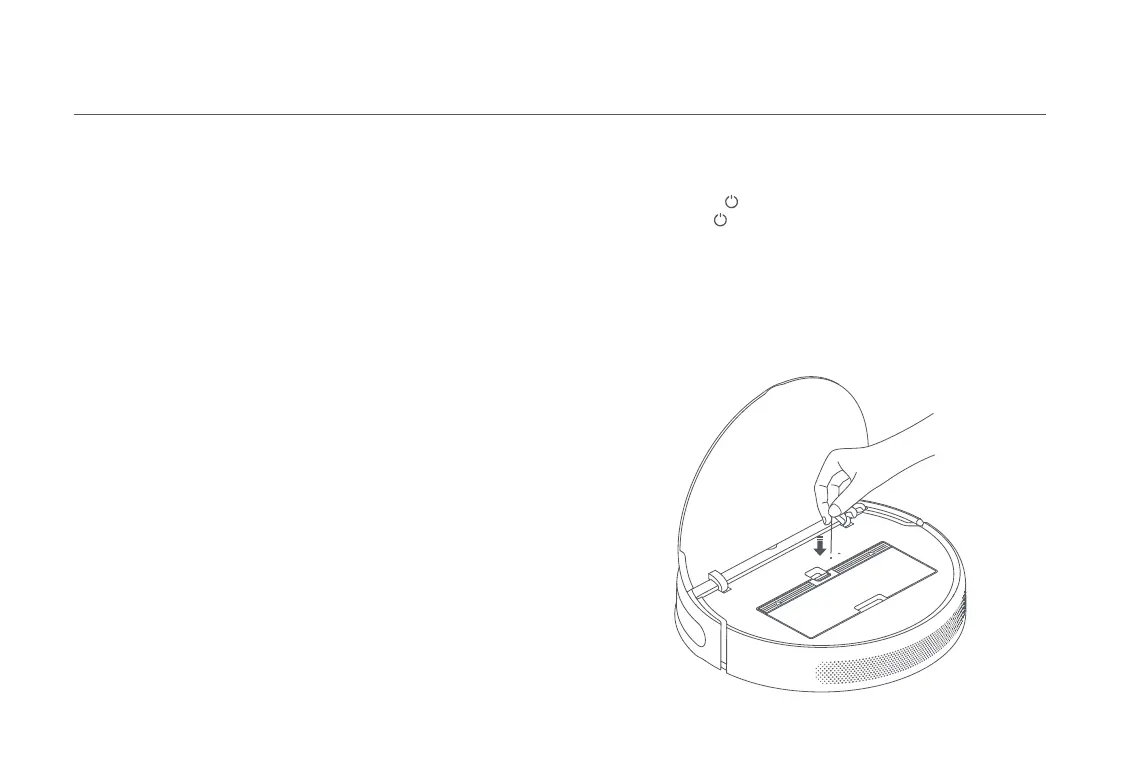
If the vacuum-mop does not function properly after being restarted, use a
pin to press the reset button until you hear a voice say "Restoring factory
settings". This will reset the vacuum-mop to its original factory settings.
Clean the contacts of the charging dock with a soft cloth.
You can update the firmware via the app. Before updating, make sure the
vacuum-mop is on the charging dock and has at least 15% battery left.
The vacuum-mop contains a high-performance lithium-ion battery pack.
Please ensure that it remains well-charged during daily use to maintain
optimal battery performance.










 To Next Page