XIAOMI-MI.COM
4. Charging the Battery
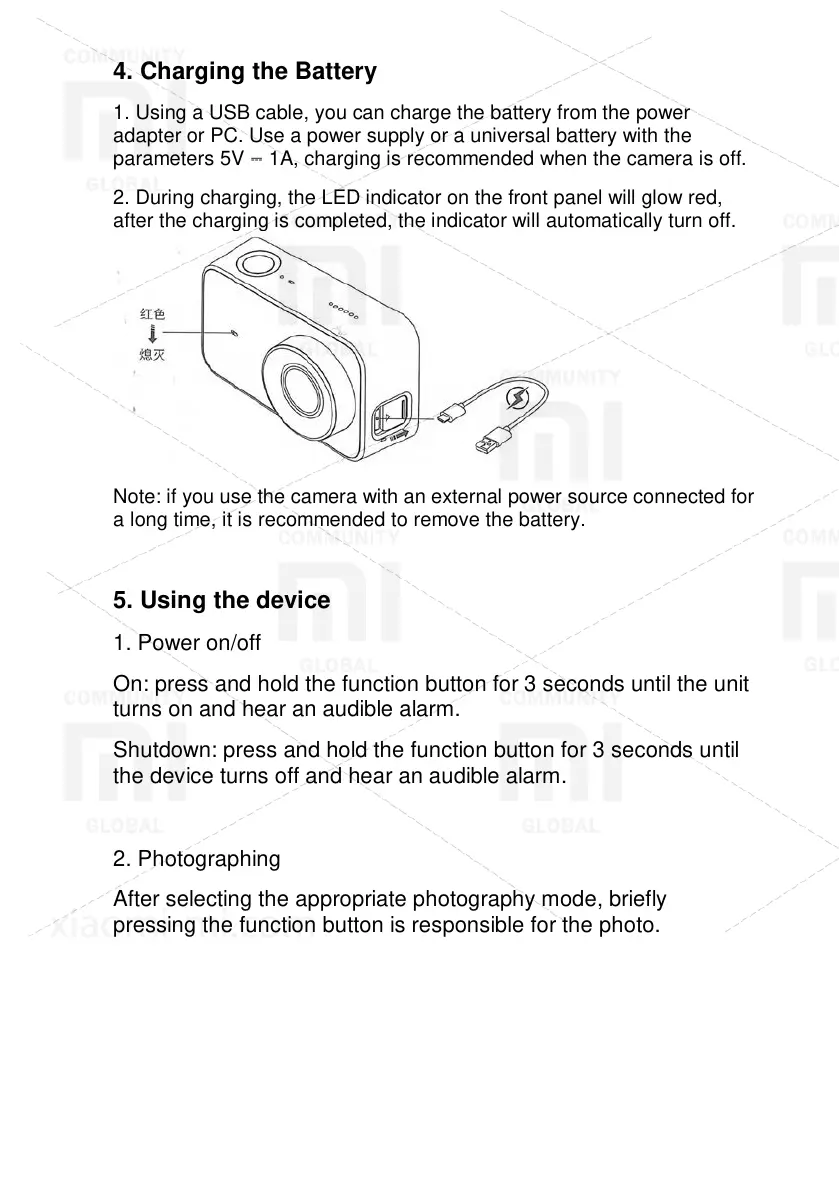
1. Using a USB cable, you can charge the battery from the power
adapter or PC. Use a power supply or a universal battery with the
parameters 5V ⎓ 1A, charging is recommended when the camera is off.
2. During charging, the LED indicator on the front panel will glow red,
after the charging is completed, the indicator will automatically turn off.
Note: if you use the camera with an external power source connected for
a long time, it is recommended to remove the battery.
5. Using the device
1. Power on/off
On: press and hold the function button for 3 seconds until the unit
turns on and hear an audible alarm.
Shutdown: press and hold the function button for 3 seconds until
the device turns off and hear an audible alarm.
2. Photographing
After selecting the appropriate photography mode, briefly
pressing the function button is responsible for the photo.









 To Next Page