* If you have forgoen your broadband account
name or password, you can get them by
contacting your broadband provider
Broadband account name
Password
Next
Set up the router
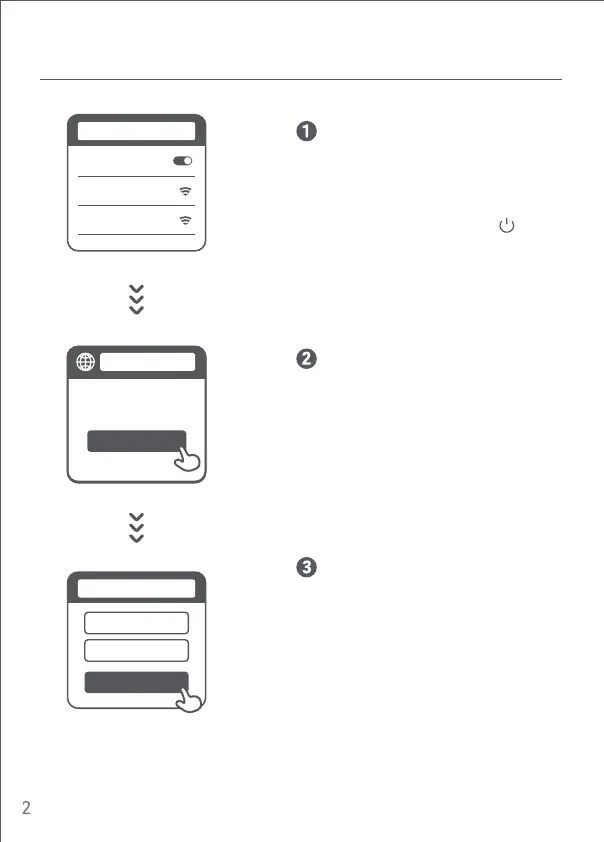
Enter the account name and password
provided by your broadband provider, then
click/tap Next (It depends on the Internet
Service Provider you selected, whether
your account name and password are
required or not).
* Mi Router EULA is available at
hp://www1.miwifi.com/router/eula/20191230.html
Once the Wi-Fi is connected, you will be directed
to the configuration page. If the configuration
page is not present, open the browser and go to
"router.miwifi.com" or "192.168.31.1" to
complete the configuration.
Start
Thank you for using
Mi Router
router.miwifi.com
* Wait until the system indicator light
turns blue. Search for the Wi-Fi network
and connect
Connect to the Wi-Fi using a phone or
computer (no password). Refer to the
information on the boom of the router for
the Wi-Fi name.
xiaomi-router-
rb02_miapxxxx
Turn on WLAN
WLAN
Step 2: Set up the network connection
xiaomi-router-
rb02_miapxxxx_5G





 To Next Page